
Ideogram 4.0 is a 9.3 billion parameter open-weight image model with state-of-the-art text rendering, bounding box layout control, and color palette conditioning. The weights are available on HuggingFace, the inference code lives on GitHub, and the whole system runs on a JSON-based prompting format that threw a lot of people off when it first dropped.
This guide covers why that JSON system exists, what each field controls, and gives you prompts you can copy and adapt for real work.
Why Does Ideogram 4.0 Use JSON Prompts?
Most image models train on (image, text caption) pairs. The caption is a natural language sentence, and the model learns to connect words with visual concepts. This works, but it creates ambiguity — when you write "red car on the left side of a blue building," the model has to figure out which color goes with which object and what "left side" means spatially.
Ideogram 4.0 was trained exclusively on structured JSON captions. Each training image was paired with a JSON object that explicitly separates the scene description, style parameters, and individual elements with their bounding box positions. According to the official documentation, the training captions are "deliberately extremely descriptive" — every JSON exhaustively describes everything in the image.
This design means the model doesn't guess spatial relationships. A bounding box coordinate maps directly to a trained position because the model saw millions of examples in the same coordinate format. Color palettes work the same way: hex codes in the JSON map to trained color associations, not loose interpretations of color names.
The practical takeaway: JSON prompts unlock layout, typography, and color precision that plain text can't match. But plain text still works — Ideogram's Magic Prompt feature uses an LLM to convert your casual input into structured JSON before generation.
Plain Text vs JSON: The Actual Difference
Here's the same concept prompted both ways:
Plain text:
A jazz festival poster with bold typography, warm colors, and a saxophone silhouette
JSON:
{"high_level_description":"A vibrant jazz festival poster featuring bold typography and a saxophone silhouette against warm-toned geometric shapes","style_description":{"aesthetics":"retro, grain texture, bold contrast","lighting":"warm stage lighting with amber tones","medium":"graphic_design","art_style":"vintage concert poster with screen-print texture","color_palette":["#E8572A","#F2A03D","#1B1B2F","#F5E6CC","#C2185B"]},"compositional_deconstruction":{"background":"Deep navy blue with subtle radial gradient and halftone dot pattern","elements":[{"type":"text","bbox":[50,100,250,900],"text":"JAZZ\nFESTIVAL","desc":"Large bold sans-serif title in warm orange, slightly tilted 3 degrees clockwise"},{"type":"obj","bbox":[300,200,850,750],"desc":"Golden saxophone silhouette with geometric art deco fragmentation, pieces floating upward"},{"type":"text","bbox":[870,150,950,850],"text":"JUNE 28-30 • RIVERSIDE PARK • TICKETS AT JAZZFEST.COM","desc":"Small caps tracking-wide footer text in cream color"}]}}
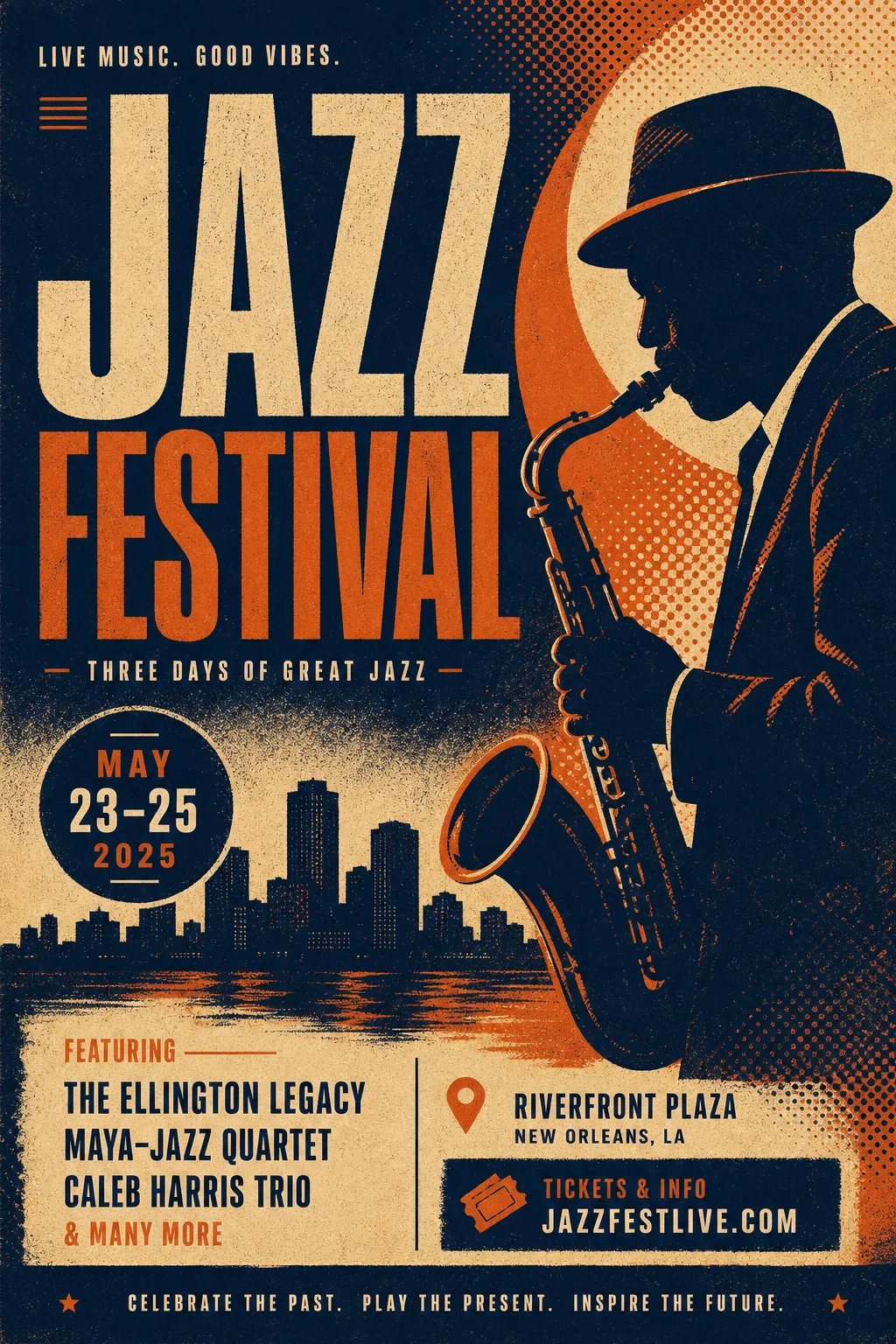
Jazz poster from plain text — the model decides layout, colors, and text placement on its own
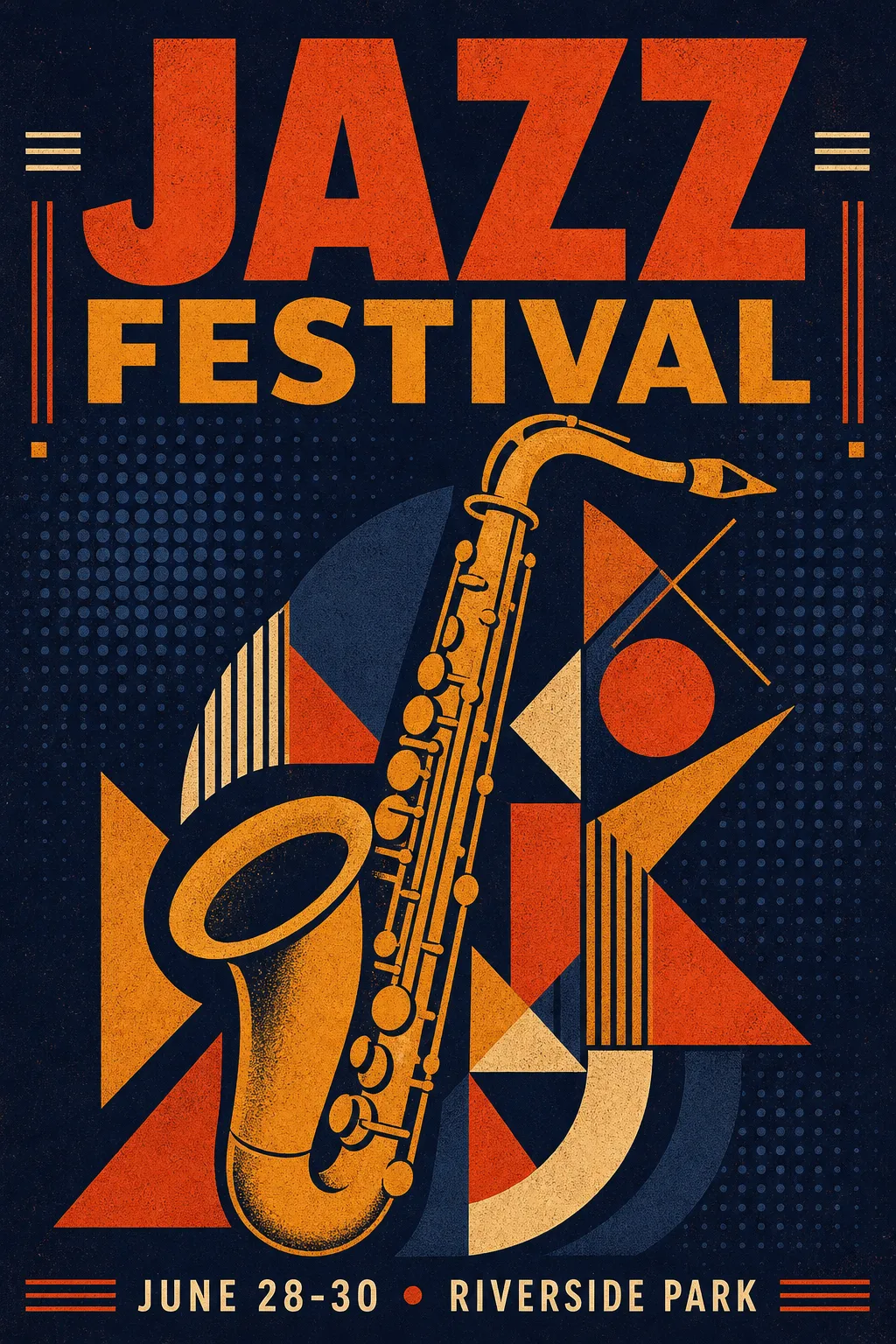
Same concept with JSON — controlled palette, precise text positions, intentional composition
The plain text version produces a usable image. The JSON version gives you a poster where every element sits where you put it, in the exact colors you specified.
JSON Schema at a Glance
The complete caption structure has three top-level fields:
| Field | Required | What It Controls |
|---|---|---|
high_level_description |
Recommended | 1-2 sentence image summary |
style_description |
Optional | Lighting, medium, aesthetics, color palette |
compositional_deconstruction |
Yes | Background + individual elements with positions |
Inside style_description, you choose either photo (camera/lens specs) or art_style (illustration/design style) — never both.
Each element is typed as obj (visual object) or text (in-image typography). Bounding boxes use [y_min, x_min, y_max, x_max] in normalized 0–1000 coordinates. Color palettes accept up to 16 hex codes globally, 5 per element.
Blank template you can fill in:
{"high_level_description":"[1-2 sentence summary]","style_description":{"aesthetics":"[mood keywords]","lighting":"[lighting setup]","medium":"[photograph|illustration|3d_render|painting|graphic_design]","art_style":"[style description — OR use photo instead]","color_palette":["#HEXCODE","#HEXCODE"]},"compositional_deconstruction":{"background":"[background/environment description]","elements":[{"type":"obj","bbox":[y_min,x_min,y_max,x_max],"desc":"[detailed element description]"},{"type":"text","bbox":[y_min,x_min,y_max,x_max],"text":"[literal text to render]","desc":"[text styling description]"}]}}
Prompt Examples by Use Case
Event Posters
Posters showcase Ideogram 4.0's text rendering at its best. Multiple text blocks at exact positions with different sizes and styles.
{"high_level_description":"A minimalist tech conference poster with clean typography and geometric accents","style_description":{"aesthetics":"clean, modern, Swiss design influenced","lighting":"flat, even studio lighting","medium":"graphic_design","art_style":"minimalist poster design with strong grid structure","color_palette":["#0D0D0D","#FFFFFF","#4ECDC4","#FF6B6B"]},"compositional_deconstruction":{"background":"Pure white background with subtle 12-column grid lines in light gray","elements":[{"type":"text","bbox":[80,60,300,940],"text":"DEVCON\n2026","desc":"Ultra-bold grotesque typeface in black, massive size, tight leading"},{"type":"obj","bbox":[350,100,700,900],"desc":"Abstract geometric composition of overlapping circles and rectangles in teal and coral, suggesting network nodes and connections"},{"type":"text","bbox":[750,60,900,940],"text":"SEPTEMBER 15-17\nSAN FRANCISCO\nREGISTER AT DEVCON.IO","desc":"Light weight mono-spaced text in dark gray, left-aligned, generous line spacing"}]}}
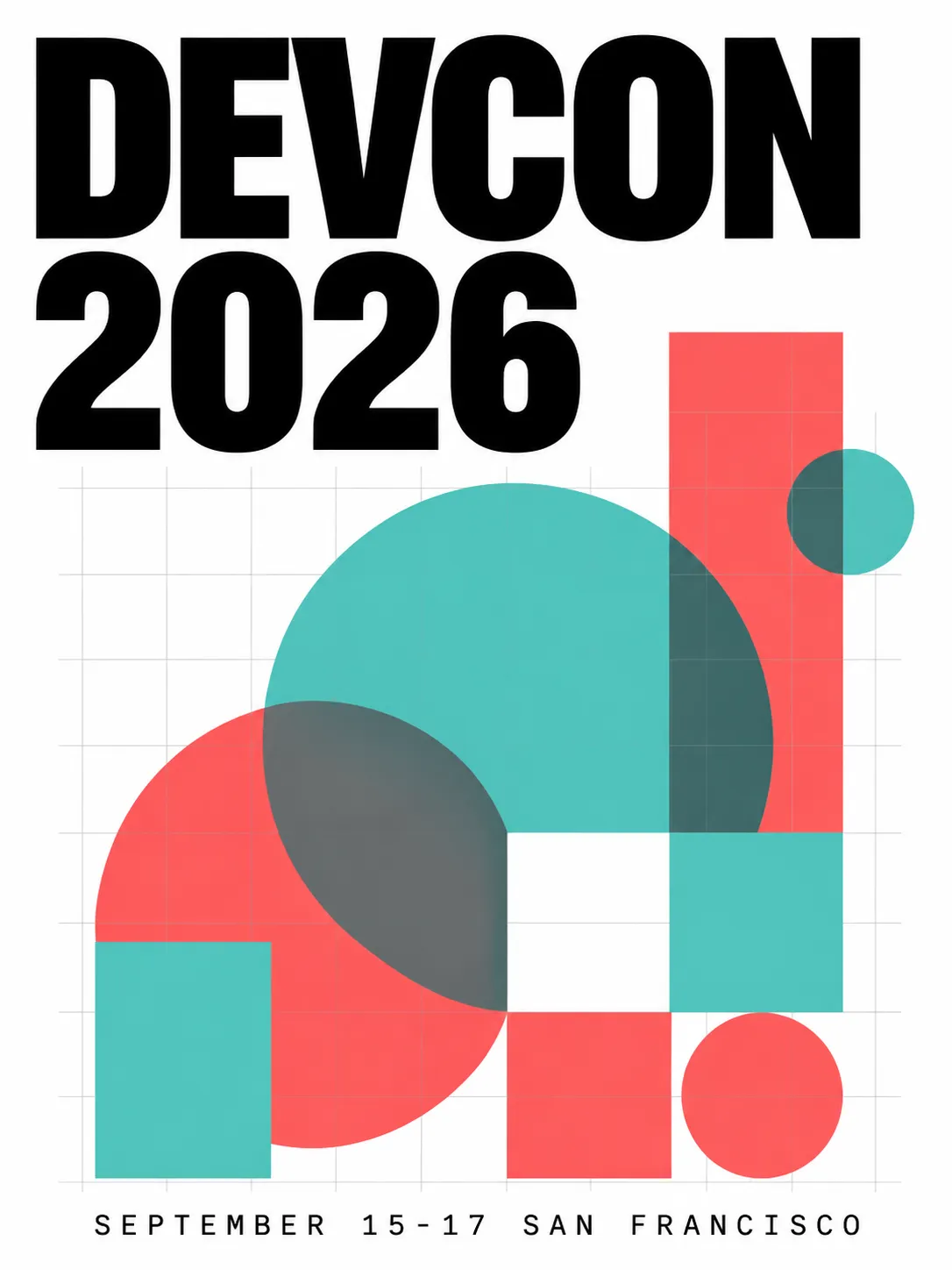
Clean grid layout, precise text placement, controlled two-color accent palette
Product Photography
Switch to photo mode with camera specs. The bounding box controls product placement and negative space.
{"high_level_description":"A premium skincare bottle photographed on a marble surface with soft natural lighting","style_description":{"aesthetics":"editorial, clean, luxury","lighting":"soft diffused window light from upper left, subtle reflection on marble","photo":"85mm f/2.8, shallow depth of field, color-graded","medium":"photograph","color_palette":["#F7F3EE","#D4C5B2","#8B7355","#FFFFFF","#E8DDD3"]},"compositional_deconstruction":{"background":"Polished white marble surface with subtle gray veining, soft gradient to warm cream in the background","elements":[{"type":"obj","bbox":[150,300,850,700],"desc":"Tall frosted glass skincare bottle with minimal gold typography label, cap removed and placed beside the bottle, casting soft shadow to the right"}]}}
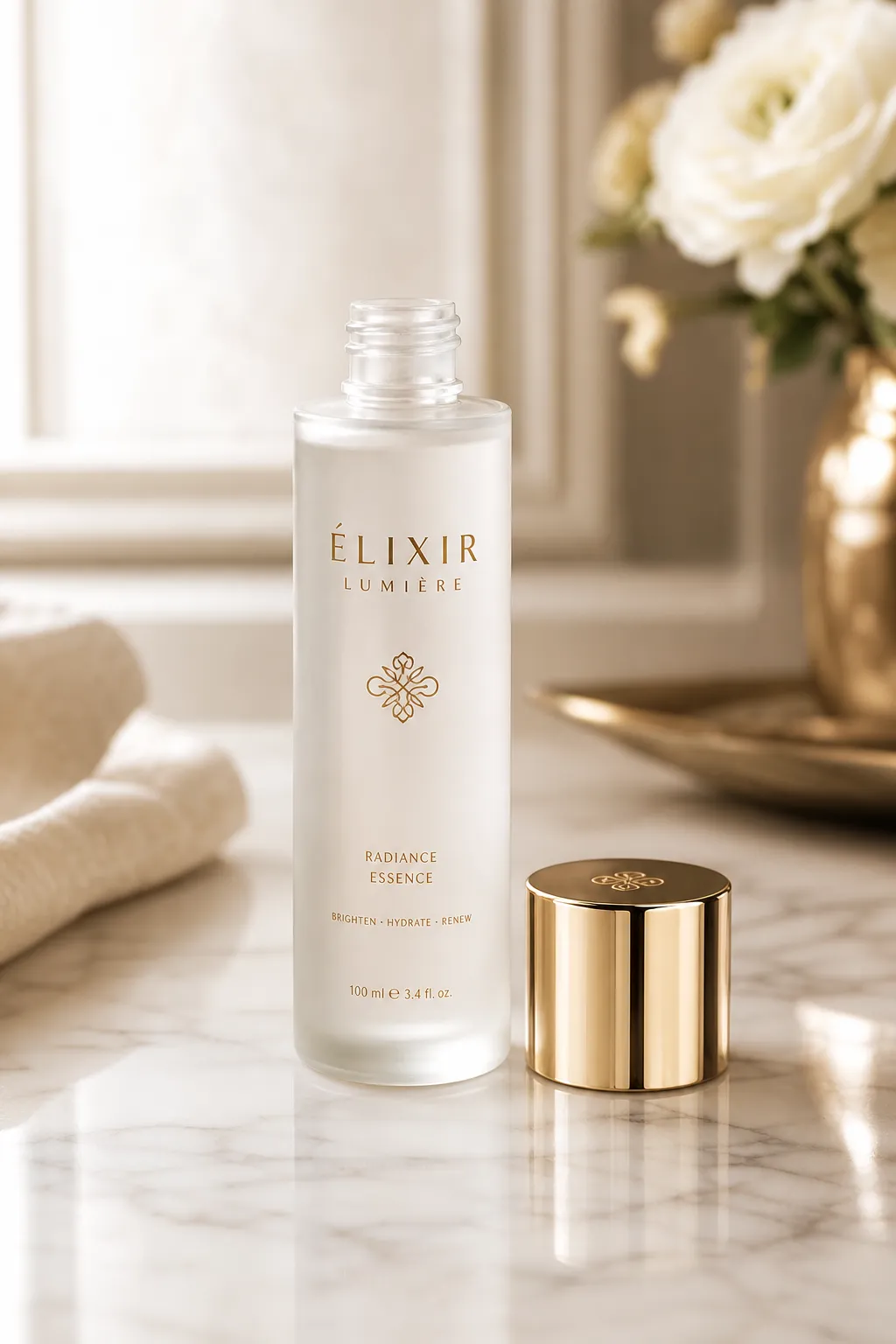
Controlled lighting direction, marble texture, intentional negative space around the product
Logo Design
Logos need flat colors and clean edges. Use art_style for vector-like output and keep elements minimal.
{"high_level_description":"A modern geometric logo mark for a sustainable energy company","style_description":{"aesthetics":"minimal, geometric, professional","lighting":"flat, no shadows","medium":"graphic_design","art_style":"flat vector logo design, no gradients, clean edges","color_palette":["#2D5F2D","#4CAF50","#FFFFFF"]},"compositional_deconstruction":{"background":"Pure white, no texture","elements":[{"type":"obj","bbox":[200,200,800,800],"desc":"Abstract leaf shape formed by three overlapping chevrons pointing upward, creating a subtle upward arrow in the negative space, rendered in two shades of green"}]}}

Flat vector-style logo — solid colors, no gradients, precise geometry
Realistic Photography
For photorealism, detailed camera specs in the photo field make the biggest difference.
{"high_level_description":"A candid street photograph of a woman walking through a rain-soaked Tokyo alley at night","style_description":{"aesthetics":"cinematic, moody, high contrast","lighting":"neon signs reflecting off wet pavement, warm tungsten from shop interiors mixing with cool blue ambient","photo":"35mm f/1.4, shot wide open, rain droplets visible on lens edge, slight motion blur on passing figures","medium":"photograph","color_palette":["#1A1A2E","#E94560","#F5A623","#16213E","#0F3460"]},"compositional_deconstruction":{"background":"Narrow Tokyo back-alley at night, wet asphalt reflecting neon kanji signs, steam rising from a ramen shop vent on the left","elements":[{"type":"obj","bbox":[100,350,900,650],"desc":"Young woman in a dark trench coat holding a transparent umbrella, mid-stride, face partially lit by warm shop light, looking slightly to camera right"},{"type":"obj","bbox":[50,50,400,200],"desc":"Glowing red and pink neon sign with Japanese characters, slightly out of focus due to shallow depth of field"}]}}
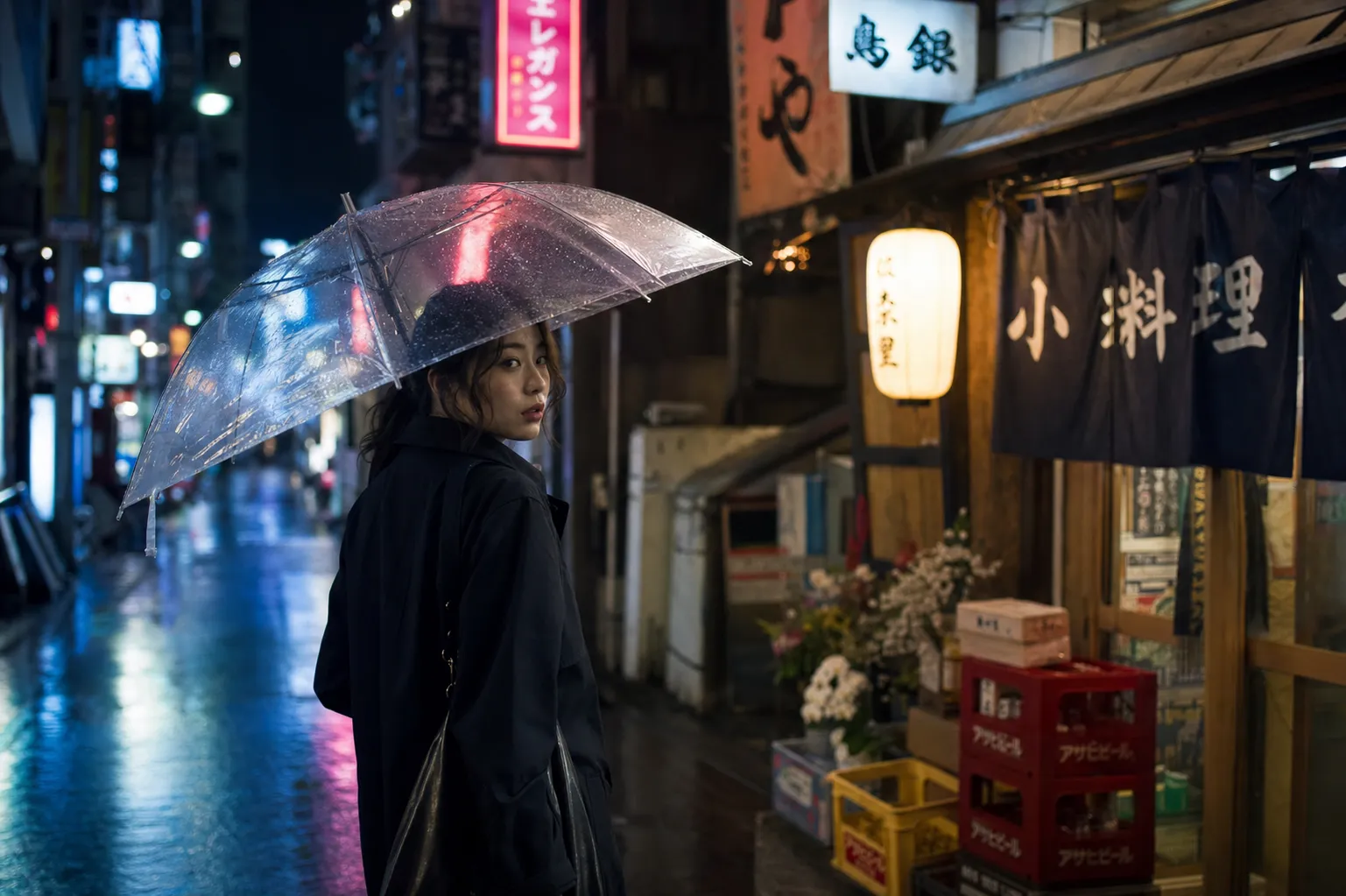
Cinematic street photography — neon reflections, shallow depth of field, controlled warm/cool lighting mix
Social Media Graphics
Social graphics often need bold text with brand colors. Use wide bounding boxes for headline text and keep the element count low.
{"high_level_description":"An Instagram carousel cover slide announcing a product launch with bold headline and gradient background","style_description":{"aesthetics":"bold, contemporary, startup","lighting":"soft ambient, no harsh shadows","medium":"graphic_design","art_style":"modern social media graphic with rounded corners and soft gradients","color_palette":["#6C5CE7","#A29BFE","#FFFFFF","#DFE6E9","#2D3436"]},"compositional_deconstruction":{"background":"Smooth gradient from deep purple at top-left to soft lavender at bottom-right","elements":[{"type":"text","bbox":[150,100,450,900],"text":"SOMETHING\nBIG IS\nCOMING","desc":"Extra-bold sans-serif headline in white, left-aligned, stacked on three lines with tight leading"},{"type":"text","bbox":[550,100,650,900],"text":"JUNE 30 • 9AM PST • BE FIRST IN LINE","desc":"Medium weight text in light gray, same left alignment as headline"},{"type":"obj","bbox":[700,300,950,700],"desc":"Abstract 3D blob shape in frosted glass material with purple and pink internal refraction, floating with subtle shadow beneath"}]}}
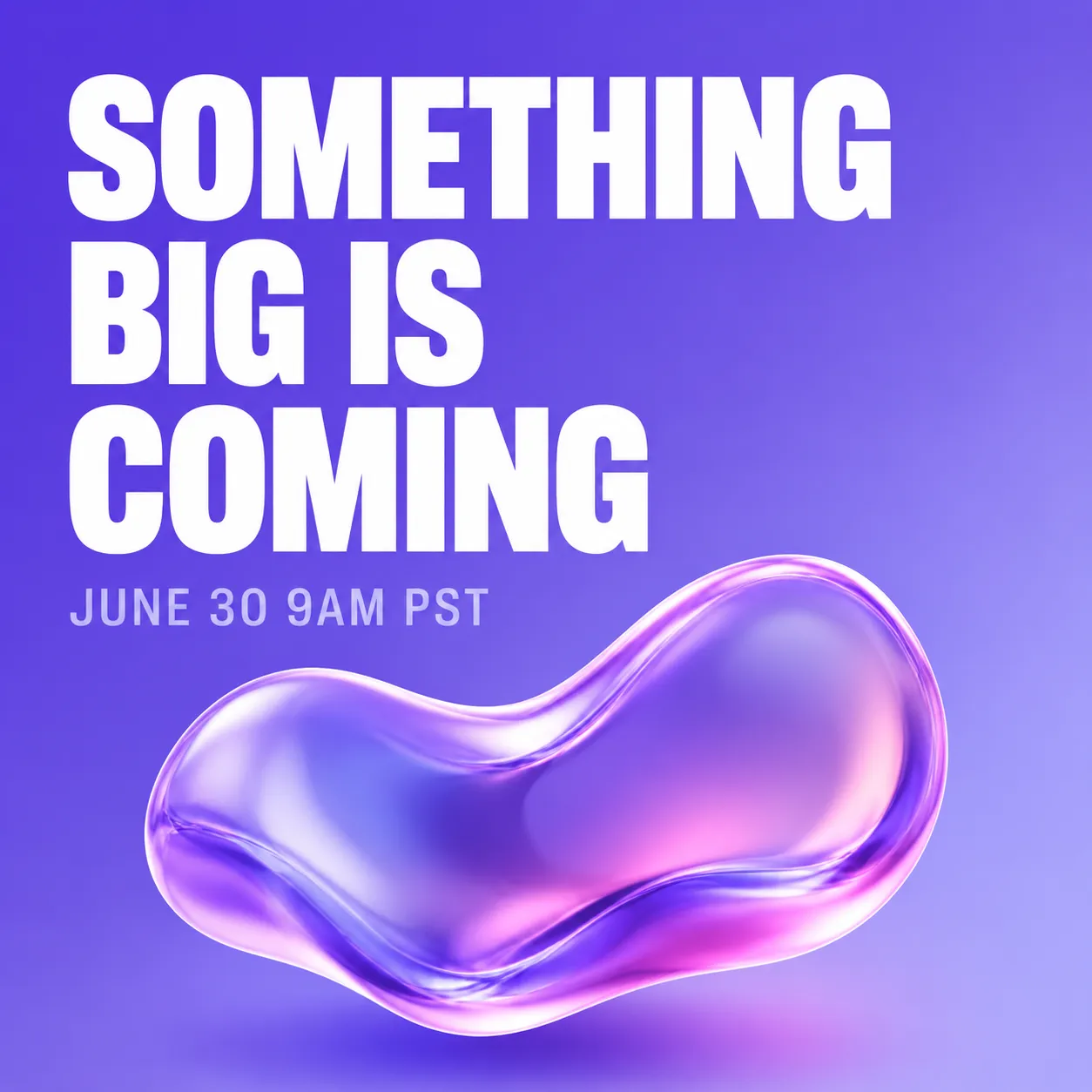
Instagram-style launch announcement — gradient background, stacked headline, 3D accent element
Packaging Design
Product packaging benefits from precise text placement and brand-consistent color control.
{"high_level_description":"A flat-lay photograph of artisan chocolate bar packaging on a dark slate surface","style_description":{"aesthetics":"artisan, premium, textured","lighting":"soft overhead light with slight directional warmth from the right","photo":"50mm f/4, even focus across the surface, high color fidelity","medium":"photograph","color_palette":["#2C1810","#D4A574","#F5E6D3","#1A1A1A","#8B6914"]},"compositional_deconstruction":{"background":"Dark charcoal slate surface with subtle texture, scattered cocoa nibs and gold foil fragments around the edges","elements":[{"type":"obj","bbox":[100,150,900,850],"desc":"Rectangular chocolate bar wrapper in matte cream paper with embossed cocoa pod illustration, partially unwrapped to reveal dark chocolate squares, gold foil inner wrapper visible at one end"}]}}
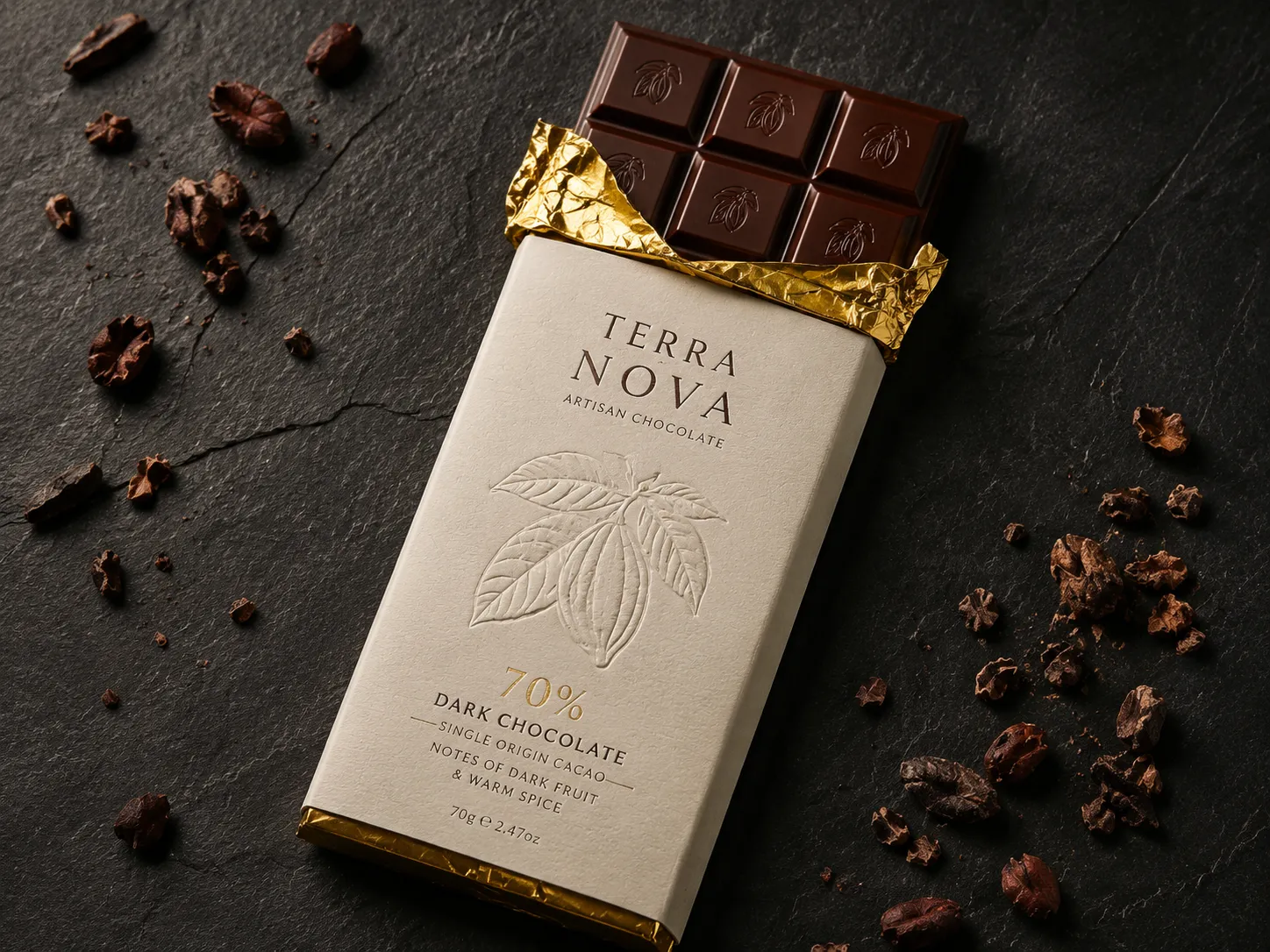
Artisan packaging flat-lay — controlled surface texture, precise color palette, premium feel
Infographics
Infographics combine multiple text blocks with visual elements. Bounding boxes are critical here — without them, text overlaps are almost guaranteed.
{"high_level_description":"A vertical infographic showing 4 steps of a morning routine with icons and numbered labels","style_description":{"aesthetics":"friendly, clean, informational","lighting":"flat, no shadows","medium":"graphic_design","art_style":"flat illustration style with rounded shapes and soft colors","color_palette":["#FF9F43","#54A0FF","#5F27CD","#10AC84","#F8F9FA"]},"compositional_deconstruction":{"background":"Light warm gray, clean and minimal","elements":[{"type":"text","bbox":[30,100,120,900],"text":"YOUR PERFECT\nMORNING ROUTINE","desc":"Bold rounded sans-serif header in dark purple, centered"},{"type":"obj","bbox":[140,50,350,450],"desc":"Circular icon of a glass of water with lemon slice, numbered 01 in orange beside it"},{"type":"text","bbox":[160,500,330,950],"text":"HYDRATE FIRST\nDrink 500ml water before coffee","desc":"Left-aligned text, title in bold dark, subtitle in medium gray"},{"type":"obj","bbox":[370,50,580,450],"desc":"Circular icon of a person stretching, numbered 02 in blue beside it"},{"type":"text","bbox":[390,500,560,950],"text":"MOVE YOUR BODY\n10 minutes of stretching or yoga","desc":"Left-aligned text, title in bold dark, subtitle in medium gray"},{"type":"obj","bbox":[600,50,810,450],"desc":"Circular icon of a journal and pen, numbered 03 in purple beside it"},{"type":"text","bbox":[620,500,790,950],"text":"WRITE 3 GOALS\nPrioritize before checking email","desc":"Left-aligned text, title in bold dark, subtitle in medium gray"},{"type":"obj","bbox":[830,50,950,450],"desc":"Circular icon of a healthy breakfast bowl, numbered 04 in green beside it"},{"type":"text","bbox":[840,500,940,950],"text":"EAT WELL\nProtein-rich breakfast, no sugar","desc":"Left-aligned text, title in bold dark, subtitle in medium gray"}]}}
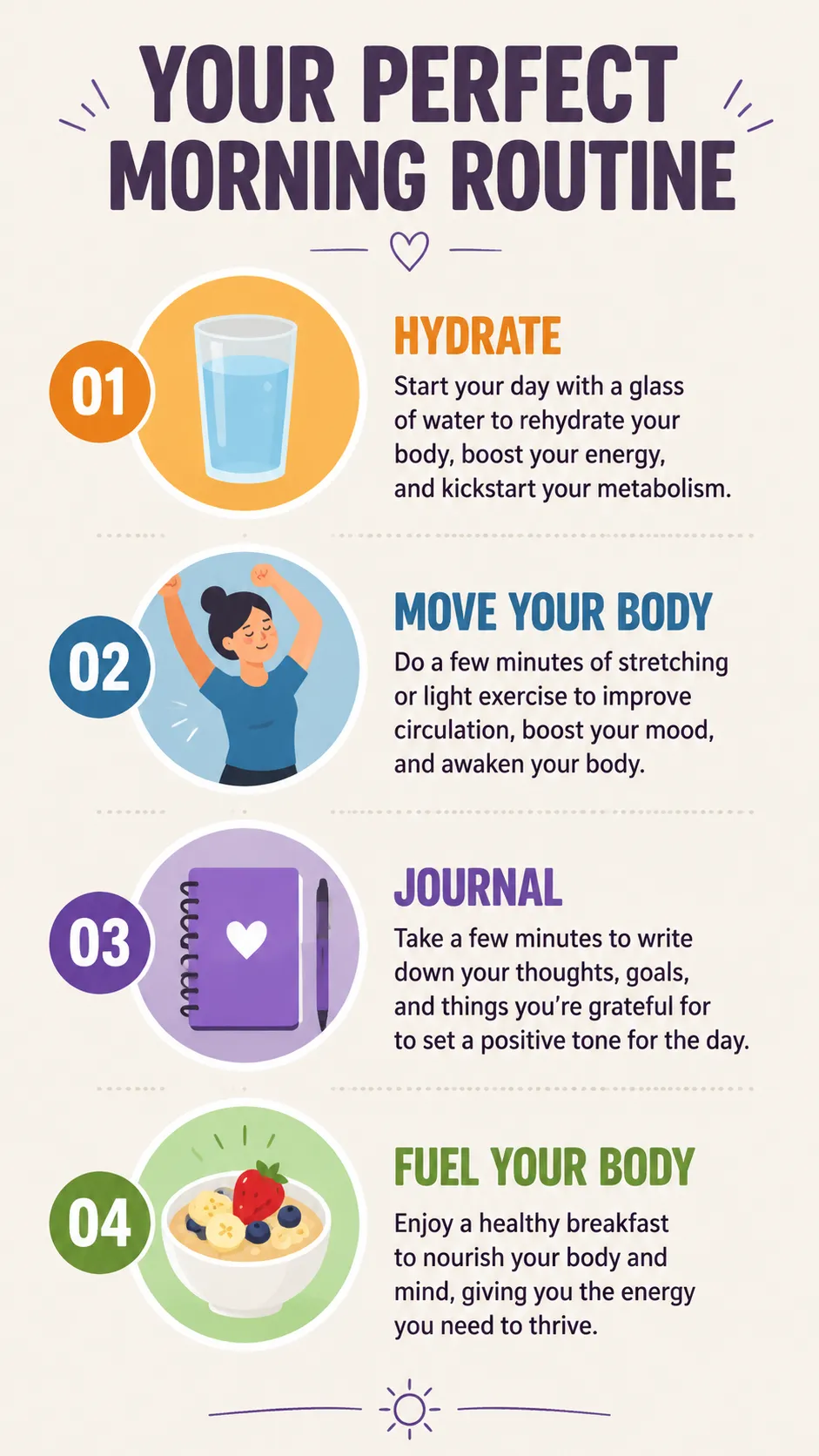
Structured infographic — each text block and icon has its own bounding box to prevent overlaps
Character Design
Character concepts work well with detailed desc fields and a constrained color palette for visual consistency.
{"high_level_description":"A character design sheet for a cyberpunk courier, showing front and side view on a neutral background","style_description":{"aesthetics":"cyberpunk, detailed, concept art","lighting":"soft studio rim light with cyan accent from the left","medium":"illustration","art_style":"semi-realistic character concept art, clean linework with cel shading","color_palette":["#0D1B2A","#1B3A5C","#00E5FF","#FF6B35","#E0E0E0"]},"compositional_deconstruction":{"background":"Flat medium gray background with subtle grid, suitable for character turnaround sheet","elements":[{"type":"obj","bbox":[50,50,950,480],"desc":"Front view of a young woman in a fitted dark navy tactical jacket with glowing cyan piping along the seams, cargo pants with orange accent straps, short asymmetric black hair with one cyan-highlighted strand, wearing augmented reality goggles pushed up on forehead"},{"type":"obj","bbox":[50,520,950,950],"desc":"Three-quarter side view of the same character, showing a messenger bag with holographic patches on the back, utility belt visible, boots with magnetic soles, same outfit and color scheme as front view"}]}}
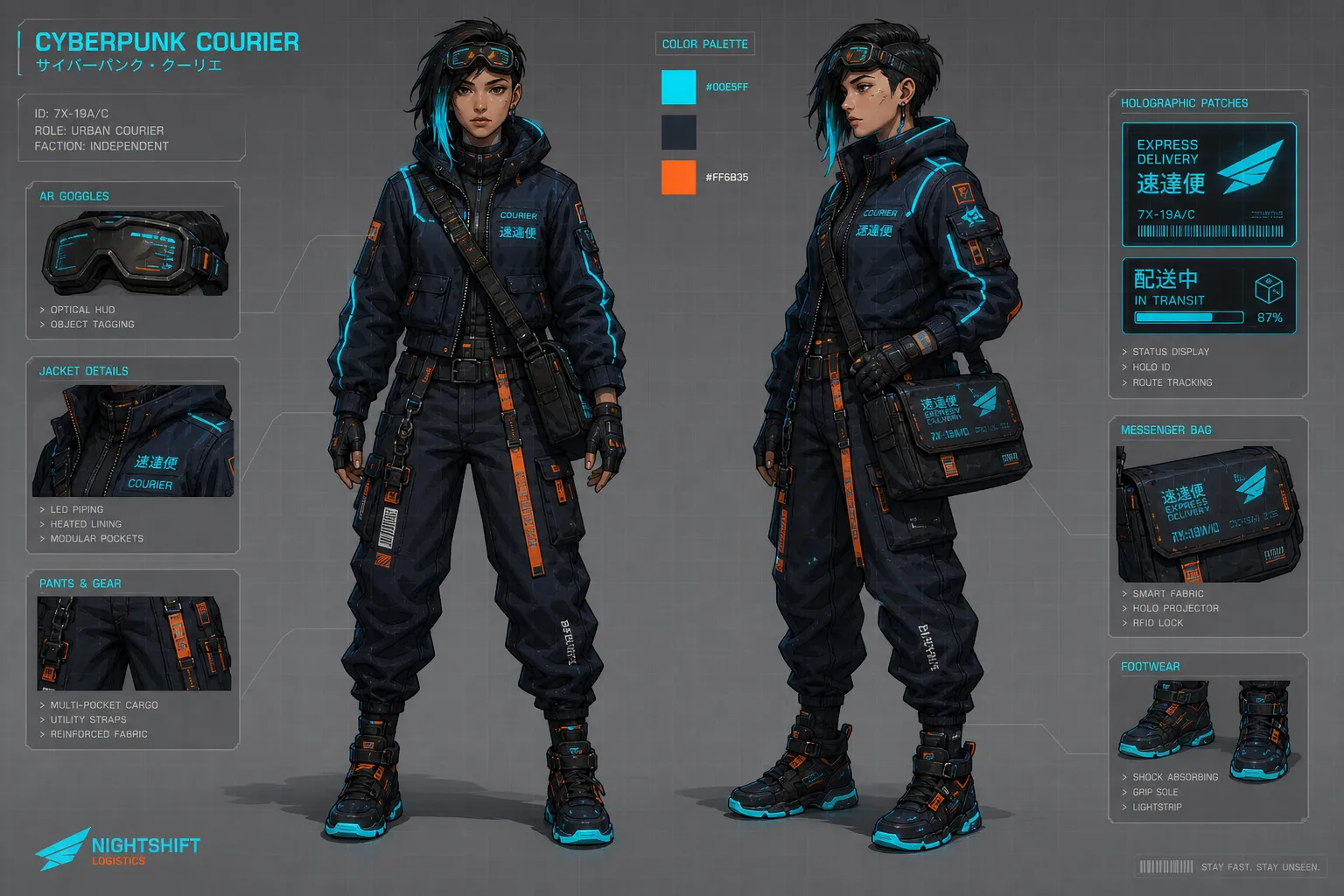
Character concept sheet — consistent design across views using a locked color palette
Magic Prompt: The Easy Mode
Not everyone wants to write JSON by hand. Ideogram 4.0 includes Magic Prompt — an LLM that expands plain text input into a full JSON caption before generation.
Type "a cozy coffee shop interior with morning light" and Magic Prompt produces a complete JSON with style description, elements, color palette, and bounding boxes. For general exploration and quick ideation, it handles the heavy lifting.
Use Magic Prompt when:
- Exploring ideas quickly
- Layout precision doesn't matter
- You want the model to make creative decisions
Write JSON manually when:
- Typography-heavy designs (posters, social graphics, packaging)
- Brand-consistent output requiring exact hex colors
- Product photography with specific composition
- Multiple elements that must not overlap
Common Mistakes and How to Avoid Them
Wrong bounding box order. The format is [y_min, x_min, y_max, x_max] — Y comes first, not X. Getting this backwards puts elements in unexpected positions.
Using both photo and art_style. Pick one. These fields are mutually exclusive in the training data — including both degrades output quality.
Shuffled key order. The model was trained on a strict field sequence. Put aesthetics → lighting → medium → art_style/photo → color_palette. In elements: type → bbox → desc (or text → desc for text elements).
Short hex codes. #FFF is invalid. Always use full six-character uppercase hex: #FFFFFF.
Overlapping text bounding boxes. Two text elements sharing the same region will render poorly. Give each text block a distinct, non-overlapping area.
Over-specifying simple scenes. A detailed high_level_description with style controls is often enough. Reserve bounding boxes and multi-element compositions for when you actually need spatial precision.
Frequently Asked Questions
Do I have to use JSON to get good results?
No. Plain text works, especially with Magic Prompt. JSON gives you control over layout, colors, and text placement that plain text can't provide — but for general image generation without strict composition needs, plain text is fine.
How many colors can I put in a color palette?
Up to 16 hex codes in the global style_description palette, 5 per individual element. These steer dominant colors but aren't exact guarantees — think of them as strong suggestions to the model.
What resolution does Ideogram 4.0 support?
Any resolution from 256×256 to 2048×2048, in multiples of 16 pixels. For best quality when running locally, use 2048×2048 with the V4_QUALITY_48 sampler preset.
How is this different from Ideogram 3.0?
Ideogram 4.0 is open-weight (3.0 was API-only), uses JSON-structured training instead of natural language, and has significantly improved text rendering. Bounding box layout and color palette conditioning are new to 4.0.
Can I run Ideogram 4.0 locally?
Yes. The fp8 and nf4 checkpoints are on HuggingFace. The fp8 version needs a GPU with at least 24GB VRAM. ComfyUI has community nodes including KJ's prompt composer that simplifies JSON construction.
Where can I use Ideogram 4.0 online?
Editly supports Ideogram 4.0 with both plain text and JSON input. The official Ideogram platform offers it through their API and web interface as well.