
Ideogram 4.0 是一个 93 亿参数的开源图像模型,在文字渲染、边界框布局控制和颜色调色板方面表现出色。权重公开在 HuggingFace 上,推理代码在 GitHub,整个系统基于一套 JSON 提示词格式——这在发布初期让不少人一头雾水。
这篇指南会讲清楚这套 JSON 系统为什么存在、每个字段控制什么,以及可以直接复制使用的各场景 prompt。
为什么 Ideogram 4.0 用 JSON 提示词?
大多数图像模型的训练数据是 (图片, 文本描述) 配对。描述是自然语言句子,模型从中学习把词语和视觉概念对应起来。这能用,但有歧义——当你写「左边有一辆红色汽车,旁边是蓝色建筑」时,模型得自己猜红色属于哪个物体、「左边」到底是画面哪个位置。
Ideogram 4.0 走了不同的路。根据官方文档,它完全用结构化 JSON 标注训练。每张训练图片配对的 JSON 把场景描述、风格参数、每个元素的位置分开写清楚。官方说法是训练标注「刻意做到极其详尽」——每个 JSON 都穷尽描述图中一切。
这意味着模型不需要猜测空间关系。边界框坐标直接映射到训练数据中的精确位置,hex 色值也直接对应训练时建立的颜色关联,而不是对颜色词的模糊理解。
实际结论:JSON 提示词能解锁纯文本做不到的布局、排版和颜色精度。但纯文本也能用——Ideogram 的 Magic Prompt 会用 LLM 把你的随意输入转成 JSON 再生图。
纯文本 vs JSON:实际差别有多大
同一个概念,两种写法:
纯文本:
A jazz festival poster with bold typography, warm colors, and a saxophone silhouette
JSON:
{"high_level_description":"A vibrant jazz festival poster featuring bold typography and a saxophone silhouette against warm-toned geometric shapes","style_description":{"aesthetics":"retro, grain texture, bold contrast","lighting":"warm stage lighting with amber tones","medium":"graphic_design","art_style":"vintage concert poster with screen-print texture","color_palette":["#E8572A","#F2A03D","#1B1B2F","#F5E6CC","#C2185B"]},"compositional_deconstruction":{"background":"Deep navy blue with subtle radial gradient and halftone dot pattern","elements":[{"type":"text","bbox":[50,100,250,900],"text":"JAZZ\nFESTIVAL","desc":"Large bold sans-serif title in warm orange, slightly tilted 3 degrees clockwise"},{"type":"obj","bbox":[300,200,850,750],"desc":"Golden saxophone silhouette with geometric art deco fragmentation, pieces floating upward"},{"type":"text","bbox":[870,150,950,850],"text":"JUNE 28-30 • RIVERSIDE PARK • TICKETS AT JAZZFEST.COM","desc":"Small caps tracking-wide footer text in cream color"}]}}
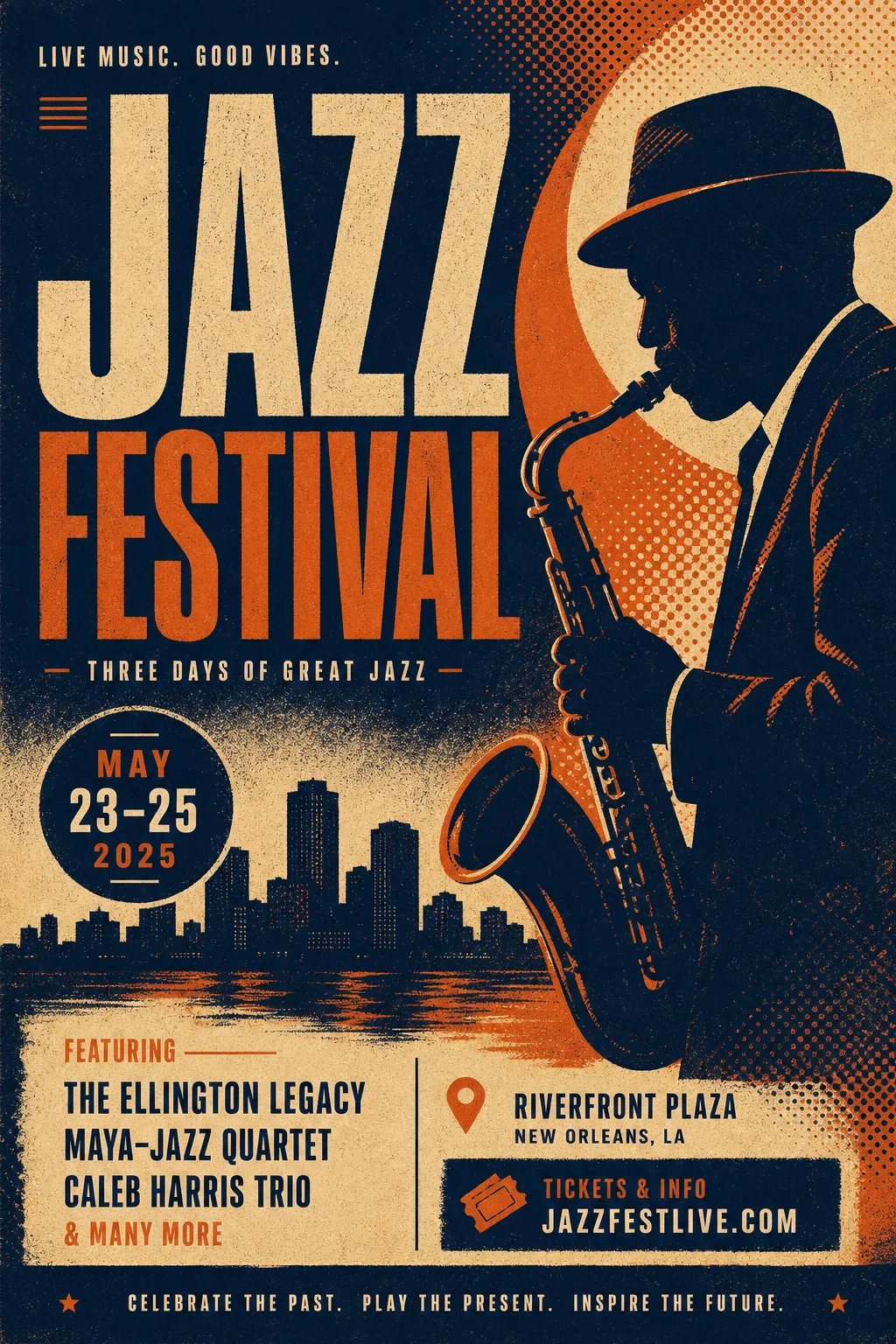
纯文本生成的爵士海报——布局和颜色由模型自行决定
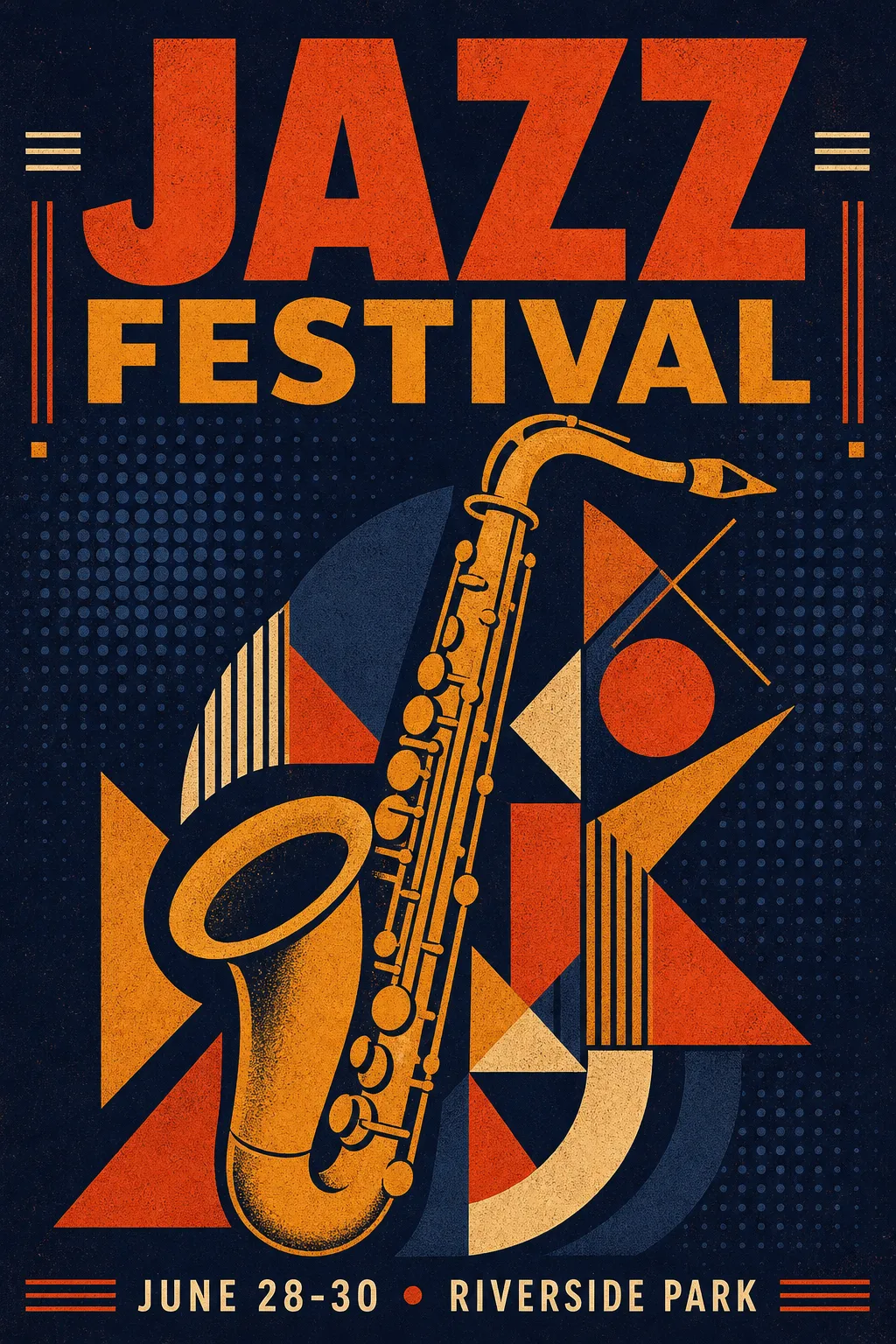
同一概念的 JSON 版本——精确调色板、可控的文字位置、有意图的构图
纯文本版本出来的图可以用。JSON 版本出来的图每个元素都在你指定的位置,用你指定的颜色。
JSON 结构速览
完整标注有三个顶层字段:
| 字段 | 是否必需 | 控制什么 |
|---|---|---|
high_level_description |
推荐 | 1-2 句整体描述 |
style_description |
可选 | 光照、媒介、美学风格、调色板 |
compositional_deconstruction |
必需 | 背景场景 + 各元素及其位置 |
style_description 里必须二选一:photo(相机/镜头参数)或 art_style(插画/设计风格)——不能同时用。
每个元素分两种类型:obj(视觉对象)或 text(画面内文字)。边界框格式是 [y_min, x_min, y_max, x_max],归一化到 0–1000 坐标。调色板全局最多 16 个 hex 色值,单个元素最多 5 个。
可复制的空白模板:
{"high_level_description":"[1-2 句概括]","style_description":{"aesthetics":"[风格关键词]","lighting":"[光照设置]","medium":"[photograph|illustration|3d_render|painting|graphic_design]","art_style":"[风格描述——或者用 photo 替代此字段]","color_palette":["#HEXCODE","#HEXCODE"]},"compositional_deconstruction":{"background":"[背景/环境描述]","elements":[{"type":"obj","bbox":[y_min,x_min,y_max,x_max],"desc":"[元素详细描述]"},{"type":"text","bbox":[y_min,x_min,y_max,x_max],"text":"[要渲染的文字]","desc":"[文字样式描述]"}]}}
各场景 Prompt 示例
活动海报
海报是 Ideogram 4.0 文字渲染的最佳展示。多个文字块放在精确位置,各有不同大小和风格。
{"high_level_description":"A minimalist tech conference poster with clean typography and geometric accents","style_description":{"aesthetics":"clean, modern, Swiss design influenced","lighting":"flat, even studio lighting","medium":"graphic_design","art_style":"minimalist poster design with strong grid structure","color_palette":["#0D0D0D","#FFFFFF","#4ECDC4","#FF6B6B"]},"compositional_deconstruction":{"background":"Pure white background with subtle 12-column grid lines in light gray","elements":[{"type":"text","bbox":[80,60,300,940],"text":"DEVCON\n2026","desc":"Ultra-bold grotesque typeface in black, massive size, tight leading"},{"type":"obj","bbox":[350,100,700,900],"desc":"Abstract geometric composition of overlapping circles and rectangles in teal and coral, suggesting network nodes and connections"},{"type":"text","bbox":[750,60,900,940],"text":"SEPTEMBER 15-17\nSAN FRANCISCO\nREGISTER AT DEVCON.IO","desc":"Light weight mono-spaced text in dark gray, left-aligned, generous line spacing"}]}}
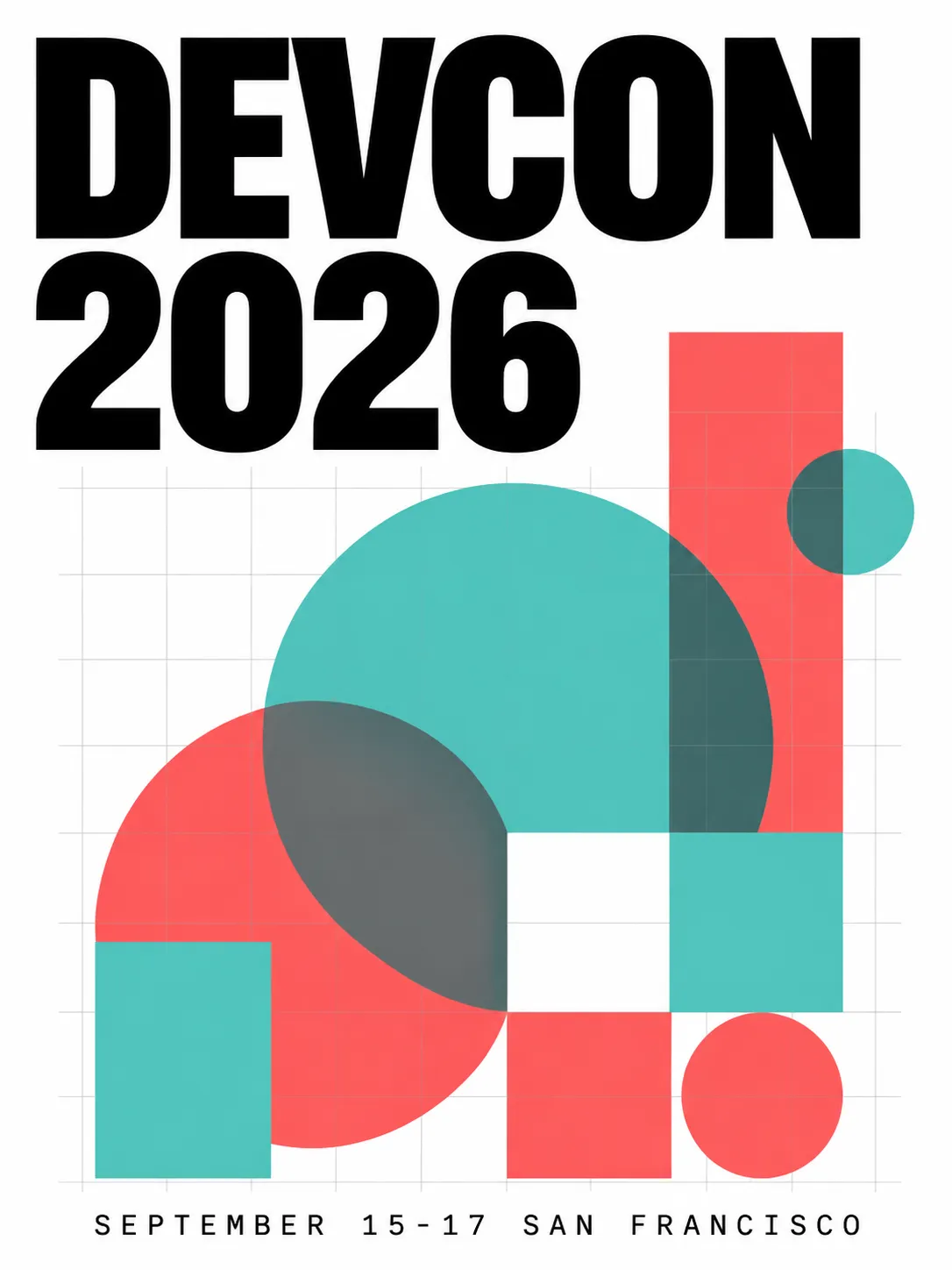
网格布局、精确文字定位、双色点缀调色板
产品摄影
切换到 photo 模式写上相机参数。边界框控制产品位置和留白空间。
{"high_level_description":"A premium skincare bottle photographed on a marble surface with soft natural lighting","style_description":{"aesthetics":"editorial, clean, luxury","lighting":"soft diffused window light from upper left, subtle reflection on marble","photo":"85mm f/2.8, shallow depth of field, color-graded","medium":"photograph","color_palette":["#F7F3EE","#D4C5B2","#8B7355","#FFFFFF","#E8DDD3"]},"compositional_deconstruction":{"background":"Polished white marble surface with subtle gray veining, soft gradient to warm cream in the background","elements":[{"type":"obj","bbox":[150,300,850,700],"desc":"Tall frosted glass skincare bottle with minimal gold typography label, cap removed and placed beside the bottle, casting soft shadow to the right"}]}}
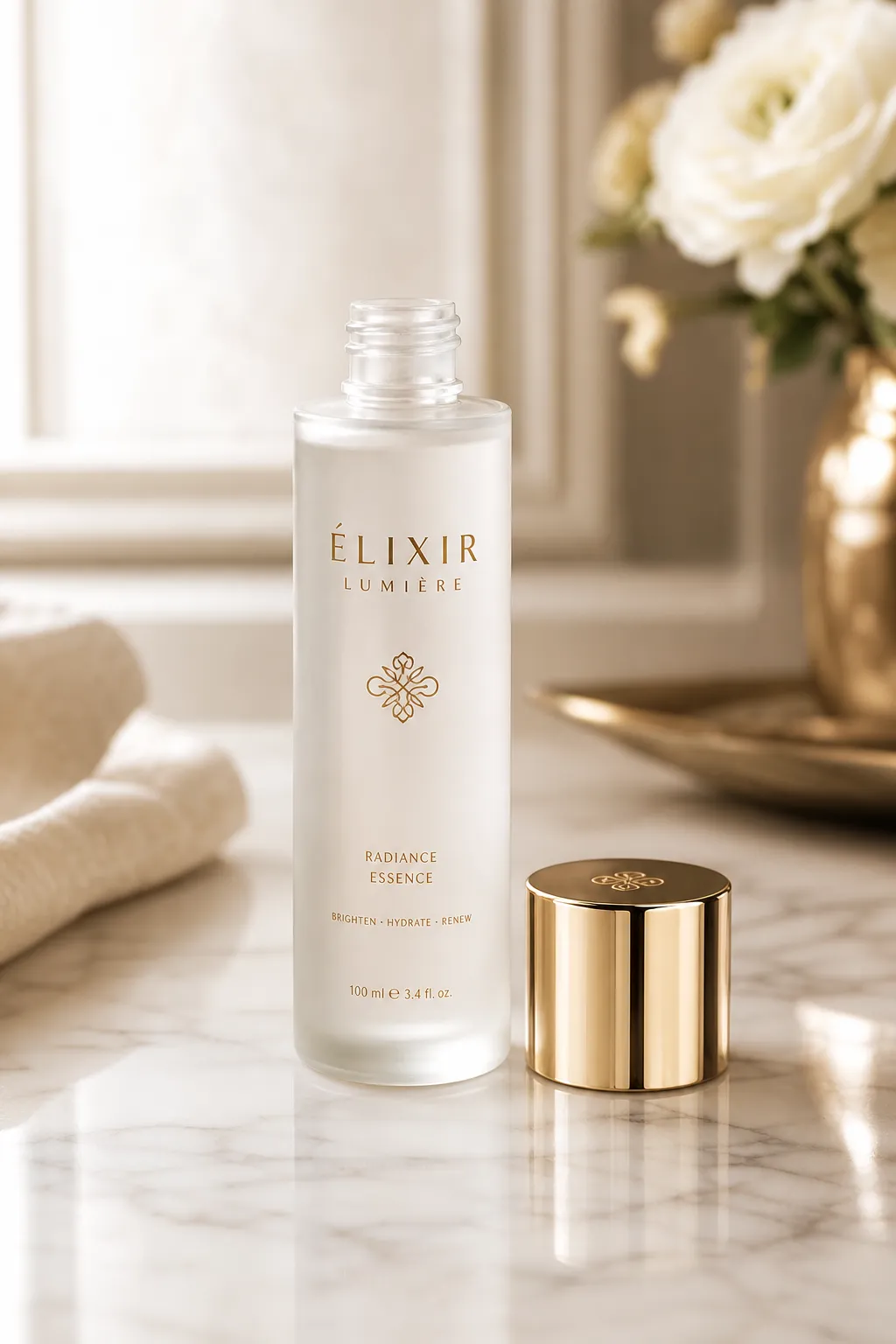
可控的光照方向、大理石质感、精心设计的留白
Logo 设计
Logo 需要纯色和干净边缘。用 art_style 实现矢量风格,元素保持简单。
{"high_level_description":"A modern geometric logo mark for a sustainable energy company","style_description":{"aesthetics":"minimal, geometric, professional","lighting":"flat, no shadows","medium":"graphic_design","art_style":"flat vector logo design, no gradients, clean edges","color_palette":["#2D5F2D","#4CAF50","#FFFFFF"]},"compositional_deconstruction":{"background":"Pure white, no texture","elements":[{"type":"obj","bbox":[200,200,800,800],"desc":"Abstract leaf shape formed by three overlapping chevrons pointing upward, creating a subtle upward arrow in the negative space, rendered in two shades of green"}]}}

矢量风格 Logo——纯色、无渐变、精准几何
写实摄影
写实效果靠 photo 字段里的相机参数细节。
{"high_level_description":"A candid street photograph of a woman walking through a rain-soaked Tokyo alley at night","style_description":{"aesthetics":"cinematic, moody, high contrast","lighting":"neon signs reflecting off wet pavement, warm tungsten from shop interiors mixing with cool blue ambient","photo":"35mm f/1.4, shot wide open, rain droplets visible on lens edge, slight motion blur on passing figures","medium":"photograph","color_palette":["#1A1A2E","#E94560","#F5A623","#16213E","#0F3460"]},"compositional_deconstruction":{"background":"Narrow Tokyo back-alley at night, wet asphalt reflecting neon kanji signs, steam rising from a ramen shop vent on the left","elements":[{"type":"obj","bbox":[100,350,900,650],"desc":"Young woman in a dark trench coat holding a transparent umbrella, mid-stride, face partially lit by warm shop light, looking slightly to camera right"},{"type":"obj","bbox":[50,50,400,200],"desc":"Glowing red and pink neon sign with Japanese characters, slightly out of focus due to shallow depth of field"}]}}
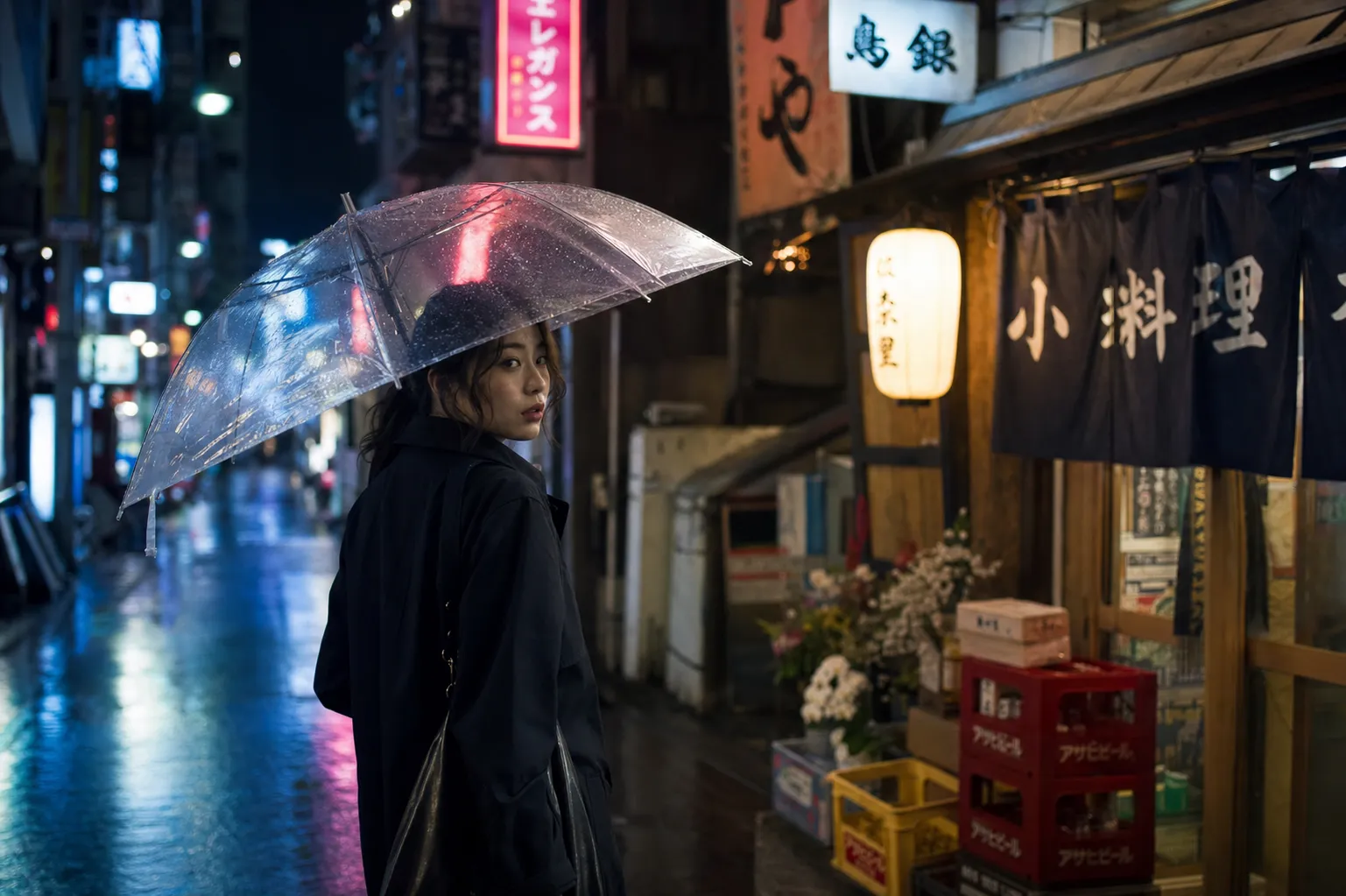
电影感街头摄影——霓虹反射、浅景深、冷暖光混合
社交媒体图
社交图通常需要醒目文字配品牌色。用宽边界框放标题文字,元素数量控制少。
{"high_level_description":"An Instagram carousel cover slide announcing a product launch with bold headline and gradient background","style_description":{"aesthetics":"bold, contemporary, startup","lighting":"soft ambient, no harsh shadows","medium":"graphic_design","art_style":"modern social media graphic with rounded corners and soft gradients","color_palette":["#6C5CE7","#A29BFE","#FFFFFF","#DFE6E9","#2D3436"]},"compositional_deconstruction":{"background":"Smooth gradient from deep purple at top-left to soft lavender at bottom-right","elements":[{"type":"text","bbox":[150,100,450,900],"text":"SOMETHING\nBIG IS\nCOMING","desc":"Extra-bold sans-serif headline in white, left-aligned, stacked on three lines with tight leading"},{"type":"text","bbox":[550,100,650,900],"text":"JUNE 30 • 9AM PST • BE FIRST IN LINE","desc":"Medium weight text in light gray, same left alignment as headline"},{"type":"obj","bbox":[700,300,950,700],"desc":"Abstract 3D blob shape in frosted glass material with purple and pink internal refraction, floating with subtle shadow beneath"}]}}
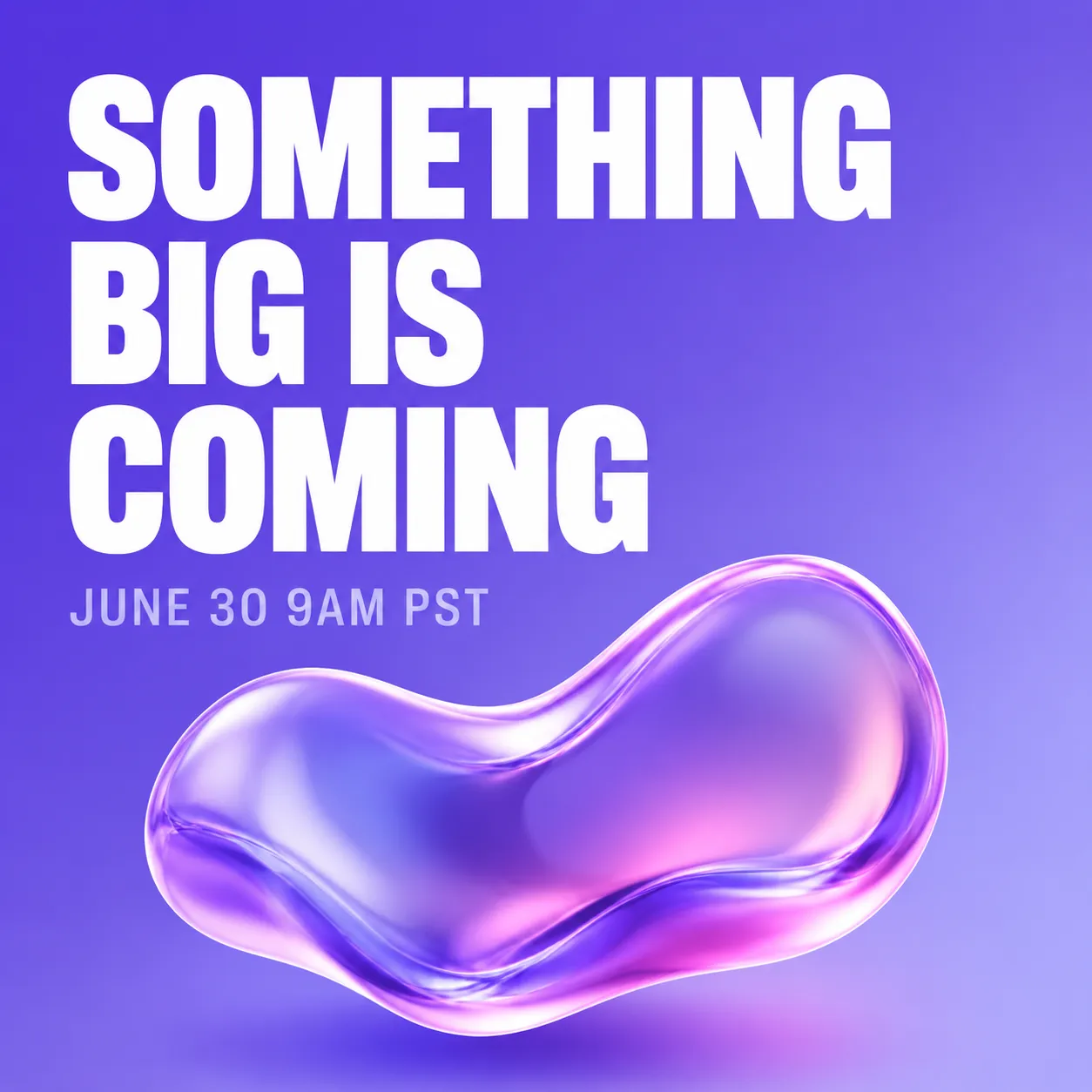
Instagram 风格发布预告——渐变背景、堆叠标题、3D 装饰元素
包装设计
产品包装需要精确的文字位置和品牌色一致性。
{"high_level_description":"A flat-lay photograph of artisan chocolate bar packaging on a dark slate surface","style_description":{"aesthetics":"artisan, premium, textured","lighting":"soft overhead light with slight directional warmth from the right","photo":"50mm f/4, even focus across the surface, high color fidelity","medium":"photograph","color_palette":["#2C1810","#D4A574","#F5E6D3","#1A1A1A","#8B6914"]},"compositional_deconstruction":{"background":"Dark charcoal slate surface with subtle texture, scattered cocoa nibs and gold foil fragments around the edges","elements":[{"type":"obj","bbox":[100,150,900,850],"desc":"Rectangular chocolate bar wrapper in matte cream paper with embossed cocoa pod illustration, partially unwrapped to reveal dark chocolate squares, gold foil inner wrapper visible at one end"}]}}
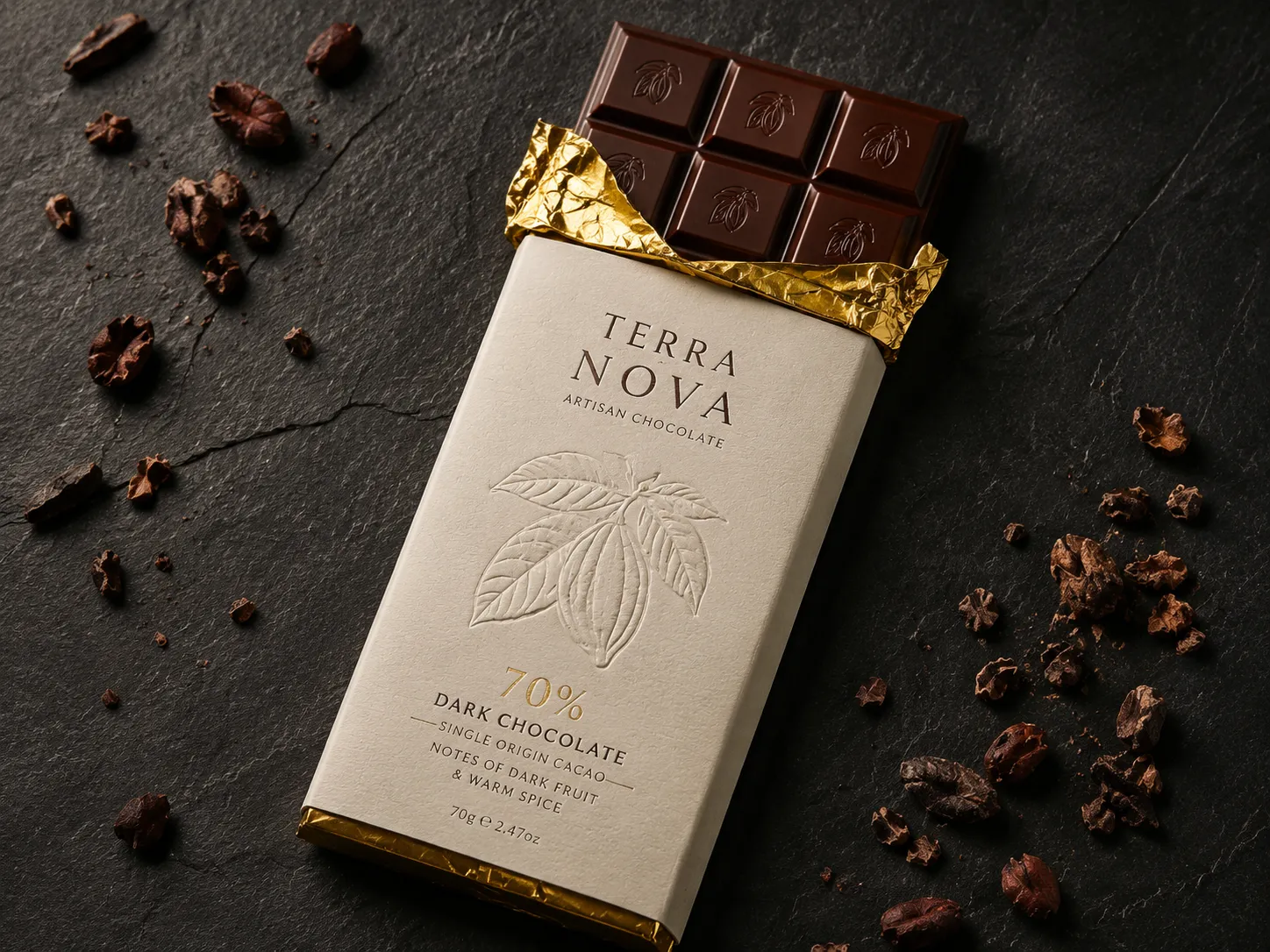
手工巧克力包装平铺——控制的表面质感、精确调色板、高端质感
信息图
信息图组合多个文字块和视觉元素。没有边界框的话,文字重叠几乎是必然的。
{"high_level_description":"A vertical infographic showing 4 steps of a morning routine with icons and numbered labels","style_description":{"aesthetics":"friendly, clean, informational","lighting":"flat, no shadows","medium":"graphic_design","art_style":"flat illustration style with rounded shapes and soft colors","color_palette":["#FF9F43","#54A0FF","#5F27CD","#10AC84","#F8F9FA"]},"compositional_deconstruction":{"background":"Light warm gray, clean and minimal","elements":[{"type":"text","bbox":[30,100,120,900],"text":"YOUR PERFECT\nMORNING ROUTINE","desc":"Bold rounded sans-serif header in dark purple, centered"},{"type":"obj","bbox":[140,50,350,450],"desc":"Circular icon of a glass of water with lemon slice, numbered 01 in orange beside it"},{"type":"text","bbox":[160,500,330,950],"text":"HYDRATE FIRST\nDrink 500ml water before coffee","desc":"Left-aligned text, title in bold dark, subtitle in medium gray"},{"type":"obj","bbox":[370,50,580,450],"desc":"Circular icon of a person stretching, numbered 02 in blue beside it"},{"type":"text","bbox":[390,500,560,950],"text":"MOVE YOUR BODY\n10 minutes of stretching or yoga","desc":"Left-aligned text, title in bold dark, subtitle in medium gray"},{"type":"obj","bbox":[600,50,810,450],"desc":"Circular icon of a journal and pen, numbered 03 in purple beside it"},{"type":"text","bbox":[620,500,790,950],"text":"WRITE 3 GOALS\nPrioritize before checking email","desc":"Left-aligned text, title in bold dark, subtitle in medium gray"},{"type":"obj","bbox":[830,50,950,450],"desc":"Circular icon of a healthy breakfast bowl, numbered 04 in green beside it"},{"type":"text","bbox":[840,500,940,950],"text":"EAT WELL\nProtein-rich breakfast, no sugar","desc":"Left-aligned text, title in bold dark, subtitle in medium gray"}]}}
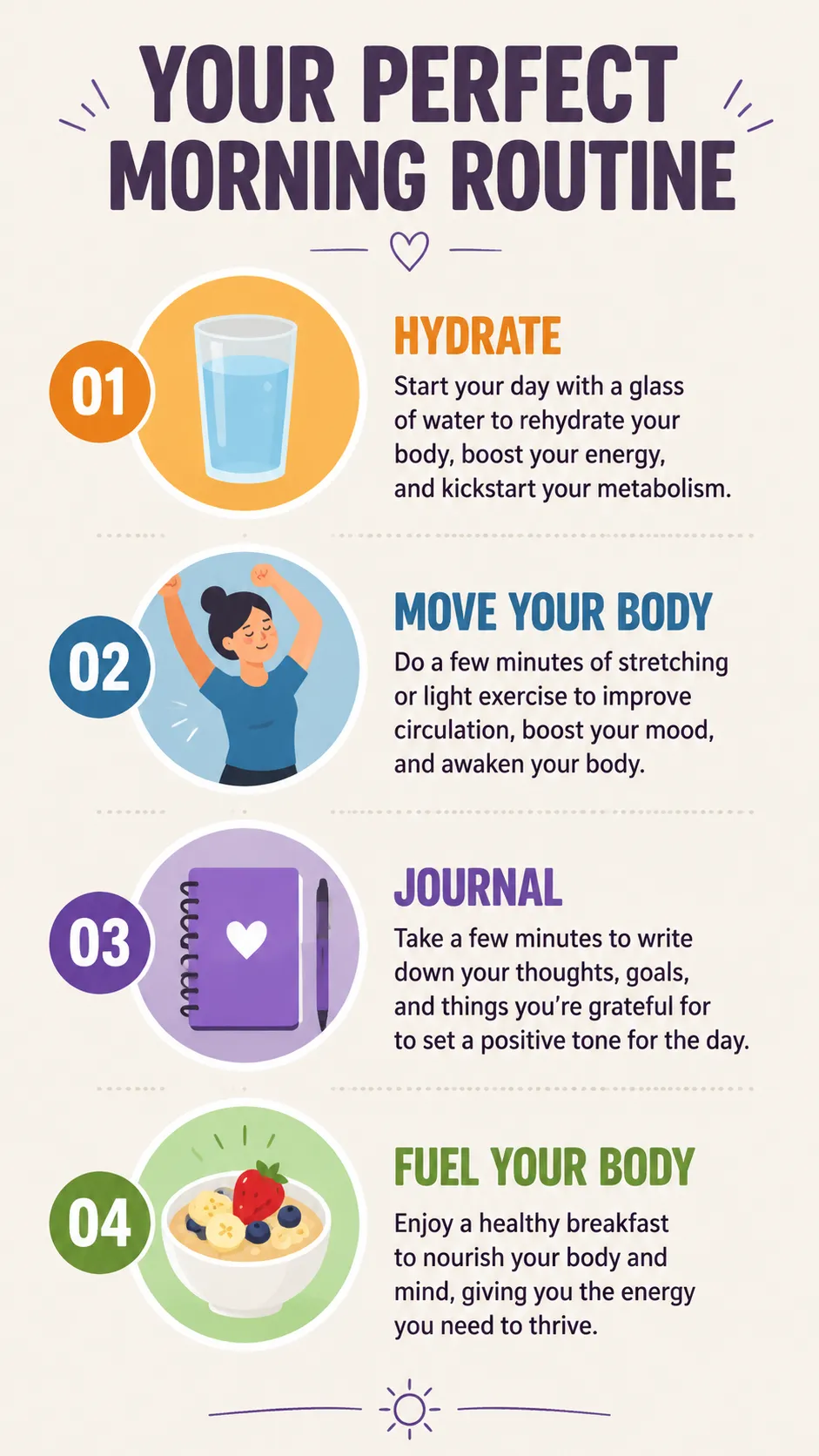
结构化信息图——每个文字块和图标都有独立边界框防止重叠
角色设计
角色概念用详细的 desc 字段加受限的调色板保持视觉一致性。
{"high_level_description":"A character design sheet for a cyberpunk courier, showing front and side view on a neutral background","style_description":{"aesthetics":"cyberpunk, detailed, concept art","lighting":"soft studio rim light with cyan accent from the left","medium":"illustration","art_style":"semi-realistic character concept art, clean linework with cel shading","color_palette":["#0D1B2A","#1B3A5C","#00E5FF","#FF6B35","#E0E0E0"]},"compositional_deconstruction":{"background":"Flat medium gray background with subtle grid, suitable for character turnaround sheet","elements":[{"type":"obj","bbox":[50,50,950,480],"desc":"Front view of a young woman in a fitted dark navy tactical jacket with glowing cyan piping along the seams, cargo pants with orange accent straps, short asymmetric black hair with one cyan-highlighted strand, wearing augmented reality goggles pushed up on forehead"},{"type":"obj","bbox":[50,520,950,950],"desc":"Three-quarter side view of the same character, showing a messenger bag with holographic patches on the back, utility belt visible, boots with magnetic soles, same outfit and color scheme as front view"}]}}
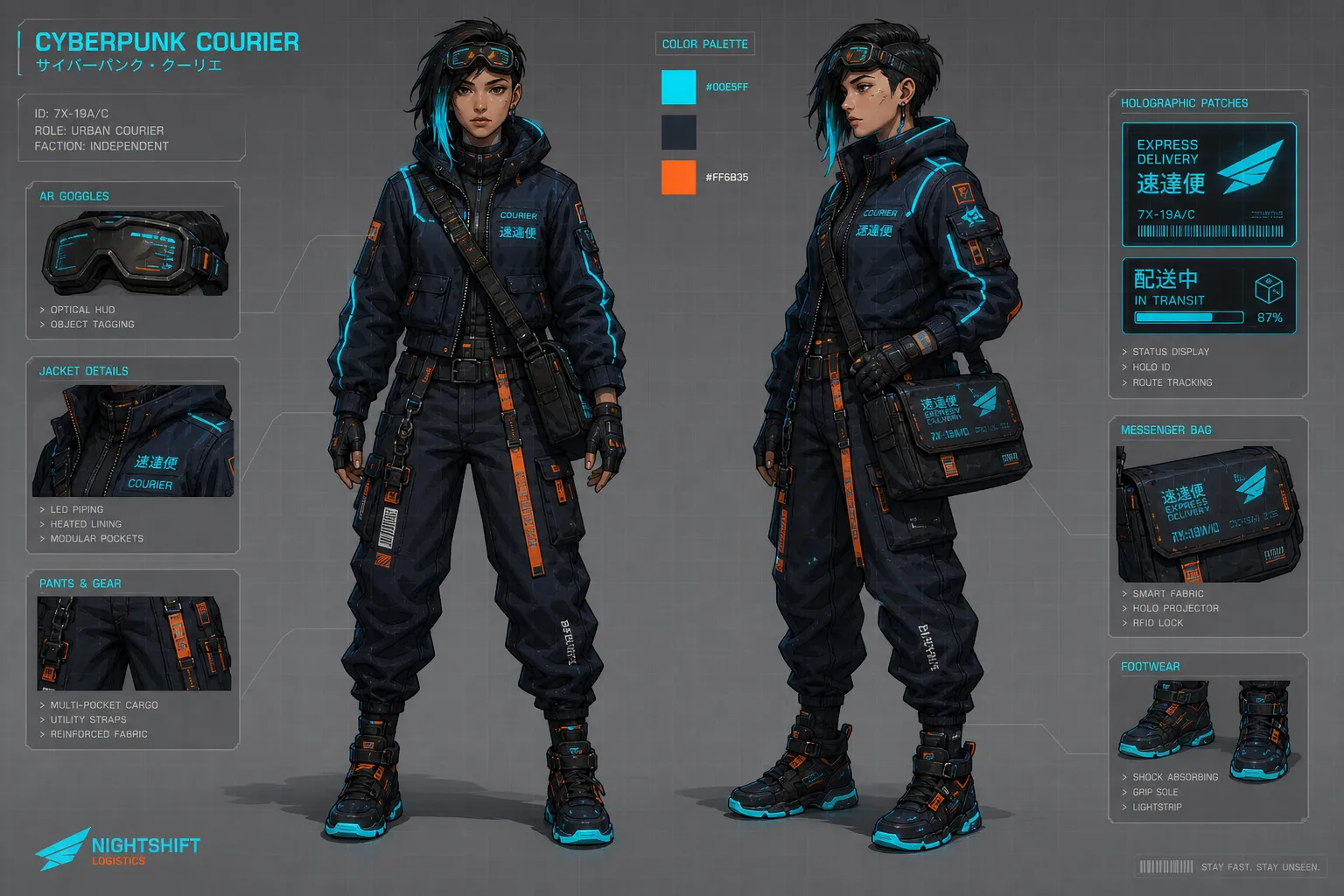
角色概念设定——锁定调色板保持多视角一致
Magic Prompt:懒人方案
不是所有人都想手写 JSON。Ideogram 4.0 内置 Magic Prompt——一个 LLM 会在生图前把纯文本展开成完整 JSON。
输入「a cozy coffee shop interior with morning light」,Magic Prompt 会生成包含风格描述、构图元素、调色板和边界框的完整 JSON。做快速探索和构思时,它能省很多事。
适合用 Magic Prompt:
- 快速探索创意
- 不需要精确布局
- 想让模型自己做创意决定
适合手写 JSON:
- 重文字排版(海报、社交图、包装)
- 需要精确 hex 色值保持品牌一致
- 有特定构图的产品摄影
- 多个元素不能重叠的场景
常见错误和避坑指南
边界框顺序搞反。 格式是 [y_min, x_min, y_max, x_max]——Y 在前面,不是 X。搞反了元素会出现在意想不到的位置。
同时用了 photo 和 art_style。 只能选一个。这两个字段在训练数据中是互斥的——都写上会降低输出质量。
字段顺序打乱。 模型训练时用的是固定字段顺序。正确顺序:aesthetics → lighting → medium → art_style/photo → color_palette。元素里:type → bbox → desc(文字元素:type → bbox → text → desc)。
用了缩写 hex 色值。 #FFF 不行,必须写完整六位:#FFFFFF。
文字边界框重叠。 两个文字元素占同一区域会渲染不清楚。给每个文字块分配独立的、不重叠的区域。
简单场景过度指定。 详细的 high_level_description 加风格控制往往就够了。只在真正需要空间精度时才用边界框和多元素构图。
常见问题
必须用 JSON 才能得到好结果吗?
不是。纯文本也能用,尤其是开了 Magic Prompt 时。JSON 给你纯文本做不到的布局、颜色和文字位置控制——但如果不需要严格构图,纯文本完全够用。
调色板最多放多少颜色?
全局 style_description 调色板最多 16 个 hex 色值,单个元素最多 5 个。这些颜色引导主色调但不保证精确匹配——更像是给模型的强建议。
Ideogram 4.0 支持什么分辨率?
256×256 到 2048×2048,必须是 16 的倍数。本地运行时用 2048×2048 配合 V4_QUALITY_48 采样预设效果最好。
和 Ideogram 3.0 有什么区别?
Ideogram 4.0 开源开权重(3.0 只有 API),用 JSON 结构化训练替代自然语言,文字渲染能力大幅提升。边界框布局和调色板控制是 4.0 新增的。
能在本地跑吗?
能。fp8 和 nf4 版本的权重在 HuggingFace 上。fp8 版本需要至少 24GB 显存。ComfyUI 有社区节点支持,包括 KJ 的 prompt 构建节点让 JSON 构造更方便。
在线哪里可以用?
Editly 支持 Ideogram 4.0,纯文本和 JSON 两种输入方式都可以。Ideogram 官方平台也通过 API 和网页端提供。