
Ideogram 4.0は93億パラメータのオープンウェイト画像モデルで、テキストレンダリング、bounding boxによるレイアウト制御、カラーパレット指定に優れています。ウェイトはHuggingFaceで公開されており、推論コードはGitHubにあります。プロンプトシステム全体がJSONベースで動作するため、リリース当初は戸惑った人も少なくありませんでした。
このガイドでは、JSONシステムが存在する理由、各フィールドの役割、そしてそのままコピーして使えるプロンプト例を紹介します。
なぜIdeogram 4.0はJSONプロンプトを使うのか?
多くの画像モデルは(画像, テキストキャプション)のペアで学習します。キャプションは自然言語の文章で、モデルは単語と視覚的概念の対応を学びます。これは機能しますが、曖昧さが生まれます。「青い建物の左側に赤い車」と書いた場合、モデルはどの色がどのオブジェクトに属するか、「左側」が空間的にどこを意味するかを推測しなければなりません。
Ideogram 4.0は構造化されたJSONキャプションのみで学習されました。各学習画像には、シーンの説明、スタイルパラメータ、個々の要素とそのbounding box位置を明示的に分離するJSONオブジェクトが紐づけられています。公式ドキュメントによると、学習用キャプションは「意図的に極めて詳細」に作成されており、各JSONは画像内のすべてを網羅的に記述しています。
この設計により、モデルは空間的な関係を推測する必要がありません。bounding boxの座標は、同じ座標フォーマットの数百万の学習例に基づいて、直接的に位置へマッピングされます。カラーパレットも同様で、JSON内のhexコードは学習時に確立された色の対応関係にマッピングされ、色名の曖昧な解釈ではありません。
実用的な結論:JSONプロンプトは、プレーンテキストでは実現できないレイアウト、タイポグラフィ、色の精度を引き出します。ただし、プレーンテキストも使えます。IdeogramのMagic Prompt機能がLLMを使って、カジュアルな入力を構造化JSONに変換してから生成します。
プレーンテキスト vs JSON:実際の違い
同じコンセプトを両方の方法でプロンプトした例です:
プレーンテキスト:
A jazz festival poster with bold typography, warm colors, and a saxophone silhouette
JSON:
{"high_level_description":"A vibrant jazz festival poster featuring bold typography and a saxophone silhouette against warm-toned geometric shapes","style_description":{"aesthetics":"retro, grain texture, bold contrast","lighting":"warm stage lighting with amber tones","medium":"graphic_design","art_style":"vintage concert poster with screen-print texture","color_palette":["#E8572A","#F2A03D","#1B1B2F","#F5E6CC","#C2185B"]},"compositional_deconstruction":{"background":"Deep navy blue with subtle radial gradient and halftone dot pattern","elements":[{"type":"text","bbox":[50,100,250,900],"text":"JAZZ\nFESTIVAL","desc":"Large bold sans-serif title in warm orange, slightly tilted 3 degrees clockwise"},{"type":"obj","bbox":[300,200,850,750],"desc":"Golden saxophone silhouette with geometric art deco fragmentation, pieces floating upward"},{"type":"text","bbox":[870,150,950,850],"text":"JUNE 28-30 • RIVERSIDE PARK • TICKETS AT JAZZFEST.COM","desc":"Small caps tracking-wide footer text in cream color"}]}}
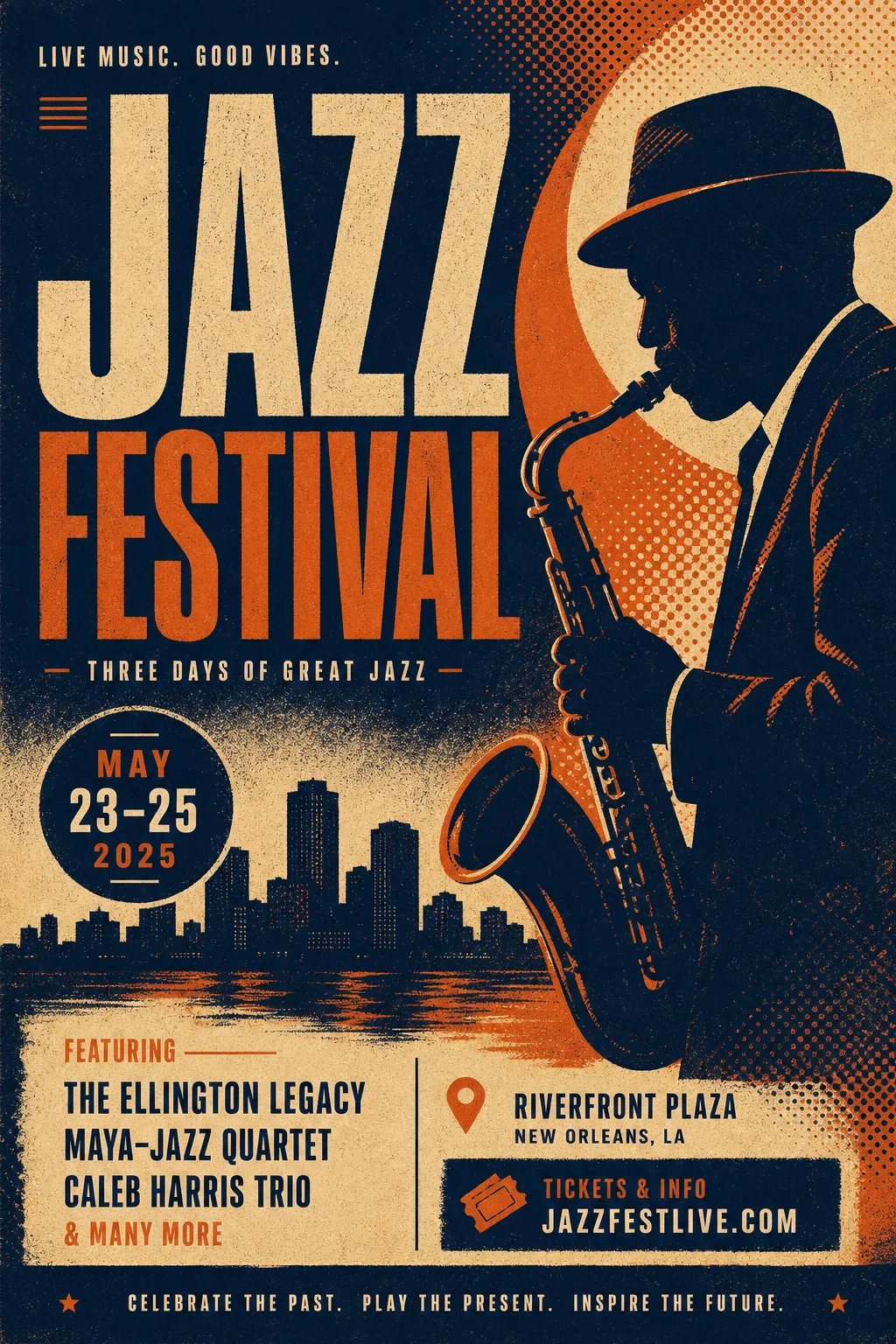
プレーンテキストで生成したジャズポスター — レイアウト、色、テキスト配置はモデルが自動決定
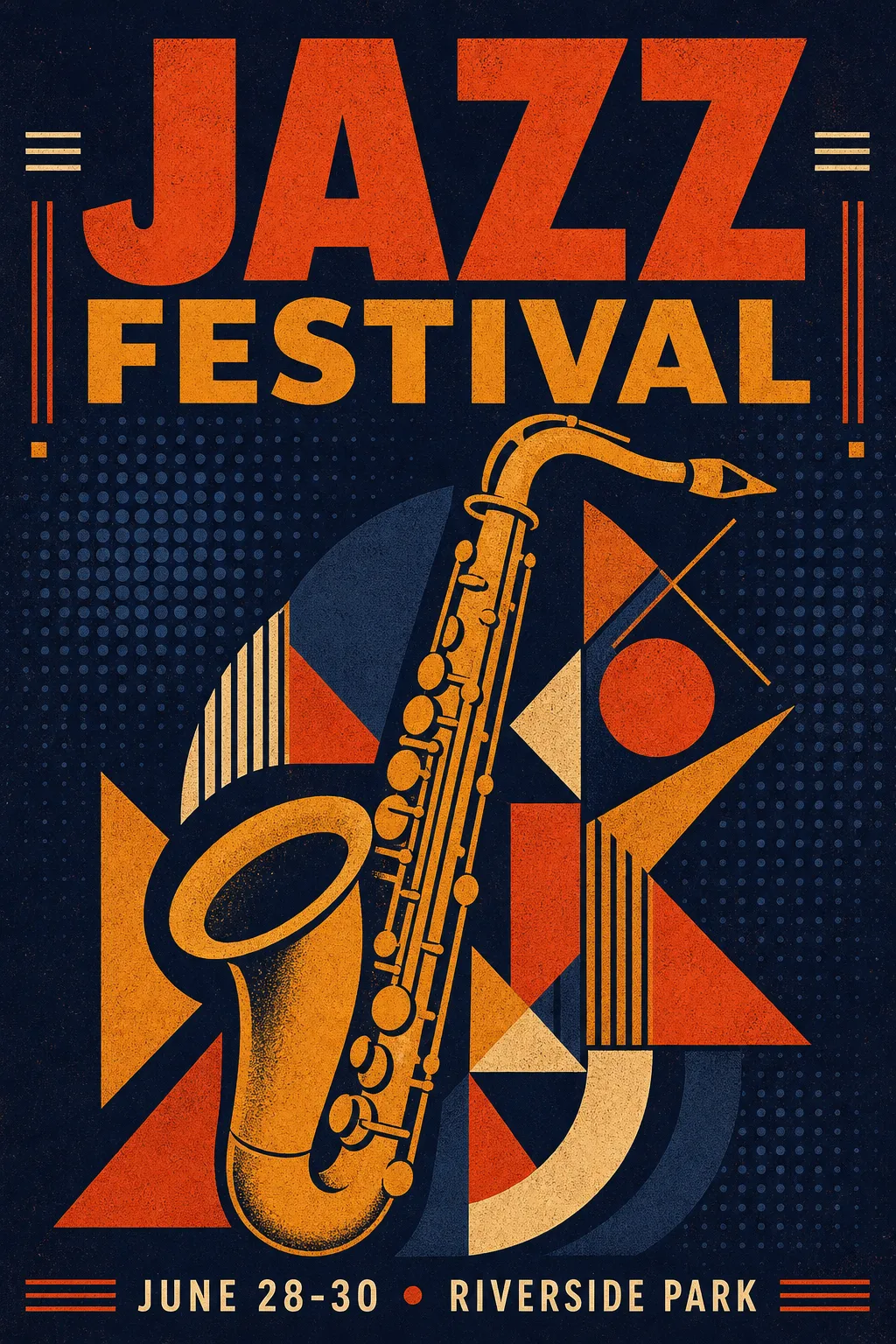
同じコンセプトのJSON版 — 制御されたパレット、正確なテキスト位置、意図的な構図
プレーンテキスト版でも使える画像が生成されます。JSON版では、すべての要素が指定した位置に、指定した色で配置されたポスターが得られます。
JSONスキーマ概要
完全なキャプション構造には3つのトップレベルフィールドがあります:
| フィールド | 必須 | 制御する内容 |
|---|---|---|
high_level_description |
推奨 | 画像の1-2文の要約 |
style_description |
任意 | ライティング、メディア、美学、カラーパレット |
compositional_deconstruction |
必須 | 背景 + 個々の要素とその位置 |
style_description内では、photo(カメラ/レンズスペック)かart_style(イラスト/デザインスタイル)のいずれかを選択します — 両方は使えません。
各要素はobj(視覚オブジェクト)またはtext(画像内テキスト)として型指定されます。bounding boxは[y_min, x_min, y_max, x_max]形式で、0〜1000の正規化座標を使用します。カラーパレットはグローバルで最大16個のhexコード、要素ごとに最大5個です。
記入できる空白テンプレート:
{"high_level_description":"[1-2文の要約]","style_description":{"aesthetics":"[ムードキーワード]","lighting":"[ライティング設定]","medium":"[photograph|illustration|3d_render|painting|graphic_design]","art_style":"[スタイルの説明 — または代わりにphotoを使用]","color_palette":["#HEXCODE","#HEXCODE"]},"compositional_deconstruction":{"background":"[背景/環境の説明]","elements":[{"type":"obj","bbox":[y_min,x_min,y_max,x_max],"desc":"[要素の詳細な説明]"},{"type":"text","bbox":[y_min,x_min,y_max,x_max],"text":"[レンダリングするテキスト]","desc":"[テキストスタイルの説明]"}]}}
ユースケース別プロンプト例
イベントポスター
ポスターはIdeogram 4.0のテキストレンダリング能力を最も発揮する場面です。異なるサイズやスタイルの複数テキストブロックを正確な位置に配置できます。
{"high_level_description":"A minimalist tech conference poster with clean typography and geometric accents","style_description":{"aesthetics":"clean, modern, Swiss design influenced","lighting":"flat, even studio lighting","medium":"graphic_design","art_style":"minimalist poster design with strong grid structure","color_palette":["#0D0D0D","#FFFFFF","#4ECDC4","#FF6B6B"]},"compositional_deconstruction":{"background":"Pure white background with subtle 12-column grid lines in light gray","elements":[{"type":"text","bbox":[80,60,300,940],"text":"DEVCON\n2026","desc":"Ultra-bold grotesque typeface in black, massive size, tight leading"},{"type":"obj","bbox":[350,100,700,900],"desc":"Abstract geometric composition of overlapping circles and rectangles in teal and coral, suggesting network nodes and connections"},{"type":"text","bbox":[750,60,900,940],"text":"SEPTEMBER 15-17\nSAN FRANCISCO\nREGISTER AT DEVCON.IO","desc":"Light weight mono-spaced text in dark gray, left-aligned, generous line spacing"}]}}
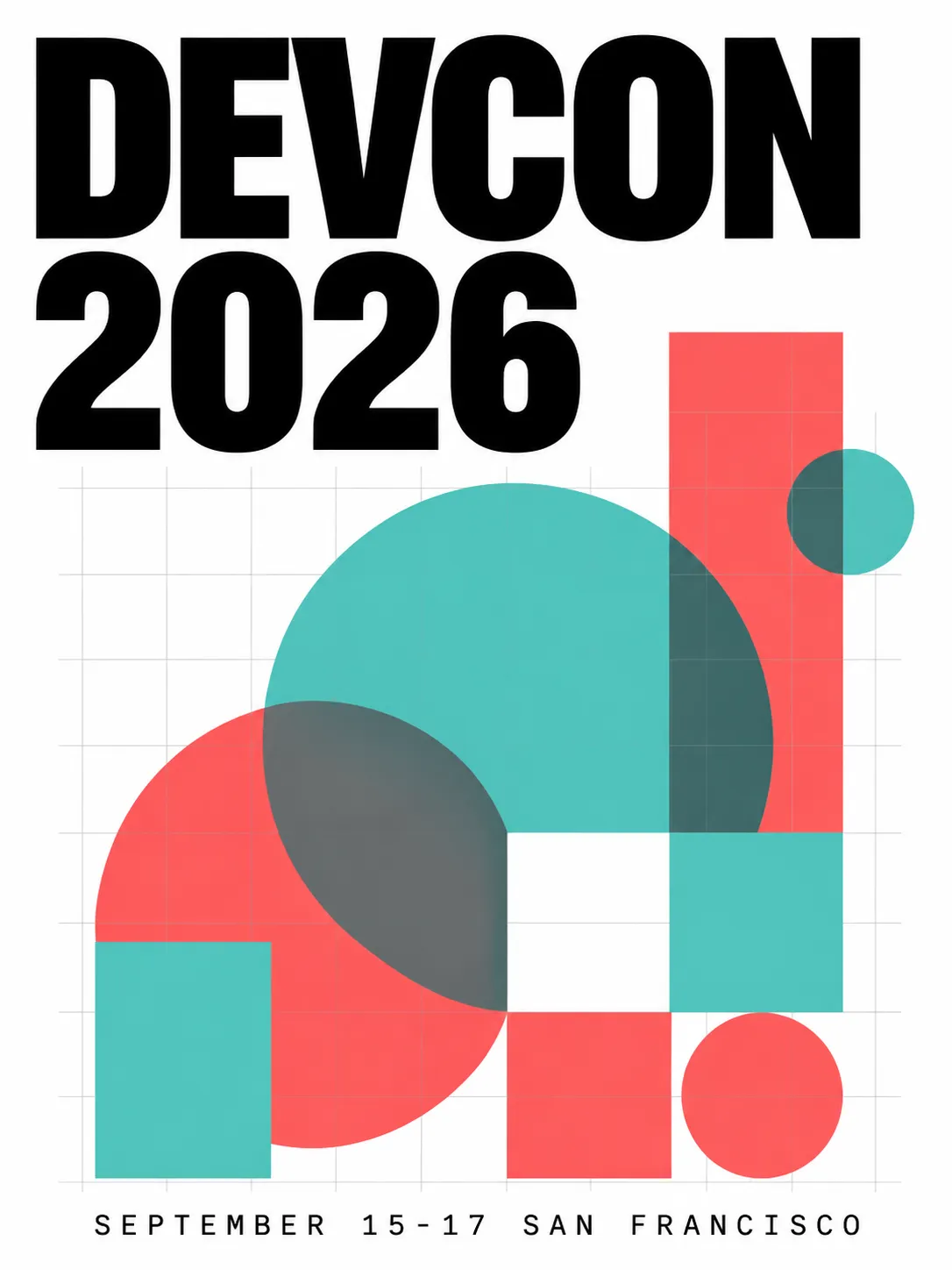
クリーンなグリッドレイアウト、正確なテキスト配置、2色アクセントパレット
商品撮影
カメラスペックを指定してphotoモードに切り替えます。bounding boxで商品の配置とネガティブスペースを制御します。
{"high_level_description":"A premium skincare bottle photographed on a marble surface with soft natural lighting","style_description":{"aesthetics":"editorial, clean, luxury","lighting":"soft diffused window light from upper left, subtle reflection on marble","photo":"85mm f/2.8, shallow depth of field, color-graded","medium":"photograph","color_palette":["#F7F3EE","#D4C5B2","#8B7355","#FFFFFF","#E8DDD3"]},"compositional_deconstruction":{"background":"Polished white marble surface with subtle gray veining, soft gradient to warm cream in the background","elements":[{"type":"obj","bbox":[150,300,850,700],"desc":"Tall frosted glass skincare bottle with minimal gold typography label, cap removed and placed beside the bottle, casting soft shadow to the right"}]}}
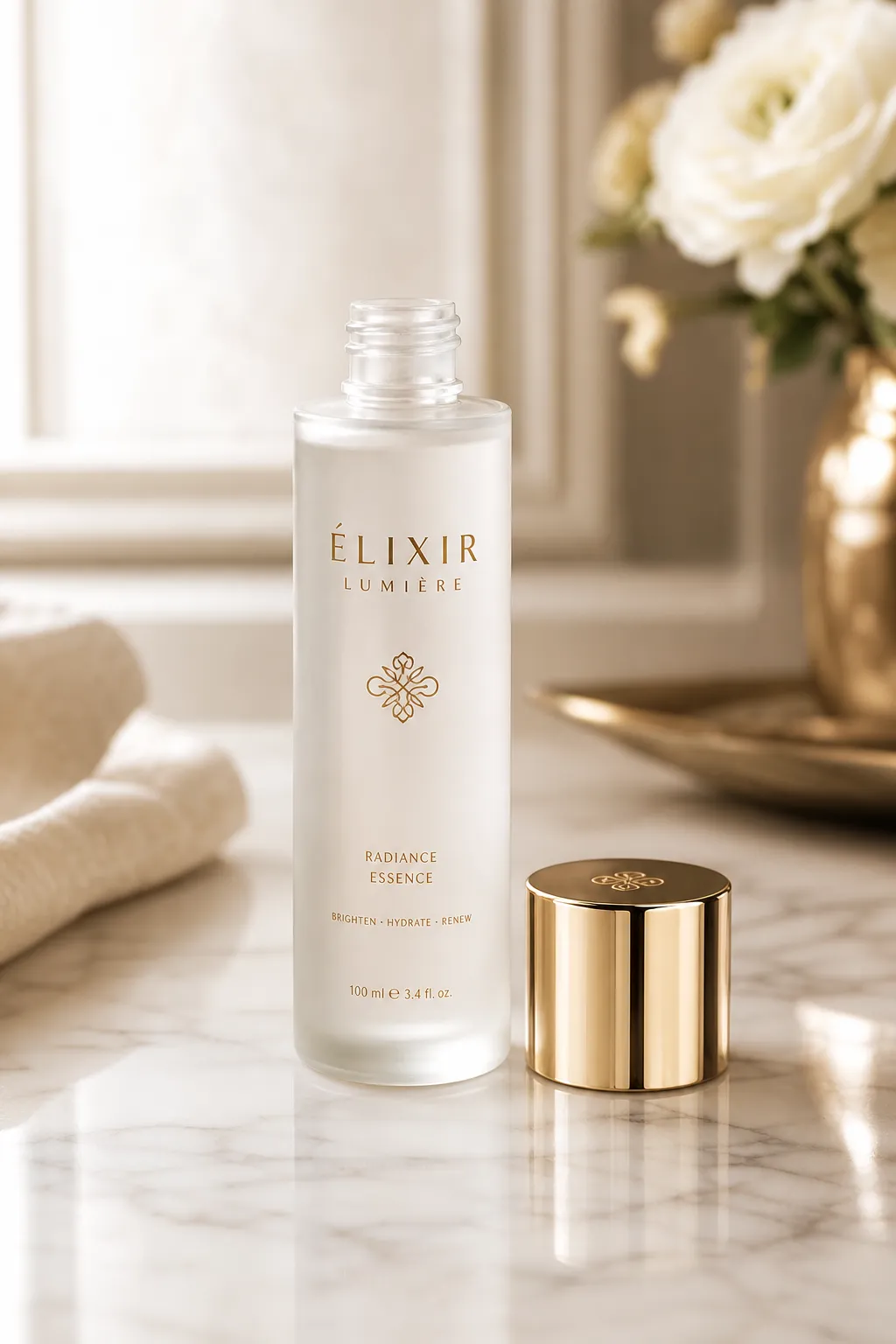
制御されたライティング方向、大理石のテクスチャ、意図的なネガティブスペース
ロゴデザイン
ロゴにはフラットカラーとクリーンなエッジが必要です。ベクター風の出力にはart_styleを使い、要素はシンプルに保ちます。
{"high_level_description":"A modern geometric logo mark for a sustainable energy company","style_description":{"aesthetics":"minimal, geometric, professional","lighting":"flat, no shadows","medium":"graphic_design","art_style":"flat vector logo design, no gradients, clean edges","color_palette":["#2D5F2D","#4CAF50","#FFFFFF"]},"compositional_deconstruction":{"background":"Pure white, no texture","elements":[{"type":"obj","bbox":[200,200,800,800],"desc":"Abstract leaf shape formed by three overlapping chevrons pointing upward, creating a subtle upward arrow in the negative space, rendered in two shades of green"}]}}

フラットベクター風ロゴ — ソリッドカラー、グラデーションなし、正確なジオメトリ
リアル写真
フォトリアリズムには、photoフィールドの詳細なカメラスペックが最も重要です。
{"high_level_description":"A candid street photograph of a woman walking through a rain-soaked Tokyo alley at night","style_description":{"aesthetics":"cinematic, moody, high contrast","lighting":"neon signs reflecting off wet pavement, warm tungsten from shop interiors mixing with cool blue ambient","photo":"35mm f/1.4, shot wide open, rain droplets visible on lens edge, slight motion blur on passing figures","medium":"photograph","color_palette":["#1A1A2E","#E94560","#F5A623","#16213E","#0F3460"]},"compositional_deconstruction":{"background":"Narrow Tokyo back-alley at night, wet asphalt reflecting neon kanji signs, steam rising from a ramen shop vent on the left","elements":[{"type":"obj","bbox":[100,350,900,650],"desc":"Young woman in a dark trench coat holding a transparent umbrella, mid-stride, face partially lit by warm shop light, looking slightly to camera right"},{"type":"obj","bbox":[50,50,400,200],"desc":"Glowing red and pink neon sign with Japanese characters, slightly out of focus due to shallow depth of field"}]}}
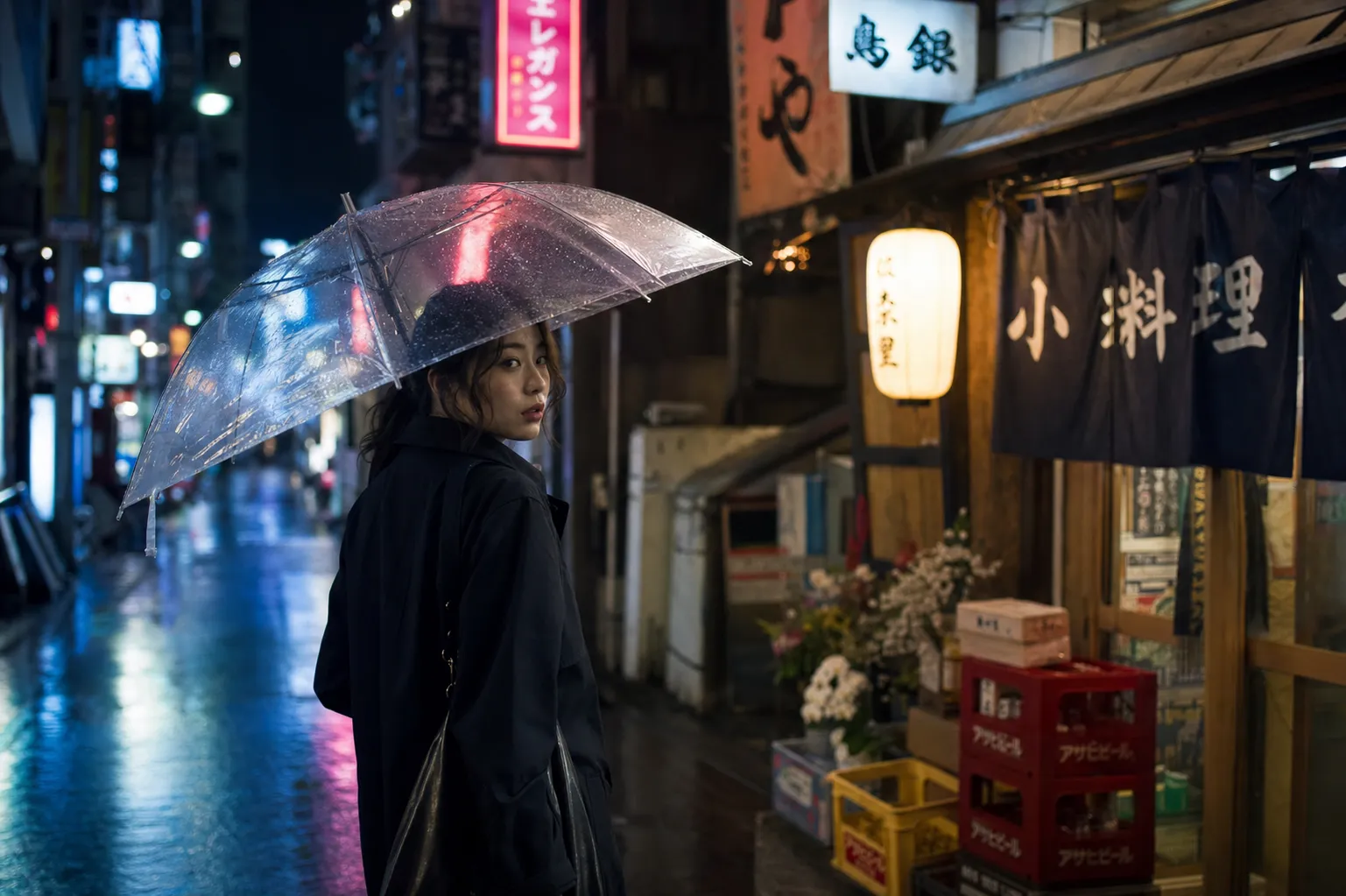
シネマティックなストリートフォト — ネオンの反射、浅い被写界深度、暖色と寒色のライティングミックス
ソーシャルメディアグラフィック
ソーシャルグラフィックでは、ブランドカラーを使った太字テキストが求められます。見出しテキストには幅広のbounding boxを使い、要素数は少なく保ちます。
{"high_level_description":"An Instagram carousel cover slide announcing a product launch with bold headline and gradient background","style_description":{"aesthetics":"bold, contemporary, startup","lighting":"soft ambient, no harsh shadows","medium":"graphic_design","art_style":"modern social media graphic with rounded corners and soft gradients","color_palette":["#6C5CE7","#A29BFE","#FFFFFF","#DFE6E9","#2D3436"]},"compositional_deconstruction":{"background":"Smooth gradient from deep purple at top-left to soft lavender at bottom-right","elements":[{"type":"text","bbox":[150,100,450,900],"text":"SOMETHING\nBIG IS\nCOMING","desc":"Extra-bold sans-serif headline in white, left-aligned, stacked on three lines with tight leading"},{"type":"text","bbox":[550,100,650,900],"text":"JUNE 30 • 9AM PST • BE FIRST IN LINE","desc":"Medium weight text in light gray, same left alignment as headline"},{"type":"obj","bbox":[700,300,950,700],"desc":"Abstract 3D blob shape in frosted glass material with purple and pink internal refraction, floating with subtle shadow beneath"}]}}
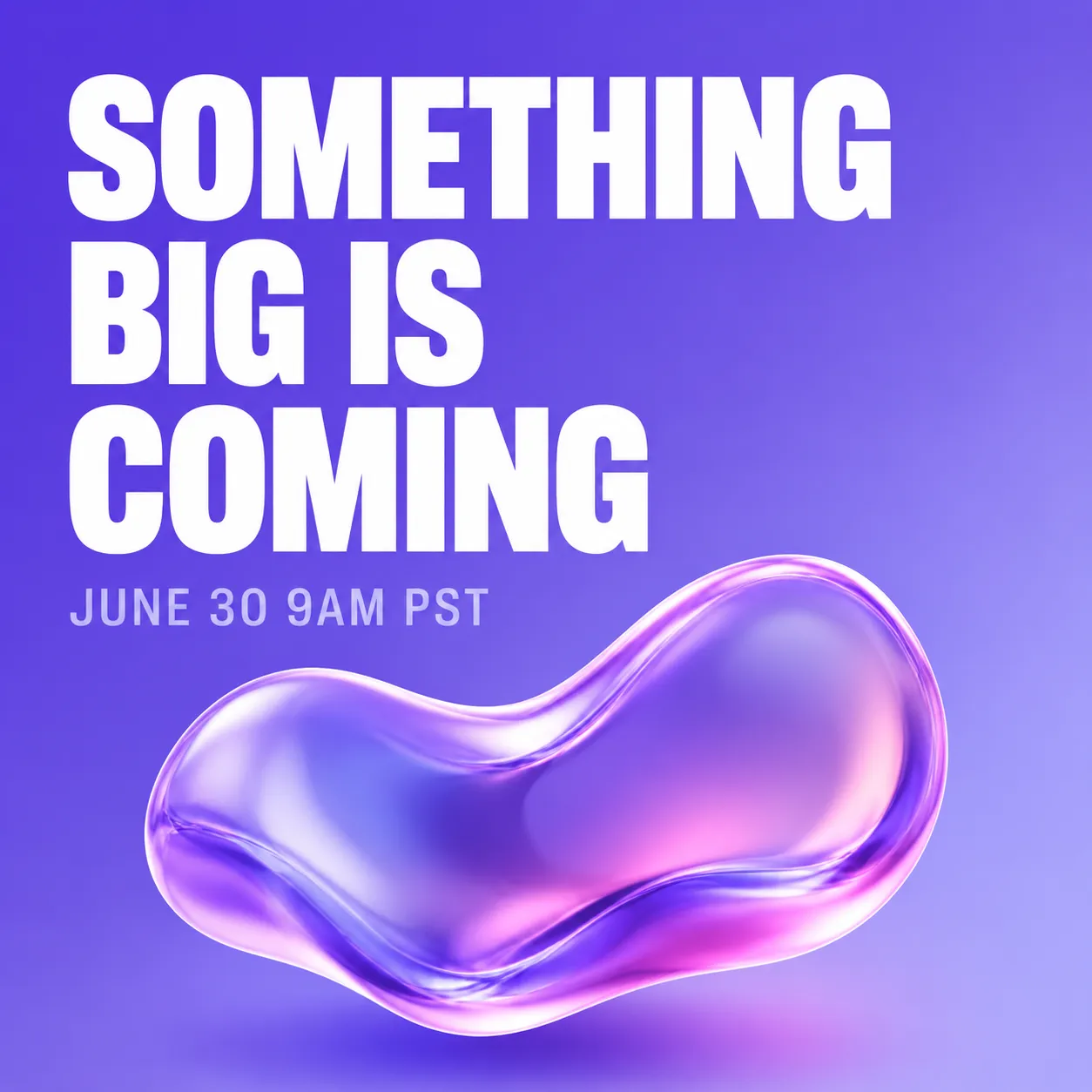
Instagram風のローンチ告知 — グラデーション背景、積み重ねた見出し、3Dアクセント要素
パッケージデザイン
商品パッケージは正確なテキスト配置とブランドカラーの一貫性が重要です。
{"high_level_description":"A flat-lay photograph of artisan chocolate bar packaging on a dark slate surface","style_description":{"aesthetics":"artisan, premium, textured","lighting":"soft overhead light with slight directional warmth from the right","photo":"50mm f/4, even focus across the surface, high color fidelity","medium":"photograph","color_palette":["#2C1810","#D4A574","#F5E6D3","#1A1A1A","#8B6914"]},"compositional_deconstruction":{"background":"Dark charcoal slate surface with subtle texture, scattered cocoa nibs and gold foil fragments around the edges","elements":[{"type":"obj","bbox":[100,150,900,850],"desc":"Rectangular chocolate bar wrapper in matte cream paper with embossed cocoa pod illustration, partially unwrapped to reveal dark chocolate squares, gold foil inner wrapper visible at one end"}]}}
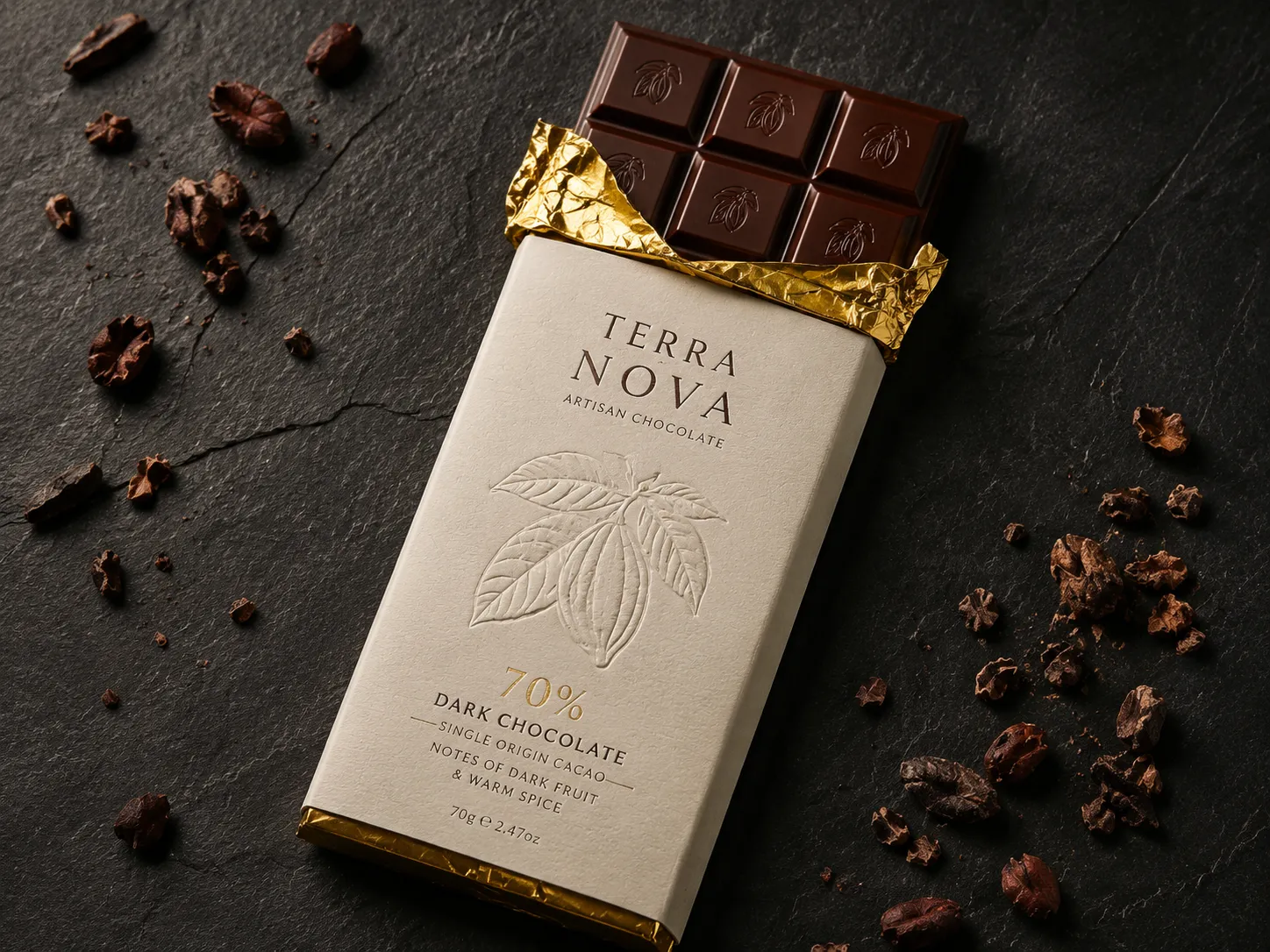
アルチザンチョコレートのフラットレイ — 制御された表面テクスチャ、正確なカラーパレット、プレミアム感
インフォグラフィック
インフォグラフィックは複数のテキストブロックとビジュアル要素を組み合わせます。ここではbounding boxが不可欠です。なければ、テキストの重なりはほぼ確実に発生します。
{"high_level_description":"A vertical infographic showing 4 steps of a morning routine with icons and numbered labels","style_description":{"aesthetics":"friendly, clean, informational","lighting":"flat, no shadows","medium":"graphic_design","art_style":"flat illustration style with rounded shapes and soft colors","color_palette":["#FF9F43","#54A0FF","#5F27CD","#10AC84","#F8F9FA"]},"compositional_deconstruction":{"background":"Light warm gray, clean and minimal","elements":[{"type":"text","bbox":[30,100,120,900],"text":"YOUR PERFECT\nMORNING ROUTINE","desc":"Bold rounded sans-serif header in dark purple, centered"},{"type":"obj","bbox":[140,50,350,450],"desc":"Circular icon of a glass of water with lemon slice, numbered 01 in orange beside it"},{"type":"text","bbox":[160,500,330,950],"text":"HYDRATE FIRST\nDrink 500ml water before coffee","desc":"Left-aligned text, title in bold dark, subtitle in medium gray"},{"type":"obj","bbox":[370,50,580,450],"desc":"Circular icon of a person stretching, numbered 02 in blue beside it"},{"type":"text","bbox":[390,500,560,950],"text":"MOVE YOUR BODY\n10 minutes of stretching or yoga","desc":"Left-aligned text, title in bold dark, subtitle in medium gray"},{"type":"obj","bbox":[600,50,810,450],"desc":"Circular icon of a journal and pen, numbered 03 in purple beside it"},{"type":"text","bbox":[620,500,790,950],"text":"WRITE 3 GOALS\nPrioritize before checking email","desc":"Left-aligned text, title in bold dark, subtitle in medium gray"},{"type":"obj","bbox":[830,50,950,450],"desc":"Circular icon of a healthy breakfast bowl, numbered 04 in green beside it"},{"type":"text","bbox":[840,500,940,950],"text":"EAT WELL\nProtein-rich breakfast, no sugar","desc":"Left-aligned text, title in bold dark, subtitle in medium gray"}]}}
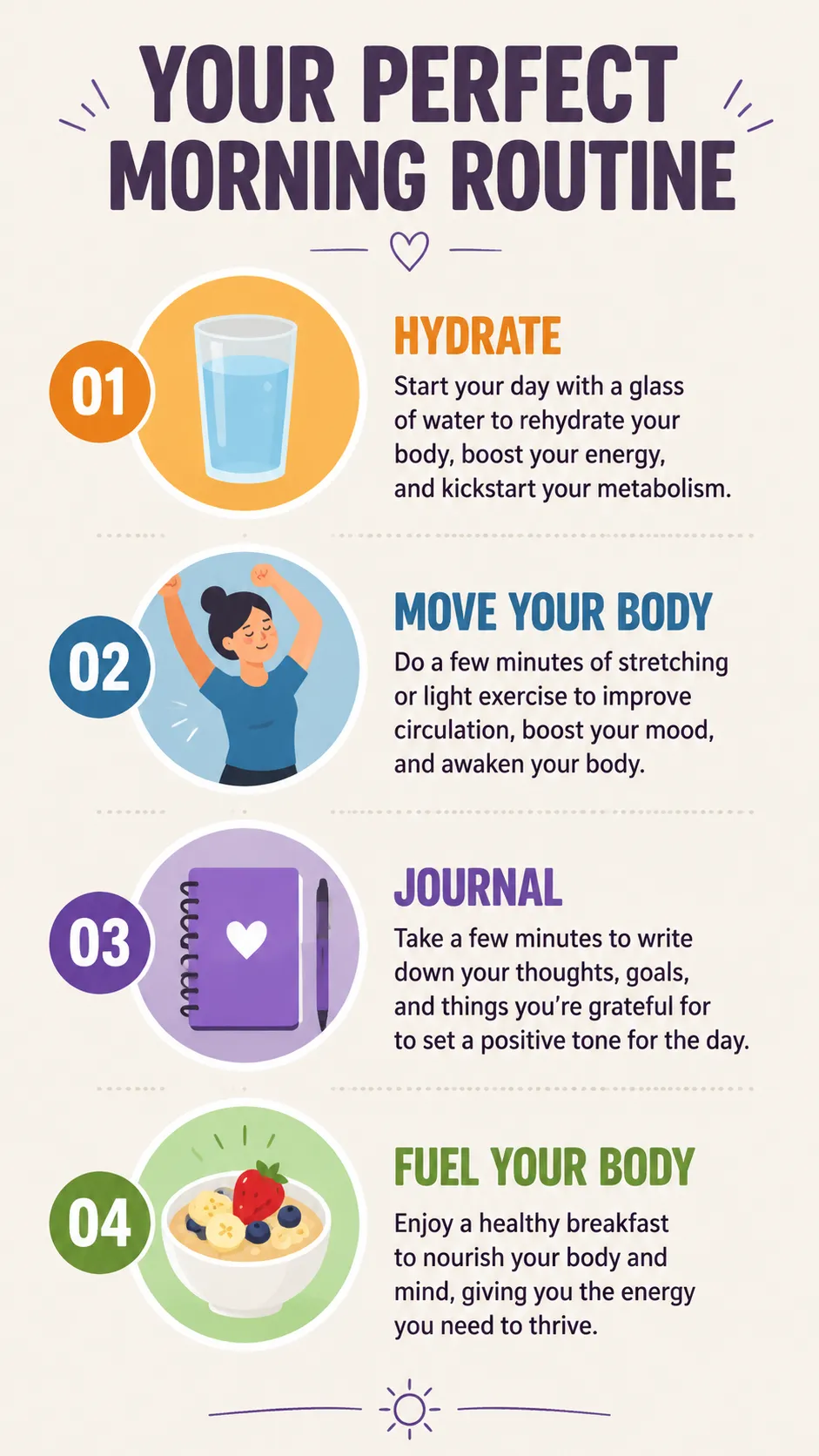
構造化インフォグラフィック — 各テキストブロックとアイコンにbounding boxを割り当て、重なりを防止
キャラクターデザイン
キャラクターコンセプトは、詳細なdescフィールドと制限されたカラーパレットで視覚的一貫性を保てます。
{"high_level_description":"A character design sheet for a cyberpunk courier, showing front and side view on a neutral background","style_description":{"aesthetics":"cyberpunk, detailed, concept art","lighting":"soft studio rim light with cyan accent from the left","medium":"illustration","art_style":"semi-realistic character concept art, clean linework with cel shading","color_palette":["#0D1B2A","#1B3A5C","#00E5FF","#FF6B35","#E0E0E0"]},"compositional_deconstruction":{"background":"Flat medium gray background with subtle grid, suitable for character turnaround sheet","elements":[{"type":"obj","bbox":[50,50,950,480],"desc":"Front view of a young woman in a fitted dark navy tactical jacket with glowing cyan piping along the seams, cargo pants with orange accent straps, short asymmetric black hair with one cyan-highlighted strand, wearing augmented reality goggles pushed up on forehead"},{"type":"obj","bbox":[50,520,950,950],"desc":"Three-quarter side view of the same character, showing a messenger bag with holographic patches on the back, utility belt visible, boots with magnetic soles, same outfit and color scheme as front view"}]}}
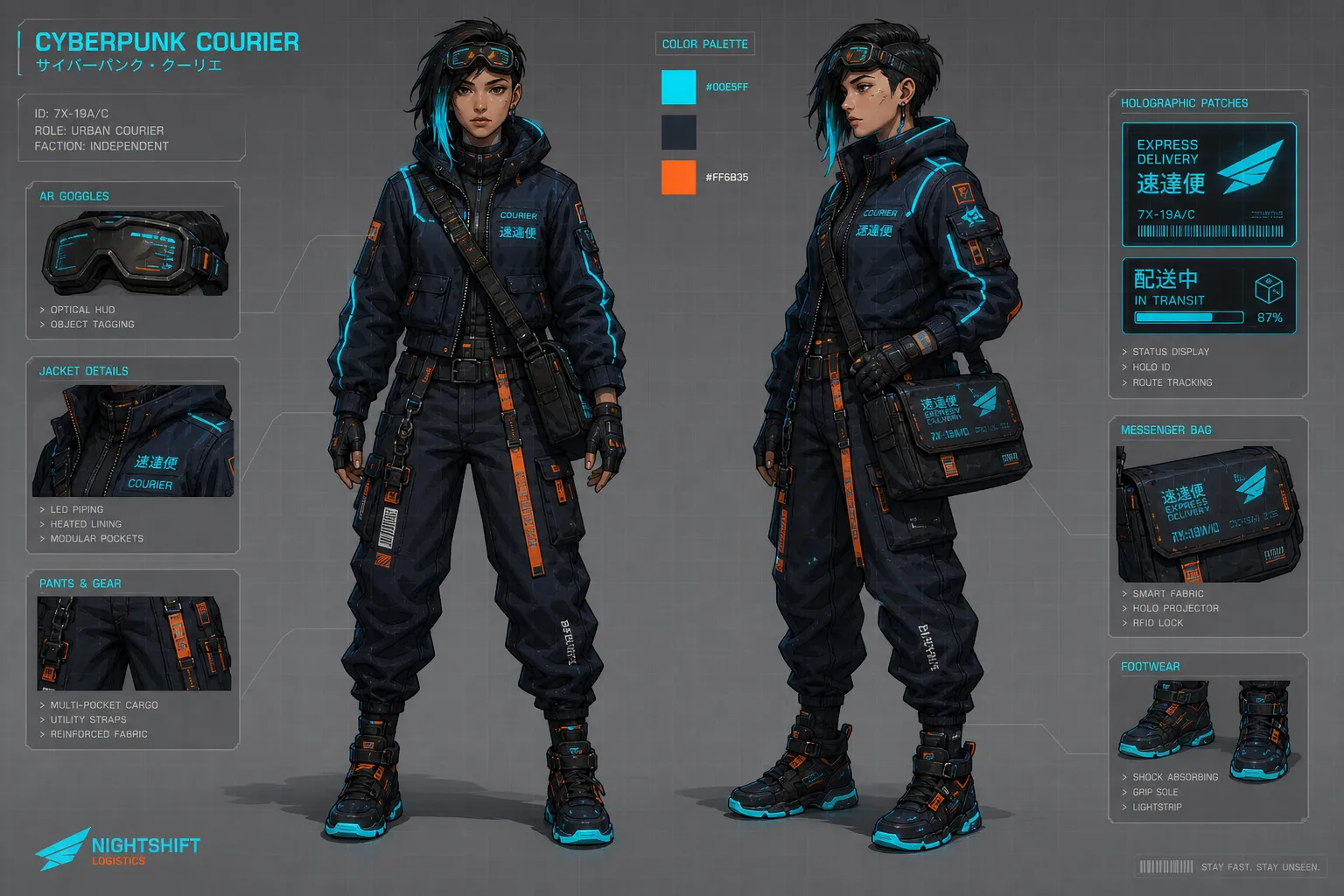
キャラクターコンセプトシート — カラーパレットを固定して複数ビューの一貫性を確保
Magic Prompt:お手軽モード
JSONを手書きしたくない人もいるでしょう。Ideogram 4.0にはMagic Promptが搭載されており、プレーンテキスト入力を生成前に完全なJSONキャプションに展開するLLMです。
「a cozy coffee shop interior with morning light」と入力すれば、Magic Promptがスタイル説明、構成要素、カラーパレット、bounding boxを含む完全なJSONを生成します。一般的な探索やアイデア出しには十分です。
Magic Promptを使うべき場面:
- 素早くアイデアを探索したいとき
- レイアウトの精度が重要でないとき
- モデルにクリエイティブな判断を任せたいとき
JSONを手書きすべき場面:
- タイポグラフィ重視のデザイン(ポスター、ソーシャルグラフィック、パッケージ)
- 正確なhexカラーが必要なブランド統一の出力
- 特定の構図が必要な商品撮影
- 複数要素が重ならないようにする必要がある場面
よくある間違いと回避方法
bounding boxの順序ミス。 フォーマットは[y_min, x_min, y_max, x_max]です。Xではなく、Yが先です。逆にすると要素が予期しない位置に配置されます。
photoとart_styleの同時使用。 どちらか一方を選んでください。これらのフィールドは学習データ上で相互排他です。両方を含めると出力品質が低下します。
フィールドの順序変更。 モデルは厳密なフィールド順序で学習されています。aesthetics → lighting → medium → art_style/photo → color_paletteの順にしてください。要素内では:type → bbox → desc(テキスト要素の場合はtext → desc)。
省略形のhexコード。 #FFFは無効です。常に6文字の大文字hexを使用してください:#FFFFFF。
テキストbounding boxの重なり。 2つのテキスト要素が同じ領域を共有すると、レンダリングが崩れます。各テキストブロックに重ならない独立した領域を割り当ててください。
シンプルなシーンの過度な指定。 詳細なhigh_level_descriptionとスタイル制御だけで十分な場合が多いです。bounding boxと複数要素の構成は、本当に空間精度が必要なときにのみ使いましょう。
よくある質問
JSONを使わないと良い結果は得られませんか?
いいえ。プレーンテキストでも動作します。特にMagic Promptを使えば。JSONはプレーンテキストでは実現できないレイアウト、色、テキスト配置の制御を提供しますが、厳密な構図制御が不要な一般的な画像生成であれば、プレーンテキストで十分です。
カラーパレットに何色まで入れられますか?
グローバルのstyle_descriptionパレットに最大16個のhexコード、個々の要素に最大5個。これらは支配的な色を誘導しますが、正確な一致を保証するものではありません。モデルへの強い提案だと考えてください。
Ideogram 4.0はどの解像度に対応していますか?
256×256から2048×2048まで、16ピクセル刻みで任意の解像度に対応しています。ローカル実行時の最高品質には、2048×2048でV4_QUALITY_48サンプラープリセットを使用してください。
Ideogram 3.0との違いは?
Ideogram 4.0はオープンウェイト(3.0はAPI限定)で、自然言語ではなくJSON構造化学習を使用し、テキストレンダリングが大幅に向上しています。bounding boxレイアウトとカラーパレット制御は4.0からの新機能です。
ローカルで実行できますか?
はい。fp8およびnf4チェックポイントがHuggingFaceにあります。fp8版には少なくとも24GBのVRAMを搭載したGPUが必要です。ComfyUIにはJSON構築を簡略化するKJのプロンプトコンポーザーを含むコミュニティノードがあります。
オンラインではどこで使えますか?
EditlyがIdeogram 4.0に対応しており、プレーンテキストとJSON両方の入力をサポートしています。Ideogram公式プラットフォームもAPIとウェブインターフェースで提供しています。