
Ideogram 4.0은 93억 파라미터의 오픈 웨이트 이미지 모델로, 텍스트 렌더링, bounding box 레이아웃 제어, 컬러 팔레트 지정에서 뛰어난 성능을 보여줍니다. 가중치는 HuggingFace에 공개되어 있고, 추론 코드는 GitHub에 있습니다. 전체 시스템이 JSON 기반 프롬프트 형식으로 동작하기 때문에, 처음 출시되었을 때 당혹스러워한 사용자가 적지 않았습니다.
이 가이드에서는 JSON 시스템이 존재하는 이유, 각 필드가 제어하는 내용, 그리고 바로 복사해서 쓸 수 있는 프롬프트 예시를 다룹니다.
Ideogram 4.0은 왜 JSON 프롬프트를 사용할까?
대부분의 이미지 모델은 (이미지, 텍스트 캡션) 쌍으로 학습합니다. 캡션은 자연어 문장이고, 모델은 단어와 시각적 개념의 연결을 배웁니다. 이 방식은 작동하지만 모호함이 생깁니다. "파란 건물 왼쪽에 빨간 자동차"라고 쓰면, 모델은 어떤 색이 어떤 객체에 해당하는지, "왼쪽"이 공간적으로 어디인지 추측해야 합니다.
Ideogram 4.0은 구조화된 JSON 캡션으로만 학습되었습니다. 각 학습 이미지에는 장면 설명, 스타일 파라미터, 개별 요소와 bounding box 위치를 명시적으로 분리하는 JSON 객체가 연결되어 있습니다. 공식 문서에 따르면, 학습 캡션은 "의도적으로 극도로 상세하게" 작성되어 각 JSON이 이미지의 모든 것을 빠짐없이 기술합니다.
이 설계 덕분에 모델은 공간 관계를 추측할 필요가 없습니다. bounding box 좌표는 동일한 좌표 형식의 수백만 학습 예시를 통해 직접적으로 위치에 매핑됩니다. 컬러 팔레트도 마찬가지로, JSON 내 hex 코드는 학습 시 확립된 색상 연관성에 매핑되며, 색 이름의 모호한 해석이 아닙니다.
실용적 결론: JSON 프롬프트는 일반 텍스트로는 달성할 수 없는 레이아웃, 타이포그래피, 색상 정밀도를 제공합니다. 다만 일반 텍스트도 사용 가능합니다. Ideogram의 Magic Prompt 기능이 LLM을 사용해 일반 입력을 구조화된 JSON으로 변환한 후 생성합니다.
일반 텍스트 vs JSON: 실제 차이
같은 컨셉을 두 가지 방식으로 프롬프트한 예시입니다:
일반 텍스트:
A jazz festival poster with bold typography, warm colors, and a saxophone silhouette
JSON:
{"high_level_description":"A vibrant jazz festival poster featuring bold typography and a saxophone silhouette against warm-toned geometric shapes","style_description":{"aesthetics":"retro, grain texture, bold contrast","lighting":"warm stage lighting with amber tones","medium":"graphic_design","art_style":"vintage concert poster with screen-print texture","color_palette":["#E8572A","#F2A03D","#1B1B2F","#F5E6CC","#C2185B"]},"compositional_deconstruction":{"background":"Deep navy blue with subtle radial gradient and halftone dot pattern","elements":[{"type":"text","bbox":[50,100,250,900],"text":"JAZZ\nFESTIVAL","desc":"Large bold sans-serif title in warm orange, slightly tilted 3 degrees clockwise"},{"type":"obj","bbox":[300,200,850,750],"desc":"Golden saxophone silhouette with geometric art deco fragmentation, pieces floating upward"},{"type":"text","bbox":[870,150,950,850],"text":"JUNE 28-30 • RIVERSIDE PARK • TICKETS AT JAZZFEST.COM","desc":"Small caps tracking-wide footer text in cream color"}]}}
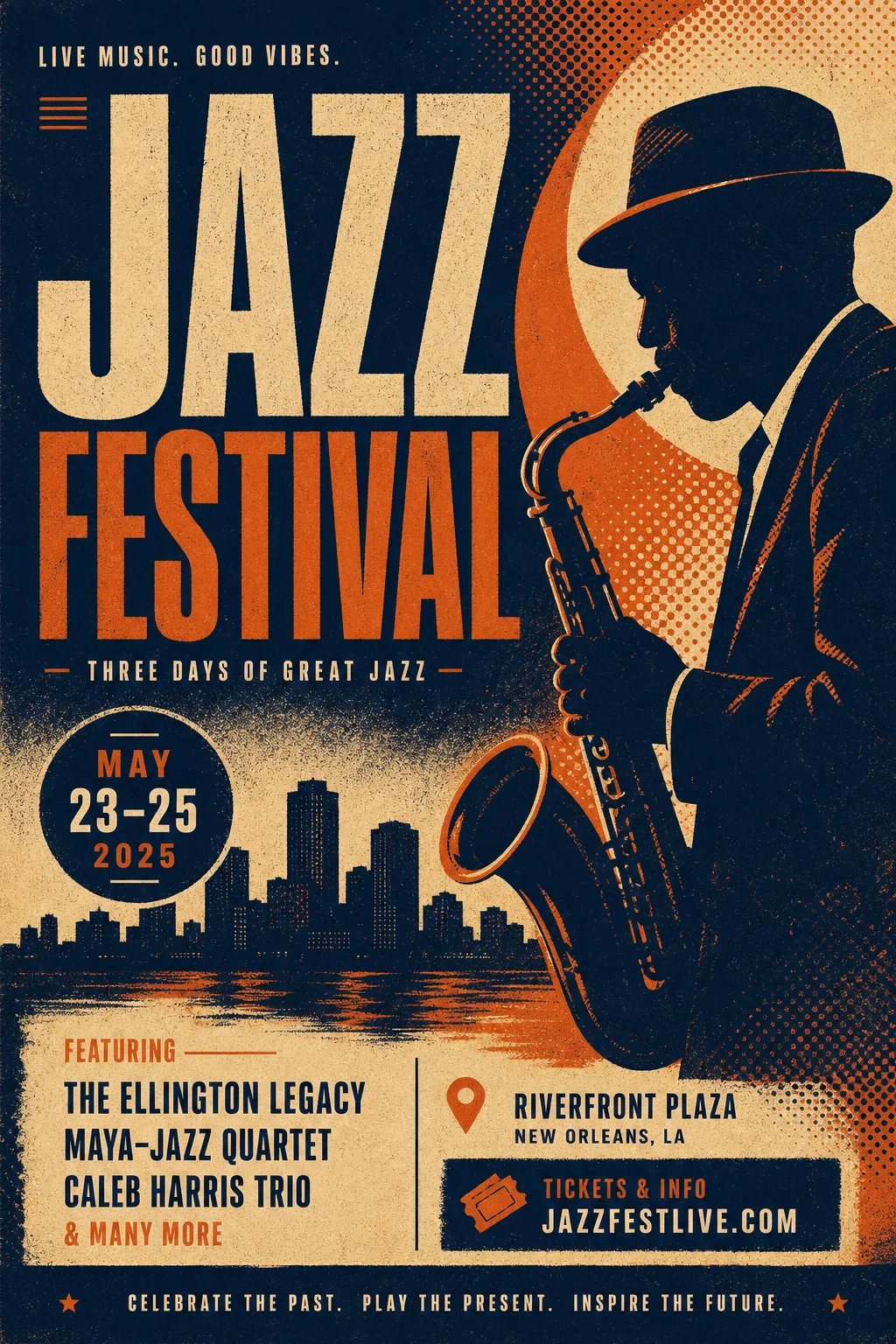
일반 텍스트로 생성한 재즈 포스터 — 레이아웃, 색상, 텍스트 배치를 모델이 자동 결정
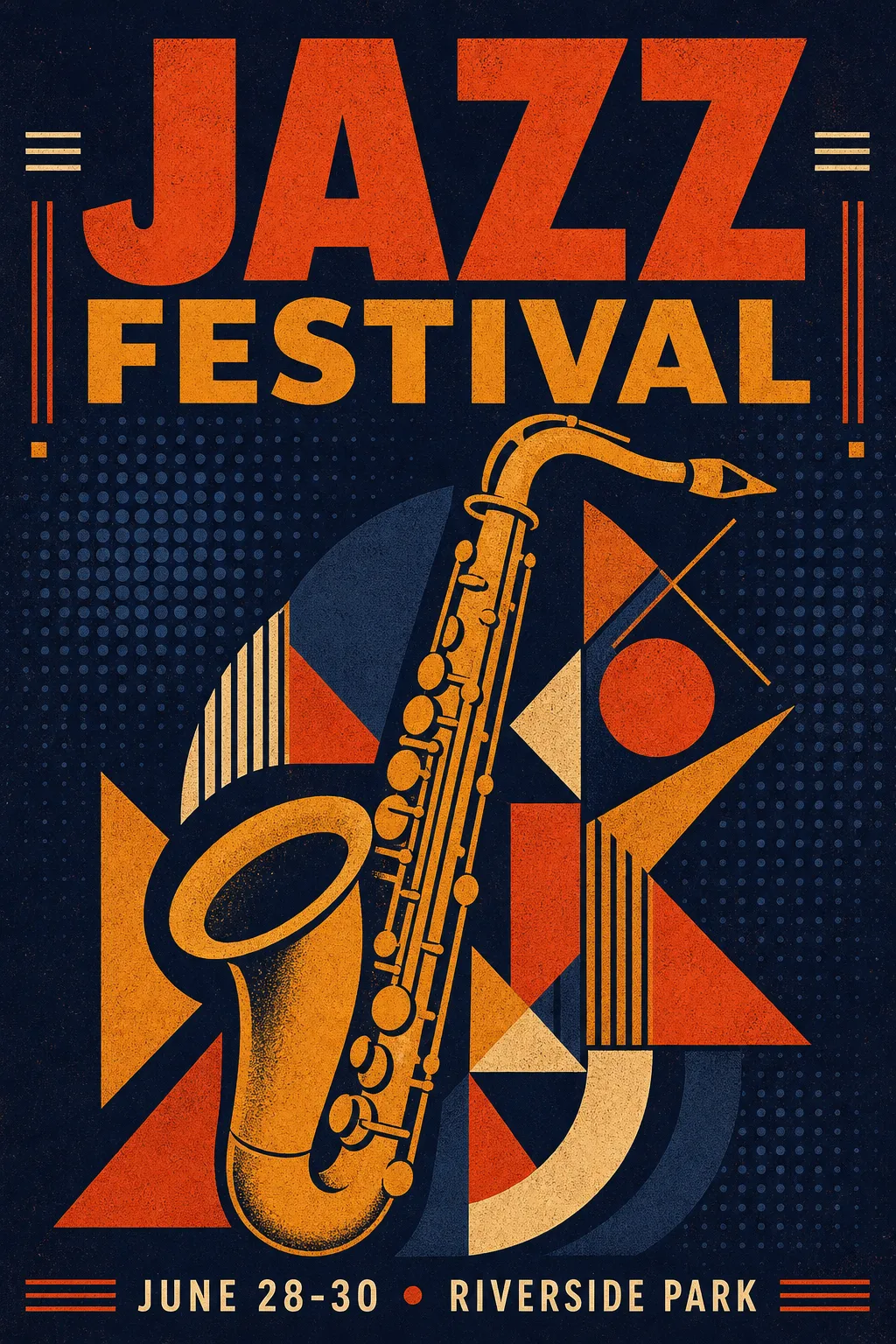
같은 컨셉의 JSON 버전 — 제어된 팔레트, 정확한 텍스트 위치, 의도적 구도
일반 텍스트 버전도 사용할 만한 이미지를 생성합니다. JSON 버전에서는 모든 요소가 지정한 위치에, 지정한 색상으로 배치된 포스터를 얻을 수 있습니다.
JSON 스키마 한눈에 보기
전체 캡션 구조에는 3개의 최상위 필드가 있습니다:
| 필드 | 필수 여부 | 제어 내용 |
|---|---|---|
high_level_description |
권장 | 이미지 1-2문장 요약 |
style_description |
선택 | 조명, 매체, 미학, 컬러 팔레트 |
compositional_deconstruction |
필수 | 배경 + 개별 요소와 위치 |
style_description 내에서 photo(카메라/렌즈 스펙) 또는 art_style(일러스트/디자인 스타일) 중 하나를 선택합니다 — 둘 다 사용할 수 없습니다.
각 요소는 obj(시각 객체) 또는 text(이미지 내 텍스트)로 유형이 지정됩니다. bounding box는 [y_min, x_min, y_max, x_max] 형식으로 0~1000 정규화 좌표를 사용합니다. 컬러 팔레트는 전역으로 최대 16개 hex 코드, 요소당 최대 5개입니다.
복사해서 채울 수 있는 빈 템플릿:
{"high_level_description":"[1-2문장 요약]","style_description":{"aesthetics":"[분위기 키워드]","lighting":"[조명 설정]","medium":"[photograph|illustration|3d_render|painting|graphic_design]","art_style":"[스타일 설명 — 또는 photo를 대신 사용]","color_palette":["#HEXCODE","#HEXCODE"]},"compositional_deconstruction":{"background":"[배경/환경 설명]","elements":[{"type":"obj","bbox":[y_min,x_min,y_max,x_max],"desc":"[요소 상세 설명]"},{"type":"text","bbox":[y_min,x_min,y_max,x_max],"text":"[렌더링할 텍스트]","desc":"[텍스트 스타일 설명]"}]}}
사용 사례별 프롬프트 예시
이벤트 포스터
포스터는 Ideogram 4.0의 텍스트 렌더링 능력을 가장 잘 보여주는 분야입니다. 다양한 크기와 스타일의 텍스트 블록을 정확한 위치에 배치할 수 있습니다.
{"high_level_description":"A minimalist tech conference poster with clean typography and geometric accents","style_description":{"aesthetics":"clean, modern, Swiss design influenced","lighting":"flat, even studio lighting","medium":"graphic_design","art_style":"minimalist poster design with strong grid structure","color_palette":["#0D0D0D","#FFFFFF","#4ECDC4","#FF6B6B"]},"compositional_deconstruction":{"background":"Pure white background with subtle 12-column grid lines in light gray","elements":[{"type":"text","bbox":[80,60,300,940],"text":"DEVCON\n2026","desc":"Ultra-bold grotesque typeface in black, massive size, tight leading"},{"type":"obj","bbox":[350,100,700,900],"desc":"Abstract geometric composition of overlapping circles and rectangles in teal and coral, suggesting network nodes and connections"},{"type":"text","bbox":[750,60,900,940],"text":"SEPTEMBER 15-17\nSAN FRANCISCO\nREGISTER AT DEVCON.IO","desc":"Light weight mono-spaced text in dark gray, left-aligned, generous line spacing"}]}}
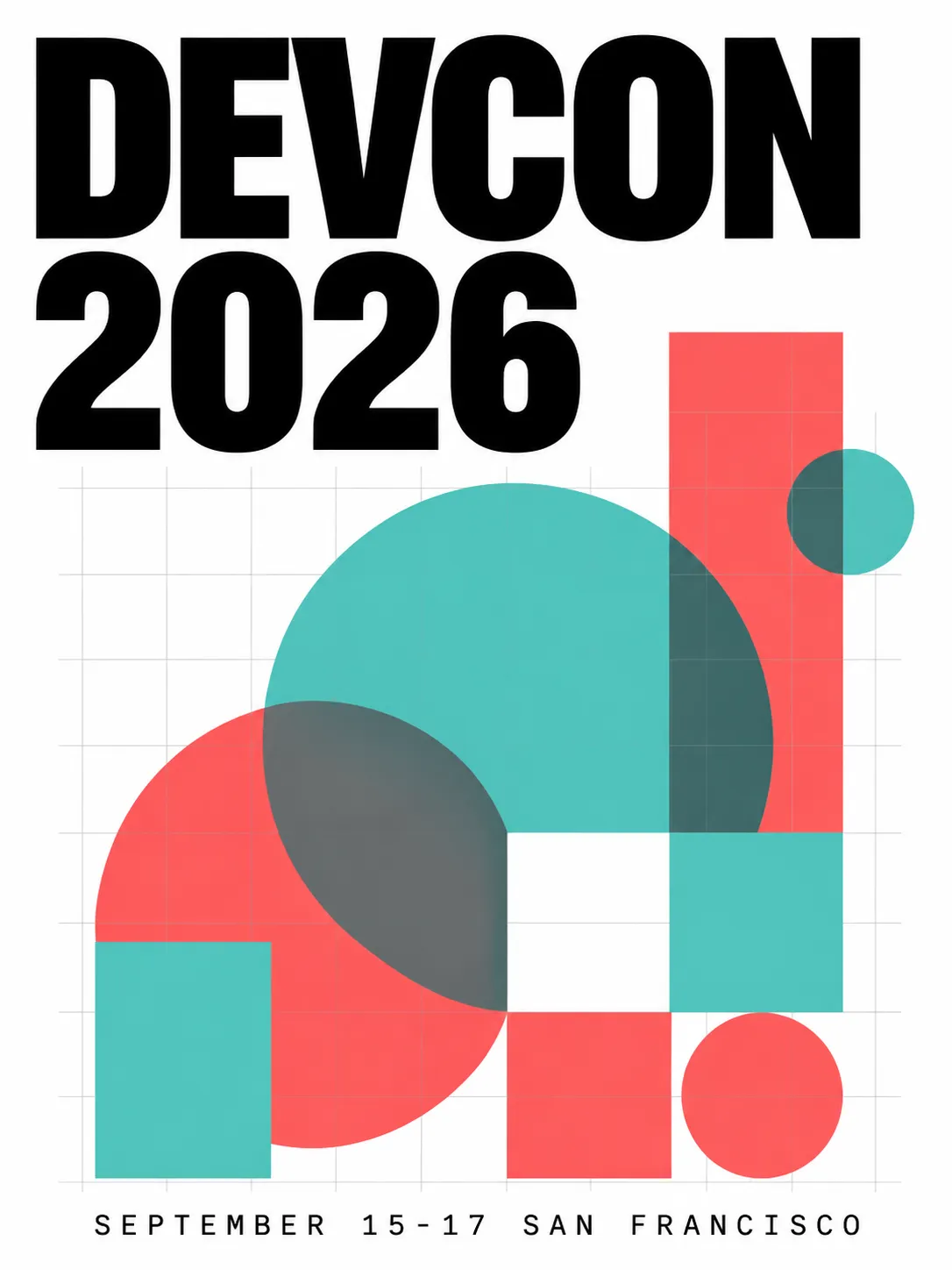
깔끔한 그리드 레이아웃, 정확한 텍스트 배치, 2색 액센트 팔레트
제품 사진
카메라 스펙을 지정하고 photo 모드로 전환합니다. bounding box로 제품 배치와 네거티브 스페이스를 제어합니다.
{"high_level_description":"A premium skincare bottle photographed on a marble surface with soft natural lighting","style_description":{"aesthetics":"editorial, clean, luxury","lighting":"soft diffused window light from upper left, subtle reflection on marble","photo":"85mm f/2.8, shallow depth of field, color-graded","medium":"photograph","color_palette":["#F7F3EE","#D4C5B2","#8B7355","#FFFFFF","#E8DDD3"]},"compositional_deconstruction":{"background":"Polished white marble surface with subtle gray veining, soft gradient to warm cream in the background","elements":[{"type":"obj","bbox":[150,300,850,700],"desc":"Tall frosted glass skincare bottle with minimal gold typography label, cap removed and placed beside the bottle, casting soft shadow to the right"}]}}
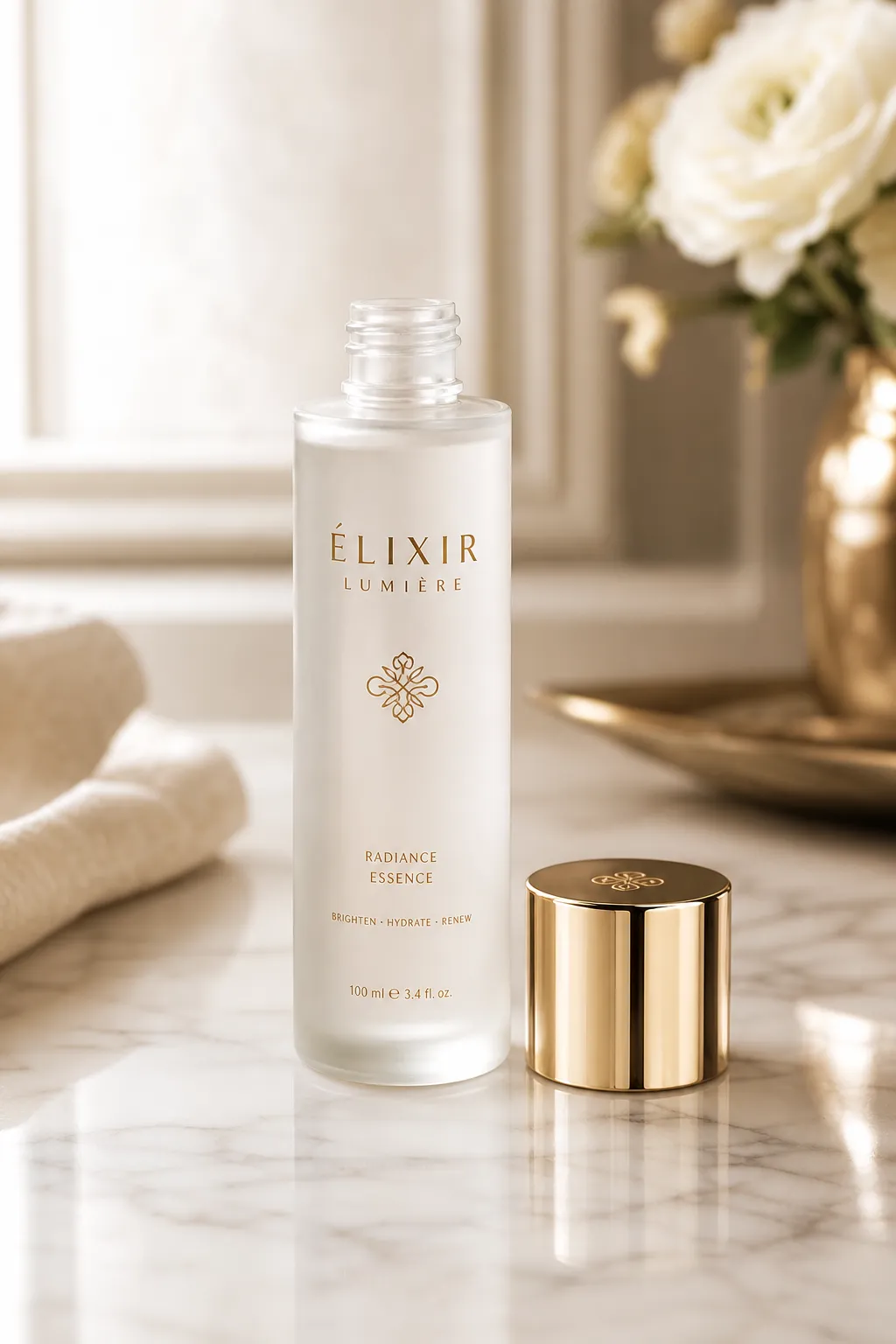
제어된 조명 방향, 대리석 질감, 의도적인 네거티브 스페이스
로고 디자인
로고에는 플랫 컬러와 깔끔한 엣지가 필요합니다. 벡터 스타일 출력에는 art_style을 사용하고 요소를 단순하게 유지합니다.
{"high_level_description":"A modern geometric logo mark for a sustainable energy company","style_description":{"aesthetics":"minimal, geometric, professional","lighting":"flat, no shadows","medium":"graphic_design","art_style":"flat vector logo design, no gradients, clean edges","color_palette":["#2D5F2D","#4CAF50","#FFFFFF"]},"compositional_deconstruction":{"background":"Pure white, no texture","elements":[{"type":"obj","bbox":[200,200,800,800],"desc":"Abstract leaf shape formed by three overlapping chevrons pointing upward, creating a subtle upward arrow in the negative space, rendered in two shades of green"}]}}

플랫 벡터 스타일 로고 — 단색, 그라데이션 없음, 정밀한 기하학
사실적 사진
사실적인 결과물에는 photo 필드의 상세한 카메라 스펙이 가장 중요합니다.
{"high_level_description":"A candid street photograph of a woman walking through a rain-soaked Tokyo alley at night","style_description":{"aesthetics":"cinematic, moody, high contrast","lighting":"neon signs reflecting off wet pavement, warm tungsten from shop interiors mixing with cool blue ambient","photo":"35mm f/1.4, shot wide open, rain droplets visible on lens edge, slight motion blur on passing figures","medium":"photograph","color_palette":["#1A1A2E","#E94560","#F5A623","#16213E","#0F3460"]},"compositional_deconstruction":{"background":"Narrow Tokyo back-alley at night, wet asphalt reflecting neon kanji signs, steam rising from a ramen shop vent on the left","elements":[{"type":"obj","bbox":[100,350,900,650],"desc":"Young woman in a dark trench coat holding a transparent umbrella, mid-stride, face partially lit by warm shop light, looking slightly to camera right"},{"type":"obj","bbox":[50,50,400,200],"desc":"Glowing red and pink neon sign with Japanese characters, slightly out of focus due to shallow depth of field"}]}}
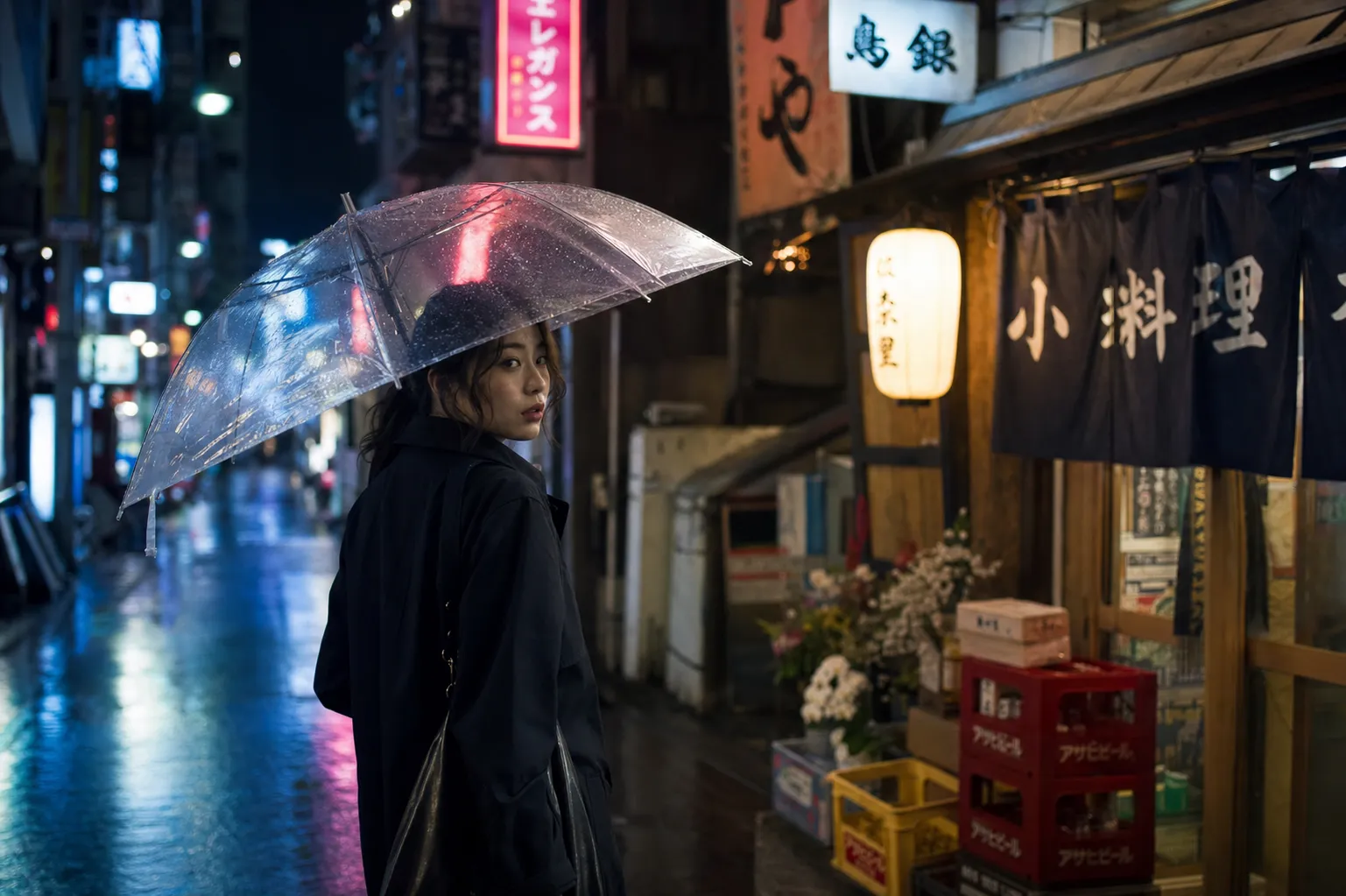
시네마틱 거리 사진 — 네온 반사, 얕은 피사계 심도, 따뜻한/차가운 조명 믹스
소셜 미디어 그래픽
소셜 그래픽에는 브랜드 컬러를 사용한 굵은 텍스트가 필요합니다. 헤드라인 텍스트에는 넓은 bounding box를 사용하고 요소 수는 적게 유지합니다.
{"high_level_description":"An Instagram carousel cover slide announcing a product launch with bold headline and gradient background","style_description":{"aesthetics":"bold, contemporary, startup","lighting":"soft ambient, no harsh shadows","medium":"graphic_design","art_style":"modern social media graphic with rounded corners and soft gradients","color_palette":["#6C5CE7","#A29BFE","#FFFFFF","#DFE6E9","#2D3436"]},"compositional_deconstruction":{"background":"Smooth gradient from deep purple at top-left to soft lavender at bottom-right","elements":[{"type":"text","bbox":[150,100,450,900],"text":"SOMETHING\nBIG IS\nCOMING","desc":"Extra-bold sans-serif headline in white, left-aligned, stacked on three lines with tight leading"},{"type":"text","bbox":[550,100,650,900],"text":"JUNE 30 • 9AM PST • BE FIRST IN LINE","desc":"Medium weight text in light gray, same left alignment as headline"},{"type":"obj","bbox":[700,300,950,700],"desc":"Abstract 3D blob shape in frosted glass material with purple and pink internal refraction, floating with subtle shadow beneath"}]}}
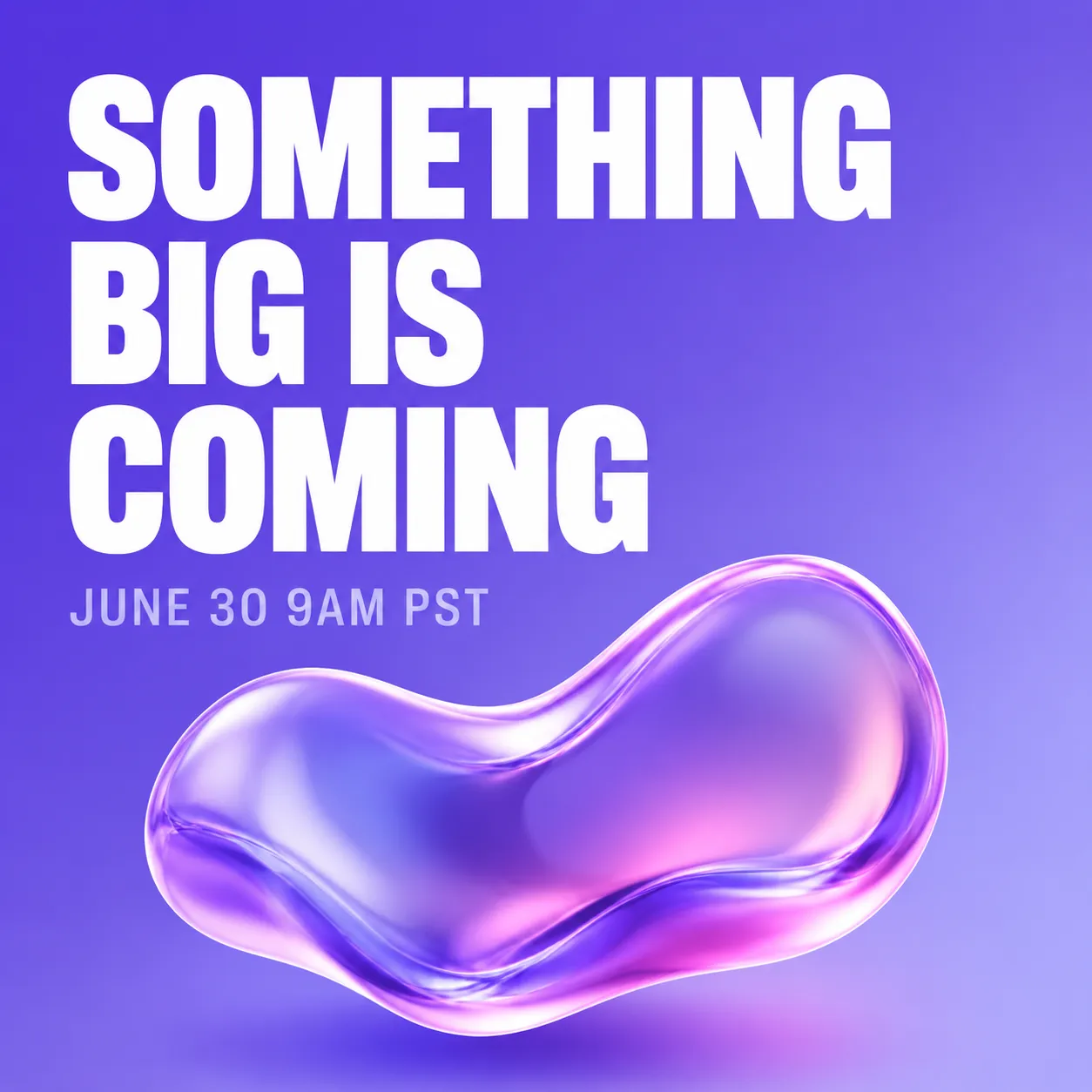
인스타그램 스타일 런칭 공지 — 그라데이션 배경, 쌓인 헤드라인, 3D 액센트 요소
패키지 디자인
제품 패키지는 정확한 텍스트 배치와 브랜드 컬러 일관성이 중요합니다.
{"high_level_description":"A flat-lay photograph of artisan chocolate bar packaging on a dark slate surface","style_description":{"aesthetics":"artisan, premium, textured","lighting":"soft overhead light with slight directional warmth from the right","photo":"50mm f/4, even focus across the surface, high color fidelity","medium":"photograph","color_palette":["#2C1810","#D4A574","#F5E6D3","#1A1A1A","#8B6914"]},"compositional_deconstruction":{"background":"Dark charcoal slate surface with subtle texture, scattered cocoa nibs and gold foil fragments around the edges","elements":[{"type":"obj","bbox":[100,150,900,850],"desc":"Rectangular chocolate bar wrapper in matte cream paper with embossed cocoa pod illustration, partially unwrapped to reveal dark chocolate squares, gold foil inner wrapper visible at one end"}]}}
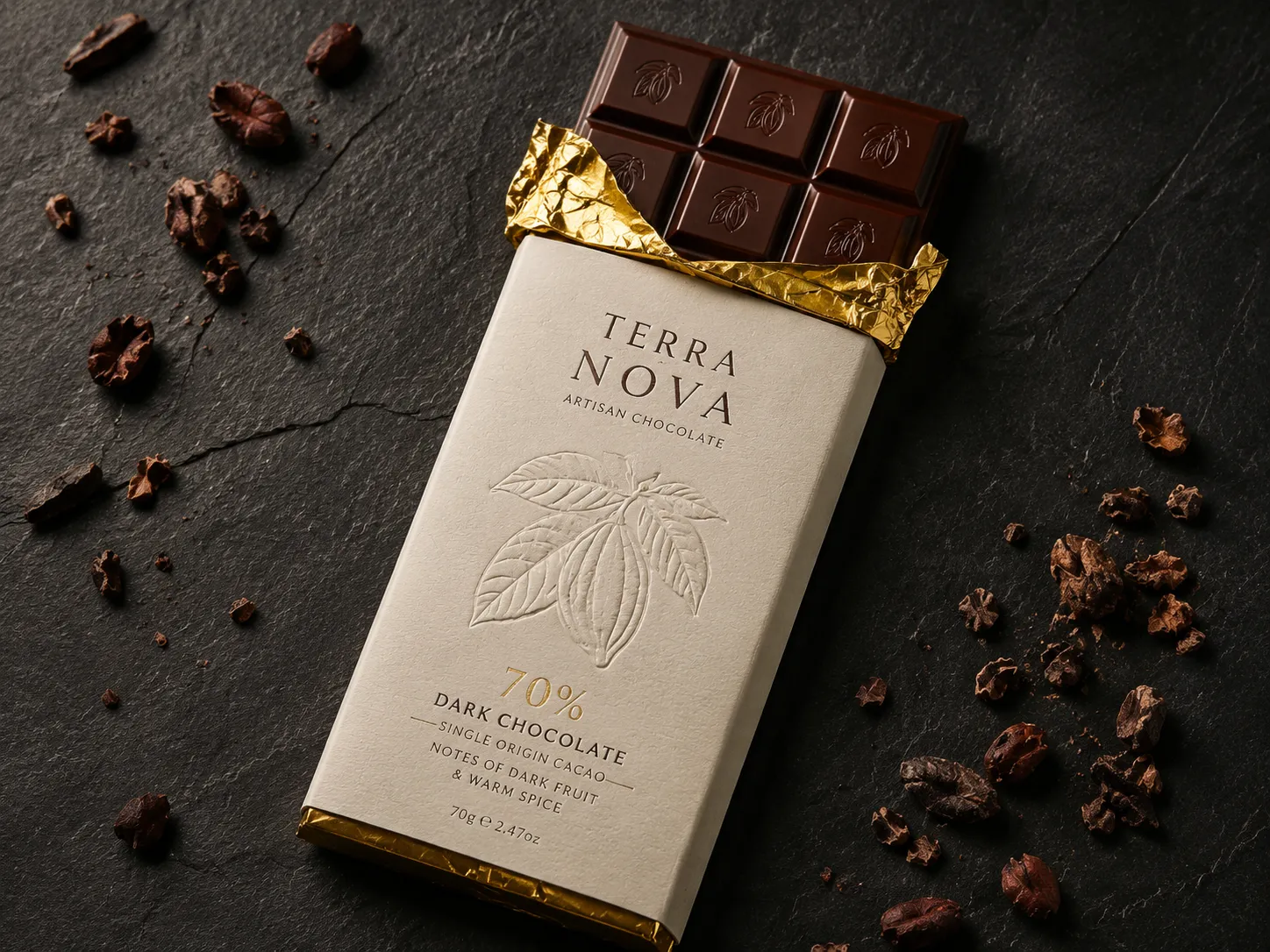
장인 초콜릿 플랫레이 — 제어된 표면 질감, 정밀한 컬러 팔레트, 프리미엄 느낌
인포그래픽
인포그래픽은 여러 텍스트 블록과 시각 요소를 결합합니다. 여기서 bounding box는 필수입니다. 없으면 텍스트 겹침이 거의 확실하게 발생합니다.
{"high_level_description":"A vertical infographic showing 4 steps of a morning routine with icons and numbered labels","style_description":{"aesthetics":"friendly, clean, informational","lighting":"flat, no shadows","medium":"graphic_design","art_style":"flat illustration style with rounded shapes and soft colors","color_palette":["#FF9F43","#54A0FF","#5F27CD","#10AC84","#F8F9FA"]},"compositional_deconstruction":{"background":"Light warm gray, clean and minimal","elements":[{"type":"text","bbox":[30,100,120,900],"text":"YOUR PERFECT\nMORNING ROUTINE","desc":"Bold rounded sans-serif header in dark purple, centered"},{"type":"obj","bbox":[140,50,350,450],"desc":"Circular icon of a glass of water with lemon slice, numbered 01 in orange beside it"},{"type":"text","bbox":[160,500,330,950],"text":"HYDRATE FIRST\nDrink 500ml water before coffee","desc":"Left-aligned text, title in bold dark, subtitle in medium gray"},{"type":"obj","bbox":[370,50,580,450],"desc":"Circular icon of a person stretching, numbered 02 in blue beside it"},{"type":"text","bbox":[390,500,560,950],"text":"MOVE YOUR BODY\n10 minutes of stretching or yoga","desc":"Left-aligned text, title in bold dark, subtitle in medium gray"},{"type":"obj","bbox":[600,50,810,450],"desc":"Circular icon of a journal and pen, numbered 03 in purple beside it"},{"type":"text","bbox":[620,500,790,950],"text":"WRITE 3 GOALS\nPrioritize before checking email","desc":"Left-aligned text, title in bold dark, subtitle in medium gray"},{"type":"obj","bbox":[830,50,950,450],"desc":"Circular icon of a healthy breakfast bowl, numbered 04 in green beside it"},{"type":"text","bbox":[840,500,940,950],"text":"EAT WELL\nProtein-rich breakfast, no sugar","desc":"Left-aligned text, title in bold dark, subtitle in medium gray"}]}}
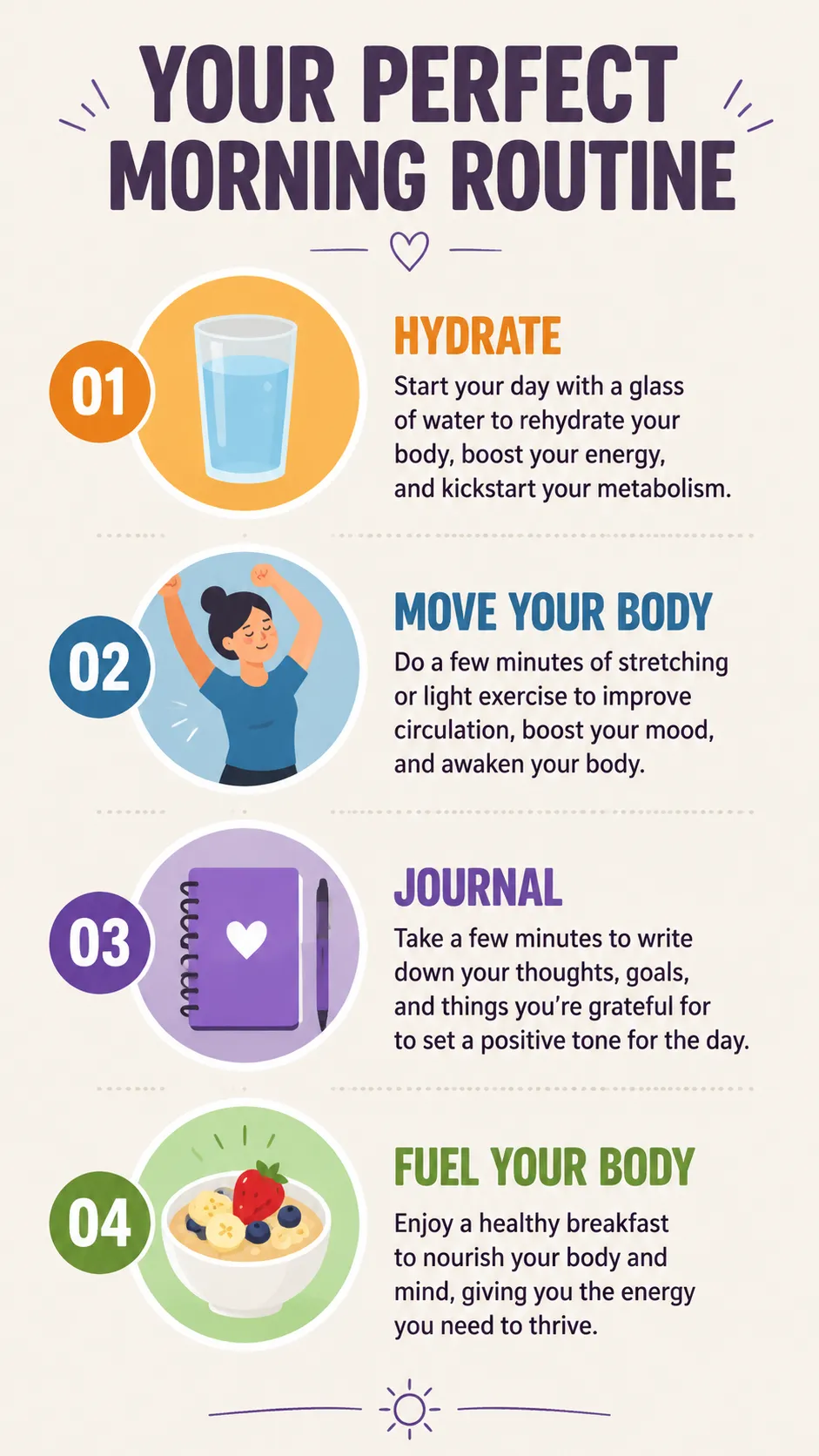
구조화된 인포그래픽 — 각 텍스트 블록과 아이콘에 bounding box를 할당하여 겹침 방지
캐릭터 디자인
캐릭터 컨셉은 상세한 desc 필드와 제한된 컬러 팔레트로 시각적 일관성을 유지할 수 있습니다.
{"high_level_description":"A character design sheet for a cyberpunk courier, showing front and side view on a neutral background","style_description":{"aesthetics":"cyberpunk, detailed, concept art","lighting":"soft studio rim light with cyan accent from the left","medium":"illustration","art_style":"semi-realistic character concept art, clean linework with cel shading","color_palette":["#0D1B2A","#1B3A5C","#00E5FF","#FF6B35","#E0E0E0"]},"compositional_deconstruction":{"background":"Flat medium gray background with subtle grid, suitable for character turnaround sheet","elements":[{"type":"obj","bbox":[50,50,950,480],"desc":"Front view of a young woman in a fitted dark navy tactical jacket with glowing cyan piping along the seams, cargo pants with orange accent straps, short asymmetric black hair with one cyan-highlighted strand, wearing augmented reality goggles pushed up on forehead"},{"type":"obj","bbox":[50,520,950,950],"desc":"Three-quarter side view of the same character, showing a messenger bag with holographic patches on the back, utility belt visible, boots with magnetic soles, same outfit and color scheme as front view"}]}}
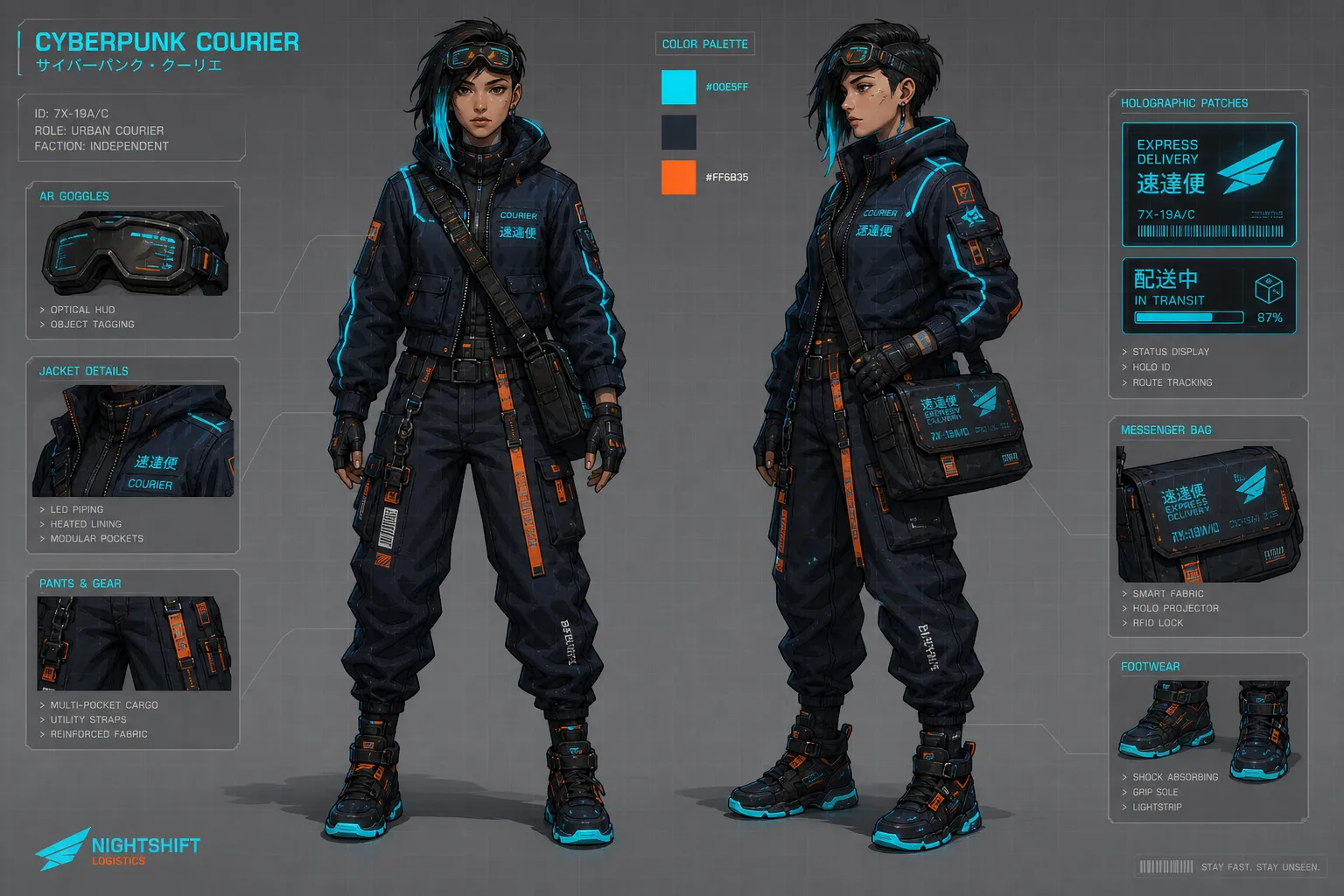
캐릭터 컨셉 시트 — 컬러 팔레트를 고정하여 다중 뷰 일관성 확보
Magic Prompt: 간편 모드
JSON을 직접 작성하고 싶지 않은 분도 있을 겁니다. Ideogram 4.0에는 Magic Prompt가 내장되어 있어, 일반 텍스트 입력을 생성 전에 완전한 JSON 캡션으로 확장하는 LLM입니다.
"a cozy coffee shop interior with morning light"라고 입력하면 Magic Prompt가 스타일 설명, 구성 요소, 컬러 팔레트, bounding box를 포함한 완전한 JSON을 생성합니다. 일반적인 탐색과 아이디어 구상에 충분합니다.
Magic Prompt를 사용할 때:
- 빠르게 아이디어를 탐색할 때
- 레이아웃 정밀도가 중요하지 않을 때
- 모델의 창의적 판단에 맡기고 싶을 때
JSON을 직접 작성할 때:
- 타이포그래피 중심 디자인 (포스터, 소셜 그래픽, 패키지)
- 정확한 hex 컬러가 필요한 브랜드 통일 출력
- 특정 구도가 필요한 제품 사진
- 여러 요소가 겹치면 안 되는 상황
자주 하는 실수와 해결 방법
bounding box 순서 오류. 형식은 [y_min, x_min, y_max, x_max]입니다 — X가 아니라 Y가 먼저입니다. 순서를 바꾸면 요소가 예상치 못한 위치에 배치됩니다.
photo와 art_style 동시 사용. 하나만 선택하세요. 이 필드들은 학습 데이터에서 상호 배타적입니다. 둘 다 포함하면 출력 품질이 저하됩니다.
필드 순서 변경. 모델은 엄격한 필드 순서로 학습되었습니다. aesthetics → lighting → medium → art_style/photo → color_palette 순서를 지켜주세요. 요소 내에서는: type → bbox → desc (텍스트 요소는 text → desc).
축약 hex 코드. #FFF는 유효하지 않습니다. 항상 6자리 대문자 hex를 사용하세요: #FFFFFF.
텍스트 bounding box 겹침. 두 텍스트 요소가 같은 영역을 공유하면 렌더링이 깨집니다. 각 텍스트 블록에 겹치지 않는 독립된 영역을 할당하세요.
단순한 장면의 과도한 지정. 상세한 high_level_description과 스타일 제어만으로 충분한 경우가 많습니다. bounding box와 다중 요소 구성은 진정으로 공간 정밀도가 필요할 때만 사용하세요.
자주 묻는 질문
JSON을 사용해야만 좋은 결과를 얻을 수 있나요?
아닙니다. 일반 텍스트도 작동합니다. 특히 Magic Prompt와 함께 사용하면요. JSON은 일반 텍스트로는 달성할 수 없는 레이아웃, 색상, 텍스트 배치 제어를 제공하지만, 엄격한 구도 제어가 필요 없는 일반적인 이미지 생성에는 일반 텍스트로 충분합니다.
컬러 팔레트에 몇 가지 색을 넣을 수 있나요?
전역 style_description 팔레트에 최대 16개 hex 코드, 개별 요소에 최대 5개입니다. 이들은 주요 색상을 유도하지만 정확한 일치를 보장하지는 않습니다. 모델에 대한 강력한 제안이라고 생각하세요.
Ideogram 4.0은 어떤 해상도를 지원하나요?
256×256부터 2048×2048까지, 16픽셀 단위로 모든 해상도를 지원합니다. 로컬 실행 시 최고 품질을 위해 2048×2048에 V4_QUALITY_48 샘플러 프리셋을 사용하세요.
Ideogram 3.0과 어떻게 다른가요?
Ideogram 4.0은 오픈 웨이트(3.0은 API 전용)이고, 자연어 대신 JSON 구조화 학습을 사용하며, 텍스트 렌더링이 크게 개선되었습니다. bounding box 레이아웃과 컬러 팔레트 제어는 4.0에서 새로 추가된 기능입니다.
로컬에서 실행할 수 있나요?
네. fp8 및 nf4 체크포인트가 HuggingFace에 있습니다. fp8 버전은 최소 24GB VRAM GPU가 필요합니다. ComfyUI에는 JSON 구성을 간소화하는 KJ의 프롬프트 컴포저를 포함한 커뮤니티 노드가 있습니다.
온라인에서 어디서 사용할 수 있나요?
Editly가 Ideogram 4.0을 지원하며, 일반 텍스트와 JSON 입력을 모두 사용할 수 있습니다. Ideogram 공식 플랫폼도 API와 웹 인터페이스로 제공합니다.