

On June 17, 2026, Kuaishou released Kling 3.0 Turbo — the fast variant of Kling 3.0. Models with "Turbo" in the name usually mean "faster but lower quality," and Kling 3.0 Turbo is no exception. But it has one unexpected highlight: audio is included for free, and lip sync accuracy is significantly improved.
This article breaks down the differences between the two versions and when to use each.
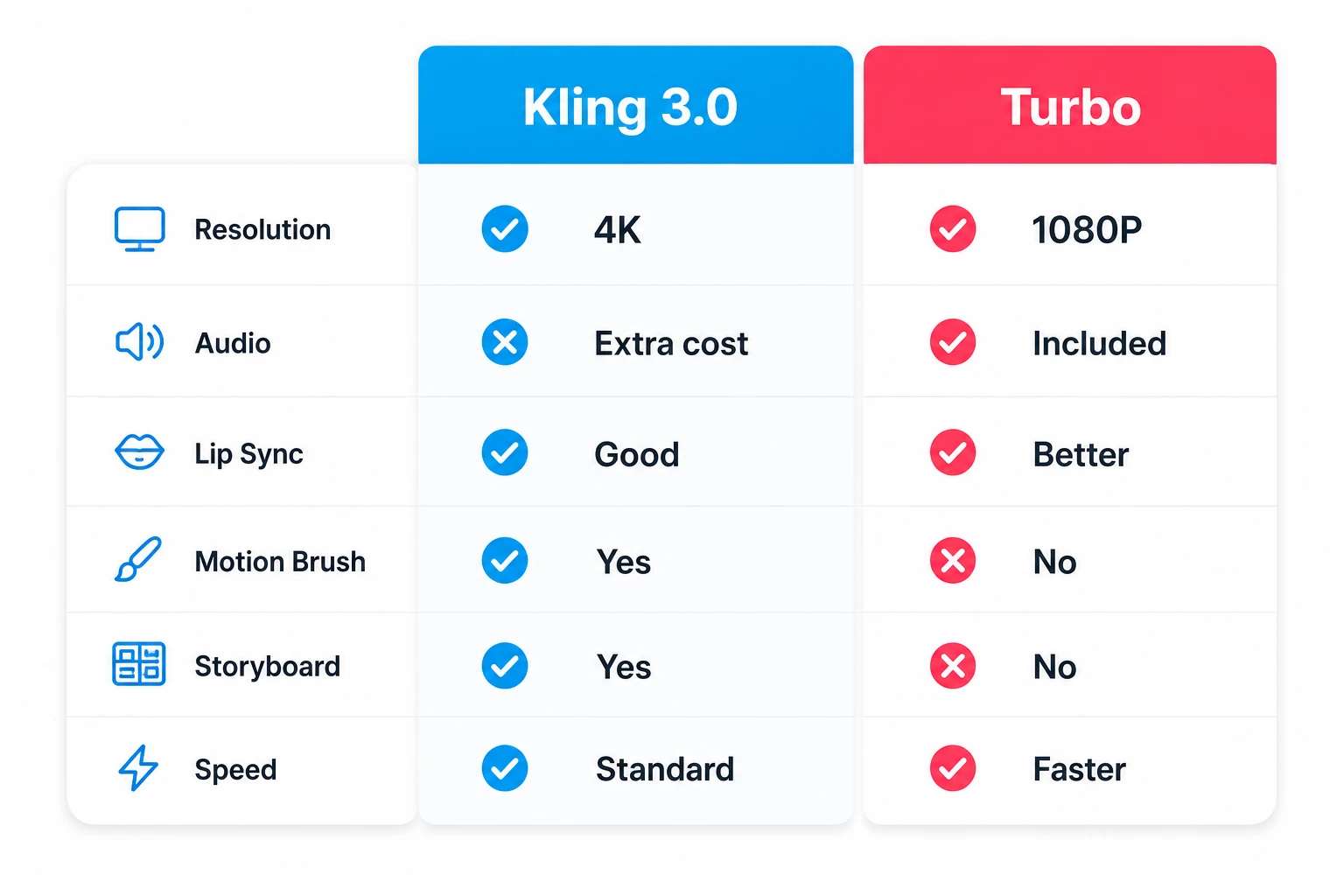
Core Specs Comparison
| Feature | Kling 3.0 | Kling 3.0 Turbo |
|---|---|---|
| Release Date | 2026.02.05 | 2026.06.17 |
| Max Resolution | 4K / 60fps | 1080P |
| Clip Duration | 3–15 seconds | 3–15 seconds |
| Audio Generation | Extra charge (+¥0.4/sec) | Included free |
| Lip Sync | 5 languages | 5 languages, improved accuracy |
| Multi-shot | Up to 6 shots | Up to 6 shots |
| Motion Brush | Supported | Not supported |
| Storyboard Tool | Supported | Not supported |
| Aspect Ratios | 16:9, 9:16, 1:1 | 16:9, 9:16, 1:1 |
| Generation Speed | Baseline | Faster |
Pricing Comparison: Is Turbo Actually Cheaper?
Looking at the per-second rate alone, Turbo is actually more expensive. But once you factor in audio costs, the picture changes.
| Version | 720P per sec | 1080P per sec | Audio | Actual 1080P cost with audio |
|---|---|---|---|---|
| Kling 3.0 | ~¥0.6–0.8 | ~¥0.8–1.0 | +¥0.4/sec | ~¥1.2/sec |
| Kling 3.0 Turbo | ¥0.8 | ¥1.0 | Included free | ¥1.0/sec |
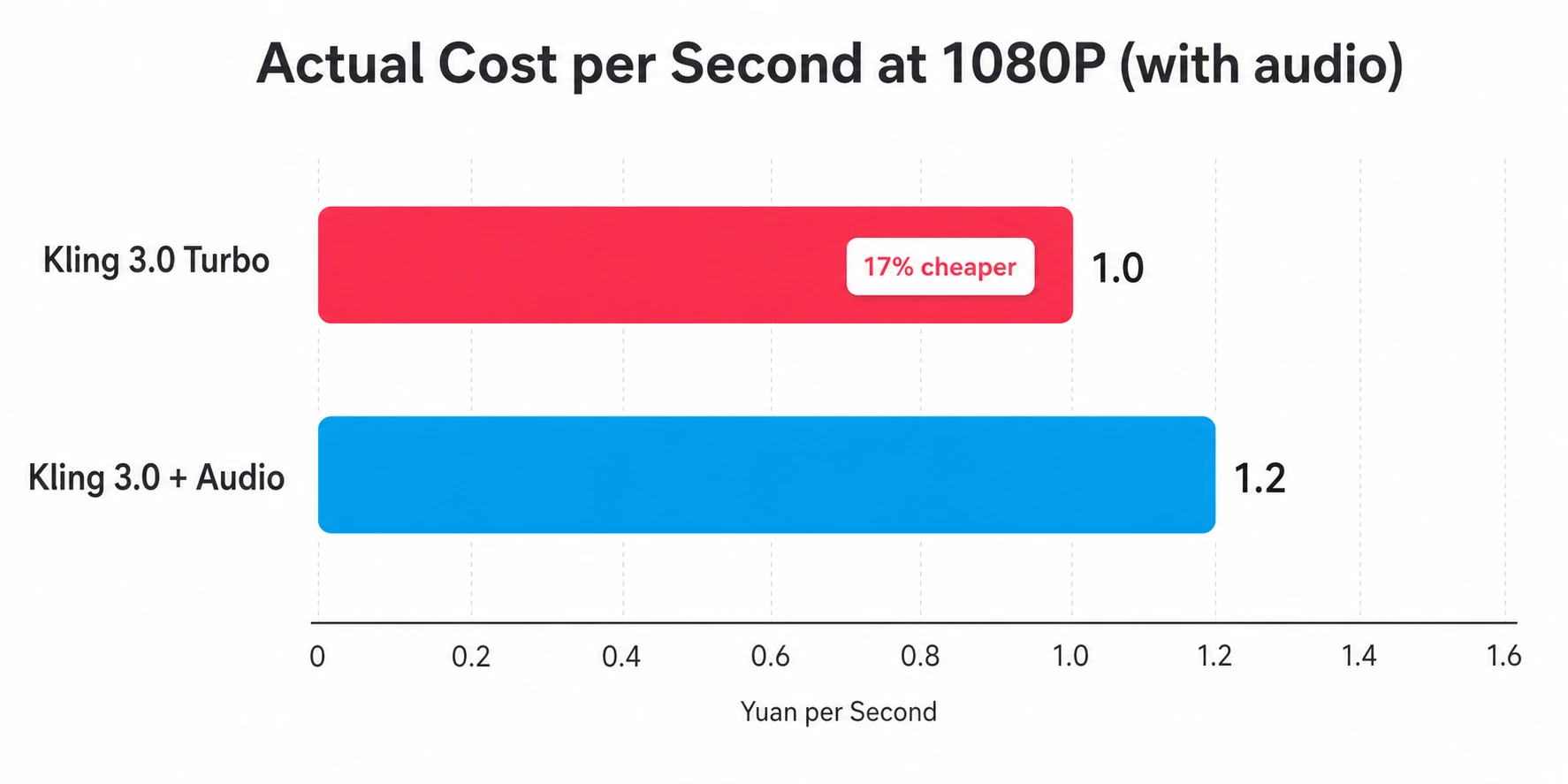
Key finding: If your videos need audio (dialogue, voiceover, sound effects), Turbo is actually 17% cheaper than the standard version. The standard version is only cheaper for silent, visual-only content.
Example with a 10-second 1080P clip with audio:
- Kling 3.0: ¥1.2 × 10 = ¥12
- Kling 3.0 Turbo: ¥1.0 × 10 = ¥10, saving ¥2
At scale, the gap adds up — 100 clips per month means ¥200 saved.
Turbo's Killer Feature: Lip Sync
The most noteworthy upgrade in Kling 3.0 Turbo isn't speed — it's lip sync accuracy.
The standard Kling 3.0 already has decent lip sync, but on close inspection you'll notice subtle delays and drift between mouth shapes and audio. Turbo fixes this significantly — mouth movements track audio timing tightly, and in talking-head scenarios the sync is nearly flawless.
Lip sync is supported in 5 languages: Chinese, English, Japanese, Korean, and Spanish.
If you're creating talking-head videos, digital avatars, or dialogue-driven content, this improvement alone justifies the upgrade.
When to Choose Turbo vs Standard
Choose Turbo
- Talking heads / digital avatars / dialogue videos: Lip sync is the core requirement, and Turbo's accuracy is higher with audio included free
- High-volume social media content: Fast generation, audio included, predictable costs — ideal for teams producing multiple clips daily
- Ad creative testing: Quickly run 5–10 variations to test directions before committing to polished renders
- When 1080P is sufficient: Primarily mobile viewing, no need for 4K
Choose Standard Kling 3.0
- 4K output required: Brand ads, TV commercials, large-screen displays — Turbo's 1080P ceiling won't cut it
- Precise motion control needed: Motion Brush is exclusive to the standard version — drawing motion paths on the canvas is something Turbo can't do
- Storyboard workflows: The standard version's storyboard tool suits complex multi-scene narratives
- Silent, visual-only videos: When audio isn't needed, the standard version's base price is lower
Best Practice: Use Both
Similar to the Seedance family's "Mini for drafts, Standard for finals" approach:
- Draft with Turbo: Test prompts, composition, and pacing on Turbo — lower cost, faster output
- Switch to standard for key shots: Shots that need 4K or Motion Brush get refined on the standard version
- Keep dialogue on Turbo: Lip sync is Turbo's strength — no reason to switch back for talking-head content
Compared to the Seedance Family
If you're torn between Kling and Seedance, check out our detailed Seedance 2.5 vs Kling 3.0 comparison.
In short: Kling 3.0 Turbo competes directly with Seedance 2.0 Mini — both are "speed-first, cost-first" lightweight variants. The difference is that Turbo has better lip sync and 1080P, while Mini is cheaper (¥0.5/sec vs ¥0.8/sec) and supports more reference inputs.
How to Access
| Platform | Best for | Billing |
|---|---|---|
| Kling AI official | Individual creators | Subscription, from $6.99/month |
| Kling API | Developers | Per-second billing |
| editly.art | Zero friction, no queues | Credits |
Kling's native platform regularly has queues of 30+ minutes during peak hours. Using editly.art lets you skip the queue and generate directly.
Conclusion
Kling 3.0 Turbo isn't a downgrade from the standard version — it's an optimization for different use cases.
- Talking heads, digital avatars, dialogue videos → Turbo (better lip sync, cheaper with audio)
- Brand films, 4K or Motion Brush required → Standard
- High-volume production on a budget → Turbo
- Just want to try it → editly.art has both versions