
In June 2026, the AI video generation space got two major updates at once: ByteDance announced Seedance 2.5 (launching in July), and Kuaishou released the Kling 3.0 Turbo + Omni upgrade. Both are leading Chinese AI video players, but their products are heading in very different directions.
There are plenty of Seedance 2.0 vs Kling 3.0 comparisons online, but they're all based on outdated specs. This article uses the latest data for a complete side-by-side to help you decide which fits your workflow.
Core Specs Comparison
| Dimension | Seedance 2.5 | Kling 3.0 |
|---|---|---|
| Release Date | 2026.06.23 (July launch) | 2026.02.05 (Turbo 6.17) |
| Max Duration | 30 seconds (single generation) | 15 seconds |
| Max Resolution | Native 4K | Native 4K / 60fps |
| Reference Input Limit | 50 (images + audio + video) | Limited (Elements system) |
| Audio Generation | Native sync, single-pass | Native sync, extra ¥0.4/sec |
| Local Redraw | Supported | Not supported |
| 3D Blockout Input | Supported | Not supported |
| Motion Brush | Not supported | Supported |
| Text Rendering | Average | Excellent (signs, logos remain legible) |
| Multi-Character Consistency | Reference-driven | Element binding system, more controllable |
| Aspect Ratios | 16:9, 9:16, 1:1, 4:3, 3:4 | 16:9, 9:16, 1:1 |
| Status | Enterprise beta | Live |
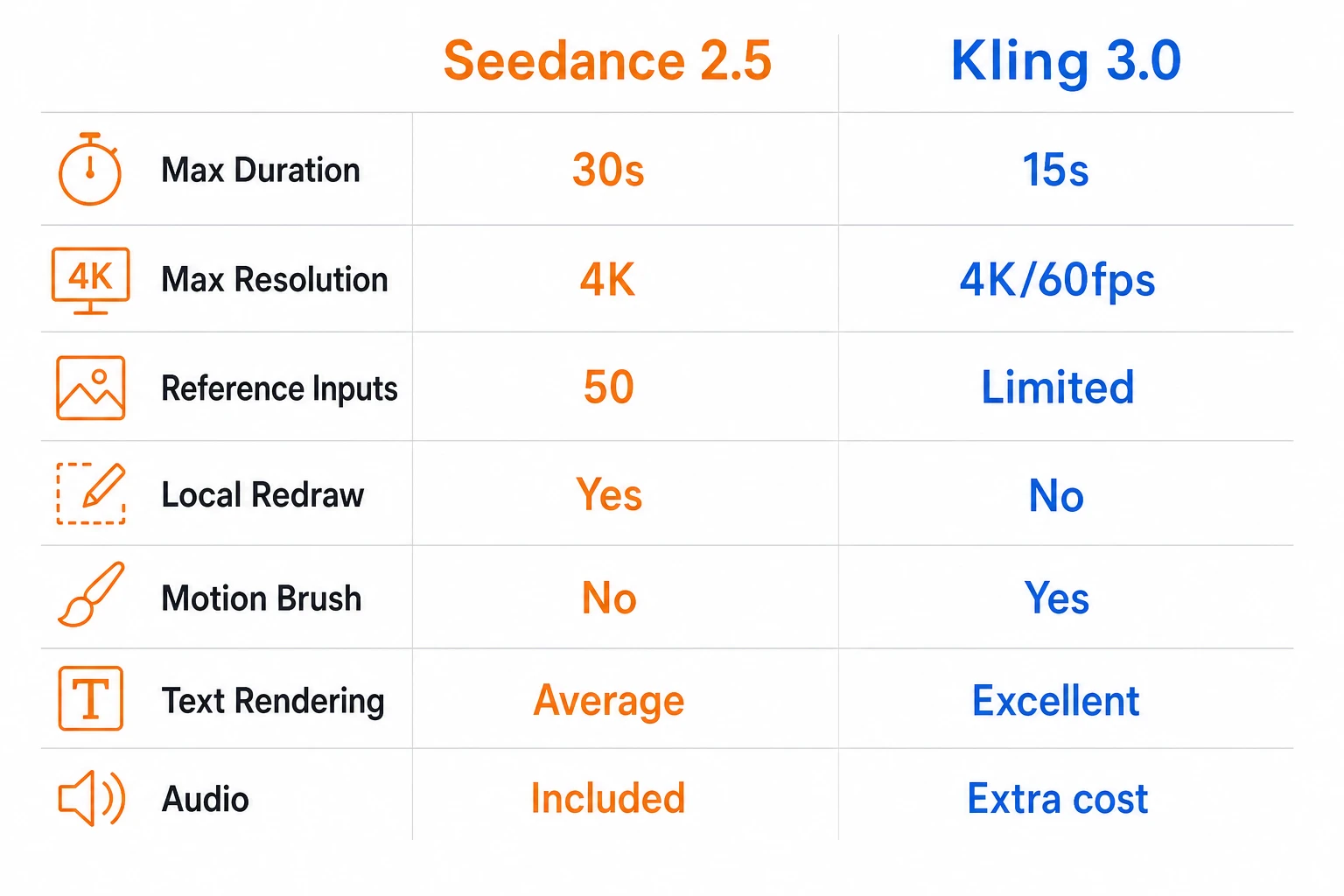
In short: Seedance 2.5 wins on duration and input capacity (30 sec + 50 references). Kling 3.0 wins on fine-grained control and immediate availability.
Pricing Comparison
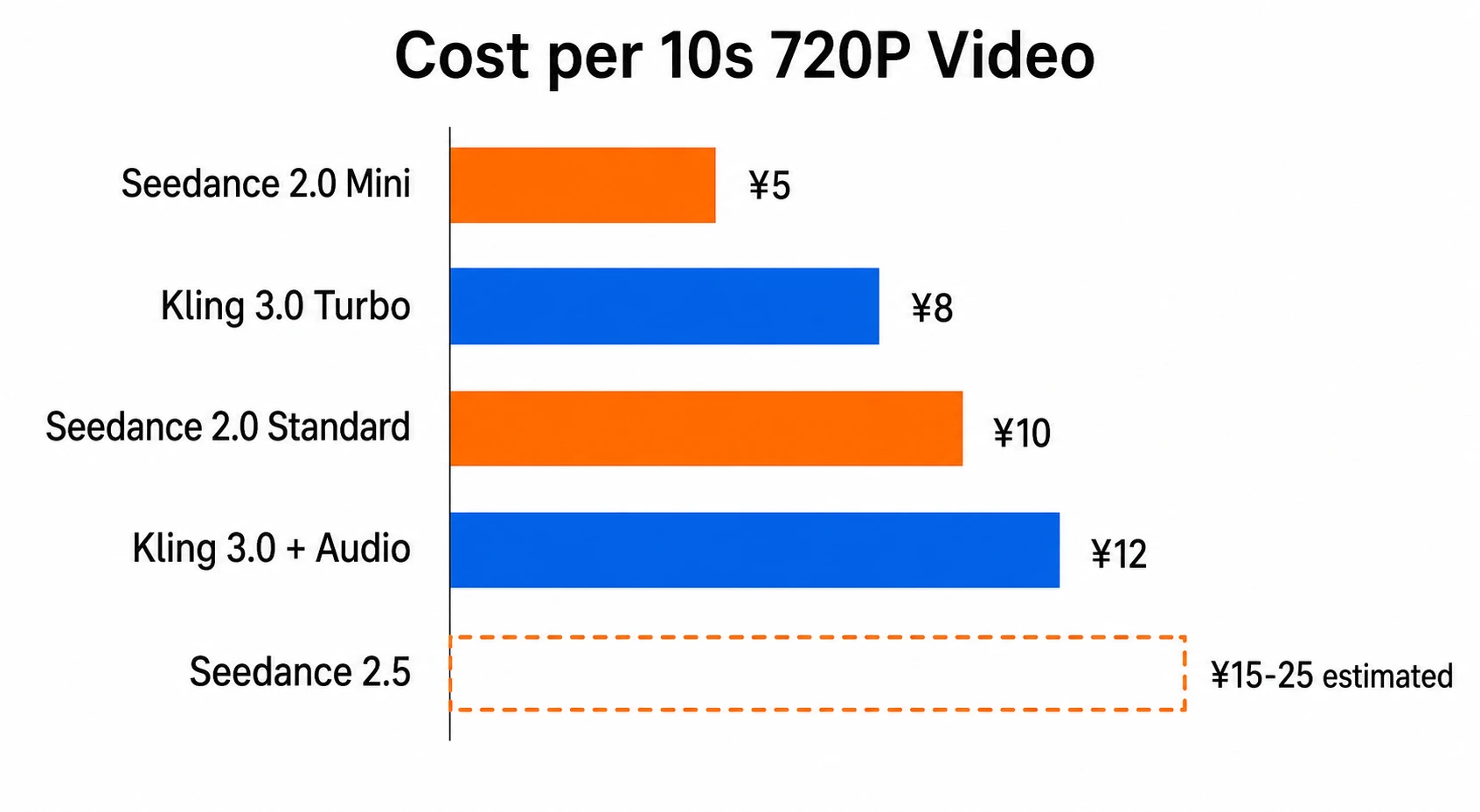
This is the messiest part of competing comparison articles — the two platforms bill differently, so comparing raw per-second prices is misleading. Here's everything normalized to "cost per 10 seconds of 720P video":
| Tier | Cost per 10s (720P) | Audio Included | Notes |
|---|---|---|---|
| Seedance 2.0 Standard | Yes | Audio included free | |
| Seedance 2.0 Mini | Yes | Best value option | |
| Seedance 2.5 | TBD | Yes | Estimated ¥15–25 (based on 2.0→2.5 feature uplift and Veo 3.1 / Kling 3.0 Pro pricing range) |
| Kling 3.0 Standard | +¥4 | Audio costs extra at ¥0.4/sec | |
| Kling 3.0 Turbo | Yes | Fast tier, audio included | |
| Kling 3.0 Pro Subscription | ~$6.99/mo | Yes | Credit-based, ~3,000 credits/month |
Key findings:
- Seedance includes audio for free. Kling Standard charges extra for audio (¥0.4/sec), which closes the apparent price gap in any scenario involving sound.
- Kling has a lower entry barrier ($6.99/mo subscription) — great for individual creators testing the waters. Seedance leans toward pay-per-use, which suits teams with defined output targets.
- Seedance 2.0 Mini remains the cheapest option (¥0.5/sec) if all you need is 720P short clips.
Strengths: When to Pick Which
Pick Seedance 2.5 When
Continuous narratives over 15 seconds: 30-second single-pass generation is Seedance 2.5's killer feature. Short dramas, brand story films, tutorial videos — no more stitching short clips together. Kling 3.0 caps at 15 seconds; anything longer requires manual splicing and character consistency suffers.
Reference-heavy projects: 50 reference inputs means you can simultaneously specify character design, scene mood, camera style, and soundtrack direction. For e-commerce product videos, feed in your brand palette + product shots + competitor references + background music — all in one go. Kling's Elements system is powerful but accepts fewer inputs.
Content that needs partial edits: Generated a video but want to swap the background or replace one element? Seedance 2.5's local redraw changes only what needs changing. Kling currently can't do this — even minor tweaks require full regeneration.
Chinese prompts: Both are domestic models with strong Chinese prompt comprehension, significantly outperforming Runway, Sora, and other international models.
Pick Kling 3.0 When
Precise motion control: Kling's Motion Brush lets you draw motion paths directly on the frame — a level of control that text prompts simply can't match. For product animation and character choreography, Motion Brush is a killer feature.
Text in your videos: Brand logos, price tags, storefront signs — Kling 3.0's text rendering is noticeably stronger than Seedance's, producing legible text instead of blurry distortions.
Multi-character scenes: Kling's Element binding system is more reliable at maintaining distinct visual identities for multiple characters. Seedance relies on reference materials, and characters tend to blend when there are too many.
Budget-conscious individual creators: The $6.99/mo subscription threshold is far lower than Seedance's pay-per-use pricing. If you're a solo creator making a few short videos, Kling's subscription model is friendlier.
You need it now: Kling 3.0 is live. Seedance 2.5 is still in beta and won't launch until July. If your project has a deadline, the tool you can use today is the right tool.
Using Both: A Practical Workflow
In practice, most professional teams use both and switch based on the task:
- Creative testing: Use Seedance 2.0 Mini (cheapest) to quickly explore 5–10 directions
- Final production: Need long narratives or reference-heavy work → Seedance 2.5. Need motion control or text rendering → Kling 3.0
- Volume output: Social content goes through Seedance Mini to keep costs down; brand content goes through Kling 3.0 Pro for quality
On editly.art, you can use both Seedance and Kling model families without registering on two separate platforms — one account, switch as needed.
Things to Watch
Seedance 2.5 specs are based on conference announcements — the model isn't live yet, and real-world performance may differ from what was presented. We'll update this article with hands-on results after the July launch.
Kling 3.0 has queuing issues during peak hours — 30+ minute waits on the native platform are common. Third-party APIs (like editly.art) can bypass the queue.
Content moderation policies differ: Seedance applies stricter filtering for face generation (especially Mini). Kling is relatively more permissive but tightening. Test with small batches before committing to realistic face content.
ELO rankings don't mean "better": Kling 3.0 ranks #1 on Artificial Analysis with ELO 1243. Seedance 2.0 tops both text-to-video and image-to-video leaderboards. Rankings are useful reference points, but the right choice depends on your specific use case.
Conclusion
There's no absolute "better" answer.
- Long videos, many references, local editing → Wait for Seedance 2.5 (July)
- Motion control, text rendering, need it now → Kling 3.0
- Lowest-cost volume production → Seedance 2.0 Mini
- Don't want to choose — use both → editly.art, one platform for everything
We'll update this article with real-world test data once Seedance 2.5 officially launches.